
Frequently Asked Questions o szablonie graficznym "Landing store"
Can blocks be rearranged?
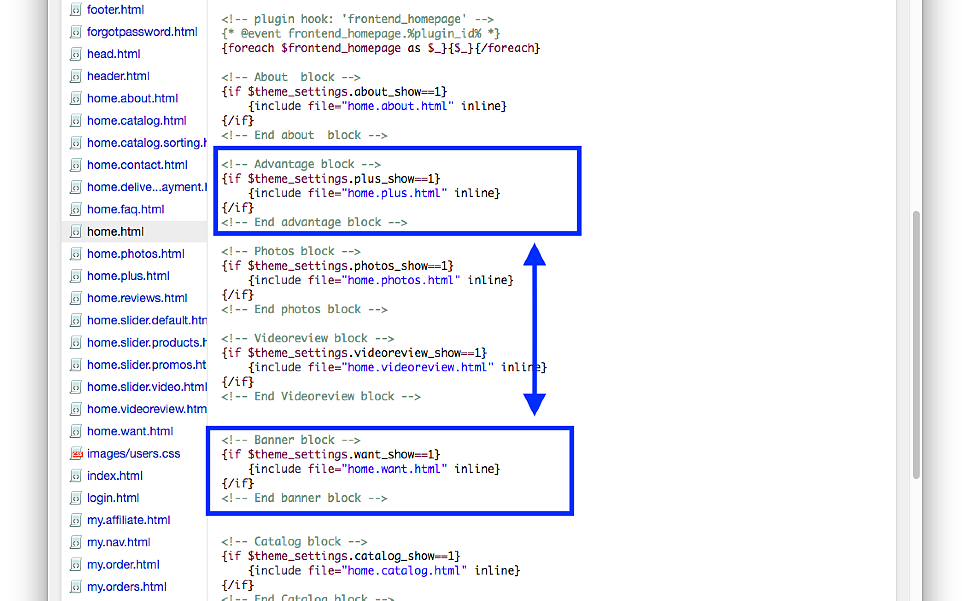
While regular methods in the Landing store theme do not currently allow changing the order of blocks, we are working on this issue. For now, block order can be manually changed in the home.html file by swapping the blocks:
Can blocks be disabled?
Yes, in the theme, blocks can be disabled via Settings of the theme by unchecking the "Show block..." option.
The exception is the "Main slider" block; to disable it, you must select the "Disable" option.
How to assign the call-back plugin trigger to the button in the "Banner" block?
To do this, in the theme settings, specify callback_plugin_handler as the "button class" for that button.
How to add a phone number to the header?
Adding a phone number to the header of the "Landing Shop" theme is done manually as follows:
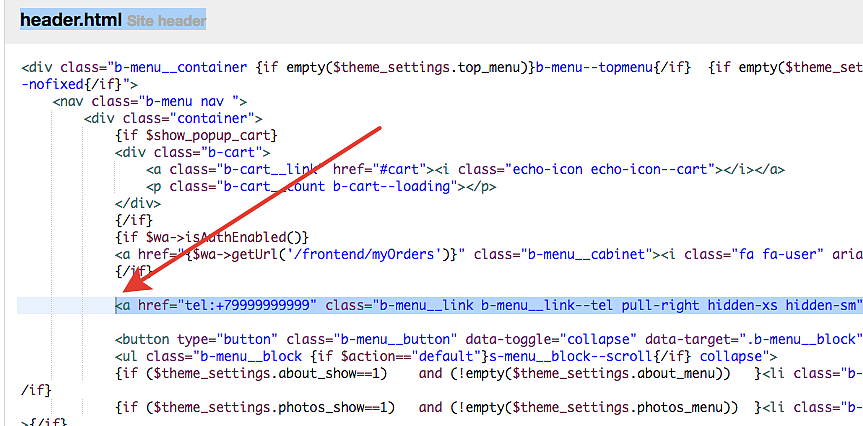
In the header.html file, add the code:
<a href="tel:+4899999999" class="b-menu__link b-menu__link--tl pull-right hidden-xs hidden-sm">+48 (999) 999-999</a>
at the location indicated in the screenshot:
Please note that the phone number will occupy space not originally intended for this menu, and overlapping elements may occur. Such cases should be resolved individually.