
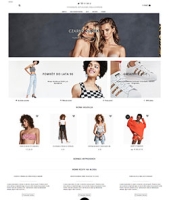
Guide o szablonie graficznym "Minimo Light"
1. Promotional images displayed at the top of the homepage are configured in the "Shop -> Marketing" section. Add up to 4 images in this section. It is best to use two or four promotional cards. Add text to the promotional cards and specify its color (use a contrasting color for readability).
2. Almost all theme settings are located in the "Shop -> Design - Appearance" section. Open this section and enter the required data-upload a logo or keep the text name.
3. To configure Instagram integration, you need to purchase the "Instagram Gallery" plugin.
4. To add news, simply create new entries in the "Blog" app. The three most recent posts will be automatically displayed on your website's homepage.
WORKING WITH UPDATES
To prevent updates from overwriting your CSS changes (if you've made any), add them to the custom.css file. Proactively create it in the section "Site -> Design -> Templates -> New file".