

Guide o wtyczce "Last-Modified"
Configuration guide for the plugins "Last-Modified"
Integration of the plugins with the project theme is required: No.
Required skills for implementation and use: SEO specialist, Web Systems Pro Administrator.
1. Purchase and install the plugin using the "Installera".
2. Customize the plugin in the Shopy-Script -> "Plugins" -> "Last-Modified" section according to the recommendations below.
Recommended settings for online stores
- Sent headers for "Last-Modified and 304 Not Modified".
- Which date to send: "Previous day" for the homepage and "Current" for all other sections.
- To whom to send the header: "For search engine robots".
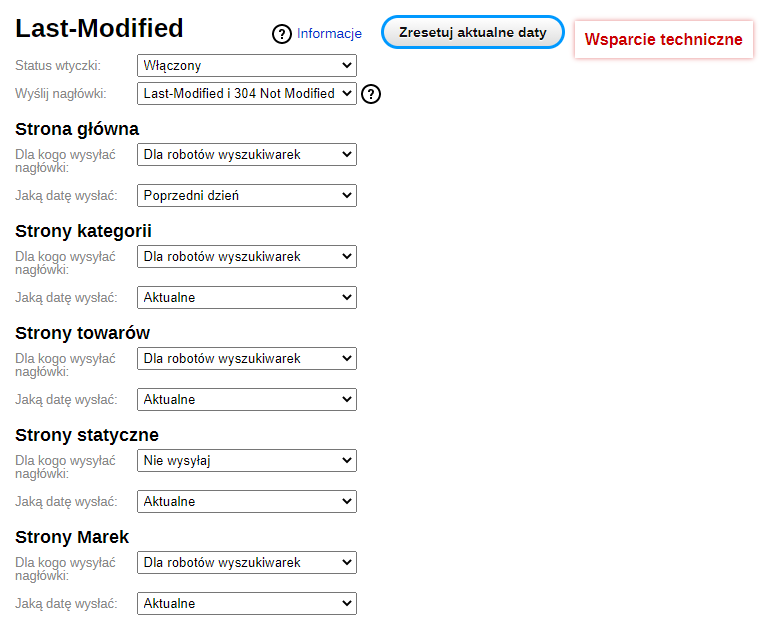
Recommended settings for catalogs (without carta)
- Headers to send: "Last-Modified and 304 Not Modified".
- Which date to send: "Previous day" for the homepage and "Current" for all other sections.
- To whom to send the header: "For everyone".
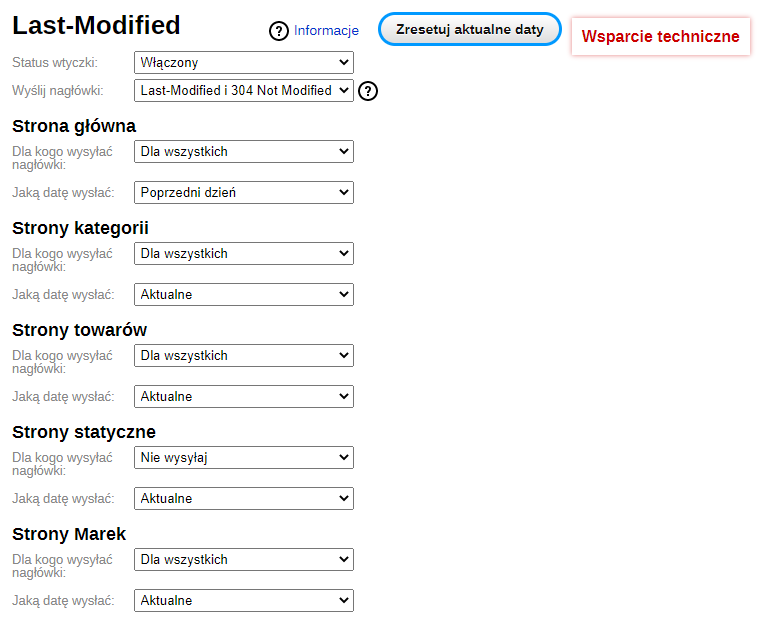
Important: After enabling "Last-Modified and 304 Not Modified" for all users, a browser-cached version will be displayed. For example, when adding a product to the carta, after refreshing the page the cart block will show 0 products, but if you go to the carta, the product will appear.
Settings description
Header:
- Last-Modified - only the page modification date is sent in the header.
- Last-Modified and 304 Not Modified - the page modification date is sent, and if the date is newer than the previous one, the page will not be retransmitted.
To whom to send the header:
- Do not send - selected headers will not be sent for this section.
- For everyone - selected headers will be sent to all website users and search engine robots.
- For search engine robots - selected headers will be sent only to search robots: Yandex, Google, Bing, Baidu.
Which date to send:
- Previous day - the date sent is from the previous day.
- Previous hour - the date sent is from the previous hour.
- Current date - the current date is sent.
- Current - the date sent is calculated automatically and updated after changes to category settings and other elements.