Automatic product management - plugin for Shopy-Script application




Features of the plugins "Automatic product management"
Automate even more routine operations!
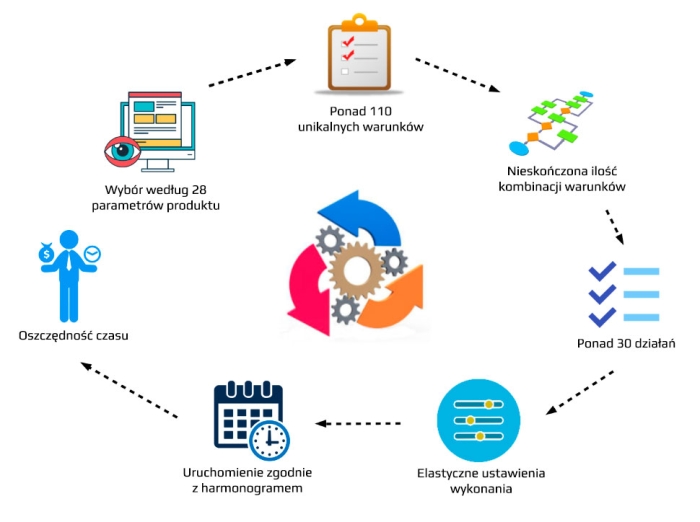
Create product processing rules for your store with just a few clicks. Define selection conditions and assign actions.
Save a significant amount of time!
Save up to 30% of your managers' working time, thereby freeing up resources to handle other operational tasks and ensure even faster growth of your store.
Flexible product selection options!
Select products based on any combination of their attributes.
Diverse actions!
Apply various actions to selected products automatically according to your conditions, via scheduled tasks, or manually. You can automatically assign features, badges, tags, set prices, move products between lists and categories, and much more.
Integration with other plugins!
The Plugin "Automated Product Management" is integrated and can be used together with the plugins "Stickies" and "Products priority".
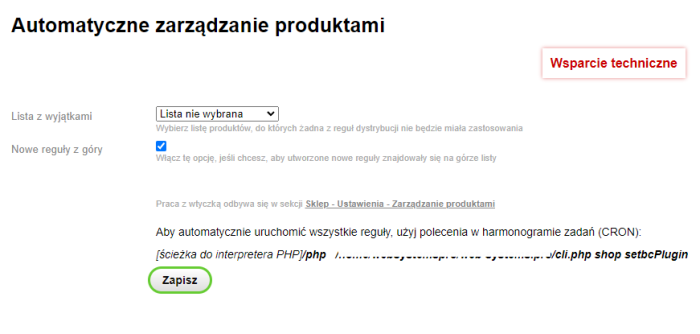
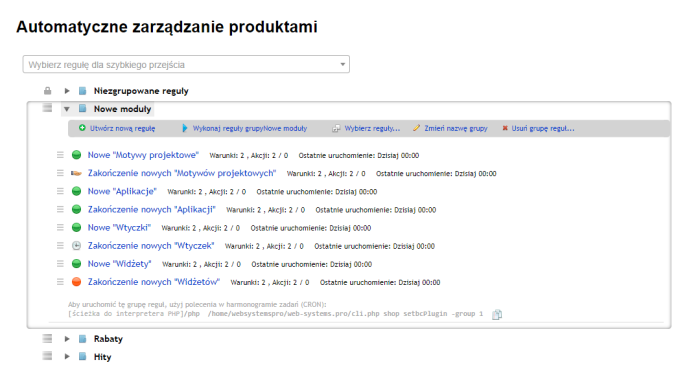
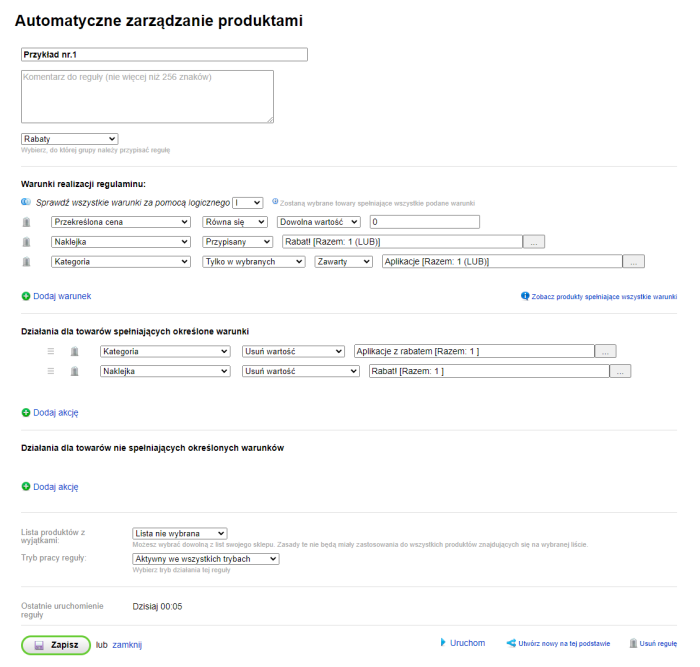
The Plugin "Automatic product management" is designed for automatic assignment of products to categories, lists, setting tags, badges, etc., based on specified conditions. The plugin is managed via the section "Shop -> Settings -> Automatic product management". Now you no longer need to waste valuable time categorizing products, managing lists, or assigning stickers and tags for SEO optimization. All of this can be done automatically by the plugin "Automatic product management" with just a few clicks.
The Plugin supports working with both built-in store badges and badges provided by the "Labels" plugin.
The Plugin allows selecting products based on the following conditions:
- Category (contains/does not contain/empty)
- Main product category (equals/does not equal/empty)
- List (contains/does not contain/empty)
- Badge (assigned/not assigned)
- Product type (equals/does not equal/empty)
- Product features (equals/does not equal/filled/empty)
- Badge (assigned/not assigned/empty). Including presence of the plugins "Labels"
- Product services (assigned/not assigned/filled/empty)
- Product tax (equals/does not equal/filled/empty)
- Price (sale/purchase/strikethrough) greater/less/equal/not equal/comparison with other product prices and arbitrary values
- By price difference
- Text fields (title, description, short description, metadata, product URL) contains/does not contain/equals/starts with/filled/empty/duplicates/regular expressions
- Product status (published on site or not)
- Tags of products (assigned value/not assigned/filled/empty)
- Product currency
- Product creation/modification date (exact/after/before/within last n days/previous last n days)
- Presence/absence of videos and images
- Number of product images (greater/less/equal)
- Additional product parameters by a specific key (assigned specific value/not assigned/filled/empty)
- Product priority - if the plugin "Products priority" is installed (equal/greater/less)
- SKU code/name (contains/does not contain/starts with/equals/filled/empty/has duplicates/regular expressions)
- Number of product SKUs (greater/less/equal/not equal)
- Stock quantity (individual or total) (greater/less/equal/not equal)
- Product rating (greater/less/equal/not equal)
- Product sales amount (greater/less/equal/not equal)
- Number of product sales over a period (greater/less/equal)
- Prices and surcharges set by the "Multi-price (wholesale pricing)" plugin
- Prices and surcharges set by the "Prices PRO" plugin
For products, the plugin allows performing the following actions:
- Add/remove product from category
- Set main product category
- Add/remove product from list(s)
- Set/remove badges
- Set/remove product tags
- Set/change/clear product tax
- Assign/cancel service for product
- Change product status
- Change stock balance quantity
- Set/change product type
- Set/change sale/purchase/strikethrough price based on other price fields (in percentages, absolute values, etc.)
- Set/remove product feature values
- Set/remove/clear values for additional product parameters
- Set product priority (specific value/increase by/decrease by) - if the plugin "Products priority" is available
- Enable/disable product availability for order
- Set prices/margins using the plugins "Multi-price (Wholesale prices)"
- Set prices/margins using the plugins "Prices PRO"
| Technical specifications | |
Developed for | Shopy-Script |
Localization settings | English, Polish, Russian |
UI backend support | 1.3 |
Software type | Plugin |
Free | No |
| Developer and version plugins | |
Designer (programmer) | waResearchLab |
License | Web Systems Pro |
Version | 2024.3.0.1.wsp |
Update | 10/29/2024 |