

Documentation o wtyczce "SEO Link Canonical"
This plugin is not an extension of the plugins "Link Canonical" (Bodysite). This plugin is an alternative plugin with a similar goal but different functionality. Use only one of the plugins - it's up to you.
Note that "Link Canonical" is not a strict tag. Search engines may ignore it and regularly do so. This plugin is recommended for use in combination with another plugin - SEO Meta Robots. The goal of plugins "SEO Meta Robots" is to close pages from indexing. The goal of plugins "SEO Link Canonical" is to transfer weight from previously indexed "incorrect" pages to "correct" pages.
Small explanation: the fact of transferring weight through "Link Canonical" is not 100% reliable and is often discussed in the SEO community. A significantly more effective and time-tested solution for transferring weight is 301 redirects. However, for objective reasons, it is incorrect to use 301 redirects on technical pages of the site.
Articles on this topic:
Demonstration of the functionality and settings of plugins "SEO Link Canonical"
Settings plugins (exactly as in the admin interface)
Settings plugins are shown only for demonstration purposes. You can test the operation of plugins only after purchase. We warn that the display of plugins settings is poorly adapted for mobile devices (similar to the plugins settings page in the admin area).
Some scripts used from plugins settings are not adapted to display them correctly in the documentation (icon size, collapsing short descriptions of each setting, masks for some fields, etc.) We apologize for the inconvenience. Settings plugins show everything correctly!
Also, the settings presented in the documentation for some plugins may not be up-to-date.
- Redefining the tag
- Main page mirror
- Hidden products
- Hidden categories
- Pagination pages
- Product article pages
- Trash pages
- Pages with product reviews
- Other pages
- Test mode
- Tag output method
Method of Outputting the Tag
If the "frontend_head" hook is not displayed in your design plugins or is displayed in a non-standard location (e.g., in the "body" tag, not in the "head" tag), use the helper to display the tag. In 99% of cases, it is not necessary to use the helper. The presence/absence of other hooks in the design plugins does not affect the operation of plugins.
Helper: {shopSeolinkcanonicalPlugin::altFrontendHead()}
Instructions for configuring plugins
Important information! If you are the owner (or representative) of an online store with a large assortment and/or high traffic from search engines, and you are not well-versed in SEO, it is strongly recommended to consult with an SEO specialist before making any decisions regarding changes to the website, especially when it comes to removing pages from indexing.
The following instructions are intended for inexperienced users, mainly owners of small online stores, who have not previously worked with SEO specialists. In some projects, SEO specialists may use non-standard techniques for internal website optimization, so following the standard recommendations of this guide may only harm your website.
The creator of plugins is not responsible for its incorrect use. Remember that every plugin SEO is not a "magic button," but merely a tool that can be used correctly to gain an advantage over the competition, or used incorrectly and incur losses.
- Install the plugin
- Go to the settings plugins («Shop» --> «Plugins» --> «SEO Link Canonical»)
- Enable the plugin
- In the settings "Defining the main mirror" leave the default value:
"Off." . -
Make sure that all settings for each page type are disabled by default (all User-Agent pages are set to "Do not output", and Yandex and Google to "Output the same as all User-Agent pages").
- Do not use settings intended for Yandex and Google for each page type. These settings are intended for experienced SEO specialists. The following instructions only apply to the general output of the "Link Canonical" tag.
The next important point. The search engines "yandex" and "google" support different settings of the "robots" tag, individually for their search engine without using cloaking (outputting different page content for different User-Agents). Therefore, in the plugin SEO Meta Robots is a legal way to inform search engines which pages should be indexed and which should not (for example, instead of the "robots" tag, you can set the "yandex" tag, which will be treated by Yandex as "robots", but only personally for itself). However, when it comes to "Link Canonical" - here the search engines do not support a similar function. Therefore, by choosing the appropriate settings in the plugin, output "Link Canonical" personally to the search engine, checking the User-Agent-u. Yes, this is considered cloaking, but in our opinion, this is not a prohibited method of page optimization (unlike, for example, outputting SEO texts in this way).
In short ... if your opinion differs from ours - just do not change the setting values for Google and Yandex. Leave the default value there for all page types: "Output the same as for all User-Agent types". - In the "Tag output method" field, leave the default "Use hook", do not change the setting to "Use helper". The helper must only be used when the hook does not exist in your design theme or is displayed in a non-standard position. For more information on this, see "Instructions for checking the operation plugins".
- Do not use settings intended for Yandex and Google for each page type. These settings are intended for experienced SEO specialists. The following instructions only apply to the general output of the "Link Canonical" tag.
- Make settings for hidden products:
- If you use plugins SEO Meta Robots and used it to prevent indexing of hidden products, it is recommended to set "Do not output" for hidden products in this plugin.
- If hidden products are to be indexed, you can set the option "Output with itself as a canonical page".
- Make settings for hidden categories:
- If you use plugins SEO Meta Robots and used it to prevent indexing of hidden categories, it is recommended to set "Do not output" for hidden categories in this plugin.
- If hidden categories are to be indexed, you can set the option "Output with itself as a canonical page".
- In general, it is a good idea to try to get rid of hidden categories. Simply remove hidden categories that have no traffic, and those that have traffic - also remove, but make a 301 redirect to other pages of the site (the most similar in terms of relevance). Hidden categories, unlike hidden products, create a large inconvenience in site administration.
- Make settings for pagination pages:
- Set pagination pages to the following setting:
«Output by specifying the page without the GET parameter "?page=" as canonical»
- Set pagination pages to the following setting:
- Make settings for product article pages:
- Set product article pages to the following setting:
«Output by specifying the page without the GET parameter "?sku=" as canonical» - The functionality of article pages was introduced in version 8.11 of the application Shopy-Script, but as of today, it is rather raw in terms of SEO and currently there are no tools to optimize the SEO of product article pages. Moreover, in 90% of themes, article pages are not needed at all for SEO promotion.
- Set product article pages to the following setting:
- Set garbage pages to:
«Redirect by specifying a page without GET parameters as canonical» - If this setting is selected, an empty product review page will display a tag pointing to the product page.
- If you are using plugins "SEO Meta Robots" and used it to block product review pages from being indexed, it is recommended to set the product review pages to "Redirect by specifying the product page as canonical" in this plugin.
- If, however, product reviews are to be indexed, you can set the option "Redirect with itself as the canonical page".
- In this block, leave all settings at the default value level.
- Set the value for the setting:
"Redirect with itself as the canonical page".
Instructions for checking the operation of plugins
- Activate test mode in the plugins settings
- Go to each type of page on your site and check if the tag is displayed correctly in the page source code. List of pages to check:
- hidden product page
- hidden category page
-
pagination page (e.g.: site.com/category/tv/?page=2)
- "First pagination pages" ("?page=1") in the "SEO Link Canonical" plugin are equated with pages with other GET parameters, because in reality these pages are duplicates of normal pages without GET parameters. Check all pagination pages starting from the second page.
- "Product pagination pages" ("?page=X" on product pages) in the "SEO Link Canonical" plugin are treated as garbage pages, because these pages are duplicates of normal product pages. Such pages occur rather rarely. But sometimes after modifying product pages by programmers who do not know SEO, links to such pages appear in the source code of product pages and are indexed by search engines. Plugin "SEO Meta Robots" will help prevent this situation, even if you leave the pagination of categories, brands, tags, etc. for indexing. And if it has already happened, plugin "SEO Meta Robots" will help close those already indexed pages from indexing, while plugin "SEO Link Canonical" will help transfer their weight to the product pages.
-
product article page (e.g.: site.com/product/iphone-8/?sku=12345)
- If your store does not have product article pages, simply open any product, add "?sku=12345" at the end of the page URL and refresh the page.
- page with other GET parameters (e.g.: site.com/category/tv/?price_min=200)
- Log in to the site under the administrator account (plugin checks if you have administrator rights to the Shopy-Script application.
- Open any checked page
- Make sure that the "Testing SEO Link Canonical" field is displayed in the lower left corner of the page to be tested (see screenshots in the description of this plugins). Remember that this block should only appear on pages that plugin interacts with. This block will not be displayed, for example, on pages of other applications ("Blog", "Site" etc.).
- Make sure that the page type is correctly defined by the plugin (displayed in the "Testing SEO Link Canonical" field)
- Make sure that the tag is correctly displayed (or not) in the "Testing SEO Link Canonical" block according to the plugins settings.
-
Check the output of the tag from the "Testing plugins SEO Link Canonical" block in the page source code.
- Copy the tag from the "Testing plugins SEO Link Canonical" block
- Open the page source code (CTRL+U)
- Open the code search field (CTRL+F)
- Paste the tag in the code search field
- Make sure that the tag is present on the page and displayed between the tags <head> ... </head>.
-
What to do if the tag is displayed on the page, but not between the tags <head> ... </head>?
-
Make changes in the plugins settings:
- In the setting «Using the "frontend_head" hook to handle plugins» set to "Use helper"
-
Make changes in the design theme code:
- Go to the section Shopy-Script --> "Design" --> "Themes"
-
In the "head.html" file, directly after <head> on the next line, add the code
{shopMetarobotsPlugin::altFrontendHead()} - In some design themes, the file may be available in a different section "Site" --> "Design" --> "Themes".
- If you have several design themes installed (different design themes on different store pages or you have separate mobile design themes) - make similar changes to the remaining design themes.
- Check the tag output after making the changes. If the tag is still not displayed, disable the plugin and contact technical support with access to the website's admin panel.
-
Make changes in the plugins settings:
-
What should I do if the tag does not appear on the page?
-
Make changes in the plugins settings:
- In the setting «Using the "frontend_head" hook to handle plugins» set the value
"Use helper"
- In the setting «Using the "frontend_head" hook to handle plugins» set the value
-
Make changes in the design theme code:
- Go to the section Shopy-Script --> "Design" --> "Themes"
-
In the "head.html" file, directly after <head> on the next line, add the code
{shopMetarobotsPlugin::altFrontendHead()} - In some design themes, the file may be available in a different section "Site" --> "Design" --> "Themes".
- If you have several design themes installed (different design themes on different store pages or you have separate mobile design themes) - make similar changes to the remaining design themes.
- Check the tag output after making the changes. If the tag is still not displayed, disable the plugin and contact technical support with access to the website's admin panel.
-
Make changes in the plugins settings:
- In the page source code, reopen the code search field and enter canonical in the code search field)
-
Make sure that no other tags of type <link rel="canonical" in the source code are displayed between the tags <head> ... </head>.
-
If you notice that another "Link Canonical" tag is displayed in the source code, it is displayed by website theme. To fix this:
- Open the design theme file "index.html" - it is located in the admin panel of the site in the application Shopy-Script («Shop --> «Project» --> «Themes» --> «index.html») or in the application "Site" («Site» --> «Project» --> «Themes» --> «index.html»).
- Find the word
canonical in the code and check in which line of the code it appears. -
Check the code. It should look like this:
{if !empty($canonical)}{/if}
If you do not see the construction around the tag
- If you do not find this code in the file "index.html" - check other design theme files. For example, "head.html", "index-head.html" etc. It is likely that the file name will contain the word "head".
{if !empty($canonical)}" ... {/if} , add it yourself, so that the code is as in the example above.
-
If you notice that another "Link Canonical" tag is displayed in the source code, it is displayed by website theme. To fix this:
- If your site has non-standard page types created using third-party plugins, and these pages should be indexed correctly (brand pages, filter pages, etc.) - I recommend checking how "Link Canonical" was/is displayed on them.
Descriptions for some settings
Below are detailed descriptions of some settings plugins (not all, only those that may not be intuitive). Links are duplicated directly in the settings plugins - it is easier to study the plugin and understand how each setting works from the settings plugins! Use the links:
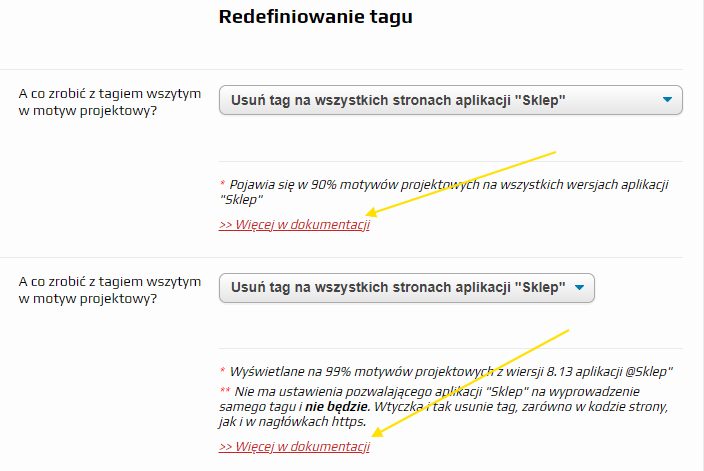
What to do with the tag in website theme?
Most design themes have the following code in the "index.html" file (or "head.html"):
Plugin does not use this code in its work, outputting (or not outputting) the tag itself. But to prevent tag duplication, plugin must disable the tag embedded in the design theme, and plugin does this by prefixing the design theme $canonical = false.
Important! Make sure you have checked this code in your design theme:
- If your design theme does not have this code, you can do nothing. Leave the default setting ("remove tag on all pages of the application Shop").
- If this code is displayed in your design theme, you also do not have to do anything. Leave the default setting ("remove tag on all pages of the application Shop").
- If your design theme has similar code, but without checking "", remove this code completely. After that, leave the default setting ("remove tag on all pages of the application Shop").
- If your design theme has similar code, is wrapped in "" and is specifically designed to display the tag on certain pages of the site, you can leave it and use the plugins option "Remove the tag only on those pages of the application Shop, where plugin "SEO Link Canonical" outputs the tag itself". But only if you fully understand what (and more importantly: why) you are doing!
What to do with the tag in the application Shopy-Script?
Starting from one of the versions (presumably version 8.13) app Shopy-Script began to introduce the Link Canonical tag itself, even though it was already implemented in almost all design themes. From version 8.17, Link Canonical was also included in the http headers (a very questionable solution).
Plugin does not use the built-in mechanism for outputting the Link Canonical tag of the application Shopy-Script, but instead outputs the tag internally (or not, depending on the settings). But to prevent tag duplication, plugin removes the tag displayed by the application Shopy-Script. You do not need to check this functionality.
Defining the primary mirror
I strongly recommend using 301 redirects to define the primary mirror and leaving this option disabled.
This option was added to plugins as a last resort when it is not possible to set up 301 redirects. If you specify the primary mirror of the site, the canonical link to the primary mirror will be inserted from all other mirrors of the site.
Remember that plugin does not support multi-site (i.e., different settings for different storefronts). If your project has the primary mirror of the main storefront as "https://www.site.com" and the primary mirror of the regional subdomain as "https://city.site.com", this option should also remain disabled.
FAQ. Replies on most frequently asked questions
Problem. Plugin was configured according to the instruction, the test mode is enabled, but the block "Testing plugins SEO Link Canonical" does not appear on the page and/or "Link Canonical" does not appear in the page source code. What to do?
- Make sure plugin is enabled
- Make sure you are checking the website page that plugin communicates with
- Review the plugins checking instructions again in detail. You may need to use a helper instead of a hook. Contact plugins technical support only as a last resort, and first try to identify the problem yourself.
Problem. The block "Testing plugins SEO Link Canonical" incorrectly identifies the current page. What to do?
- Try refreshing the webpage (F5).
- If the page is still not detected correctly, disable the "SEO Link Canonical" plugin in the installer and contact technical support.
Question. Why do we need separate settings for Yandex and Google if the plugins instructions say not to use them?
Question. Why can't plugin mark "Link Prev" and "Link Next"?
These tags are no longer relevant at the time of writing plugins and these instructions: Yandex and Google have stated that they do not use them.
Question. I am already using plugins "Link Canonical" from Bodysite. Do I need this plugins?
Plugin "SEO Link Canonical" and plugin "Link Canonical" from Bodysite have several differences in functionality. For example, plugin from Bodysite supports multi-site, while this one does not. Plugin from Bodysite does not support linking hidden products to other pages, while this plugin does. Plugin from Bodysite requires integration with the project theme, and this one does not. etc. In short, everything that is practically used by SEO specialists has been added to plugins. And a few features that are not in the Bodysite plugin have been added. But those features that are in the plugin, but which are not used in practice at all, have not been added to the "SEO Link Canonical" plugin.
Question. Why can't plugin manually insert links from certain pages of the site (e.g., products or categories)?
Because such a manually inserted link is a "ball and chain" on its own. Regardless of the purpose of creating a category that requires a "Link Canonical" to another page, there is always a more appropriate and correct solution. Example situations:
- The same category is created to replace it in the menu in two different sections of the site, but it should be indexed only in one section.
- A product is out of stock, the product page is bad, but you do not want to delete it. The correct solution is to make the product hidden so that the rules for hidden products apply to it.
- A plugins "SEO filter" page has been created and you need to place a link from it to another page. The correct solution: why create a page to then place a "Link Canonical" from it? Remove it and perform a 301 redirect. And do not create pages with unique URLs that you basically do not want to attract traffic to!
Question. Which types of URL addresses does plugin work with? In my categories, "/category/" does not appear in the URL, and in products, "/product/" does not appear in the URL. Will plugin work correctly?
Plugin works on website pages with any types of page URLs (natural, mixed, flat). Category and product pages are defined not by reading the page URL, but by hooks.
Question. Is this plugin compatible with the pluginmi "Brands", "Brands PRO"?
Yes, it is compatible. Plugin does not conflict with the pages of plugins "Brands", "Brands PRO", "Catalog reviews" and pages of other plugins creating "custom page types": tags are correctly placed according to the settings of plugins for "other pages". And pagination pages and junk pages will be defined, regardless of the parent "page types".
Question. Is this plugin compatible with the "SEO filter" plugin?
Plugin does not conflict with the plugins pages "SEO filter" and pages of other plugins that convert certain GET parameter pages into optimized pages with normally readable URLs: if a page is technically a GET parameter page, then plugin additionally checks if the URL of such a page contains the character "?" and in the absence of it applies to such a page not the settings for junk pages, but the settings for other pages.
Question. I want to close all junk pages from indexing except pages with the GET parameter "sort". I want sorting pages to be indexed. How to do it?
In no way. Plugin does not support the ability to exclude pages with certain GET parameters from the list of junk pages and it is unlikely that such a modification will appear in the updates of plugins.
We do not recommend leaving any GET parameter pages for indexing. If you want to index sorting pages - programmatically change the GET parameters of such pages to a normally readable URL. Then this plugin will stop perceiving such pages as junk pages and will stop applying the appropriate settings to them.
Question. Why are the pagination page settings not applied to the page "site.com/category/tv/?page=1"?
Plugin perceives the page with a single GET parameter "?page=1" not as a pagination page, but as a junk page and applies the appropriate settings to it.
This page is a full view of a regular page without a GET parameter and should never be indexed. Ideally, you should configure 301 redirects from the page "with«?page=1»" to the page "without«?page=1»", but that is already beyond the scope of this plugins.
Question. Why are the pagination page settings not applied to the page "site.com/category/tv/?page=2&sort=total_sales"?
If there is a GET parameter "page", plugin checks the total number of GET parameters of the page, and if there are multiple GET parameters, it defines the page not as a pagination page, but as a junk page and applies the appropriate settings to it.
Question. Why are the product article page settings not applied to the page "site.com/product/iphone10/?sku=2123&price=123"?
If there is a GET parameter "sku", plugin checks the total number of GET parameters of the page, and if there are multiple GET parameters, it defines the page not as a product article page, but as a junk page and applies the appropriate settings to it.
Question. Why are the settings of the product article pages not applied to the page "site.com/product/iphone10/?page=123qwerty"?
If there is a single GET parameter "page", plugin checks the value of the GET parameter and, upon detecting foreign characters (any characters other than digits), defines the page not as a "pagination page", but as a junk page and applies the appropriate settings to it.
Question. Why are the settings of the product article pages not applied to the page "site.com/product/iphone10/?sku=123qwerty"?
If there is a single GET parameter "sku", plugin checks the value of the GET parameter and, upon detecting foreign characters (any characters other than digits), defines the page not as a "product article page", but as a junk page and applies the appropriate settings to it.