SEO-redirects - plugin for Shopy-Script application




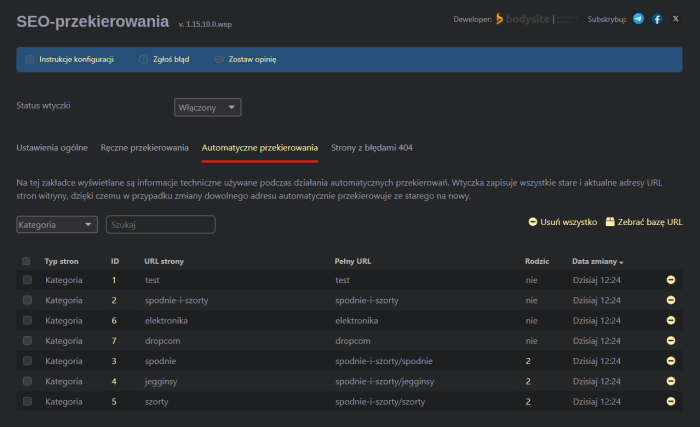




With the plugin "SEO-redirects", you can create redirects and change URLs for categories, products, product subpages or informational pages without technical knowledge, and not worry about users or search robots landing on non-existent pages.
Advanced redirect manager: automatically, manually, by theme, without editing .htaccess and other issues!
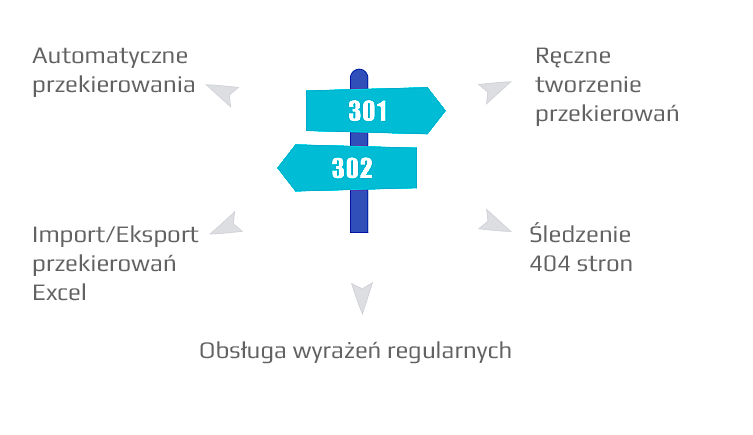
Main features of plugins:
 Automatic redirects
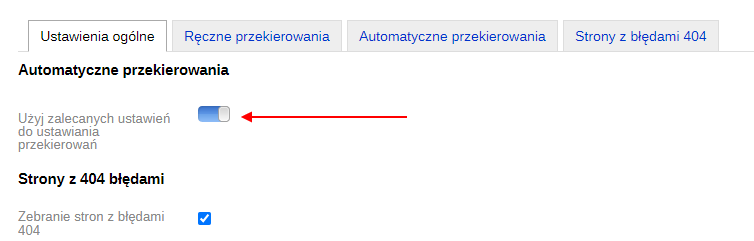
Redirects can be set automatically by selecting recommended settings or configuring them manually. Settings cover common scenarios: changing the URL of a category/product and others.
Integration with plugins
The "Plugin SEO Redirect" plugin is integrated with the "plugins" "SEO-filter" and "Review Catalog". It sets up automatic redirects based on selected configurations.
 Manual creation of redirects
You can manually set up a redirect from one page to another. When adding a redirect, options are available to select a website and add a comment.
 Pages with 404 errors
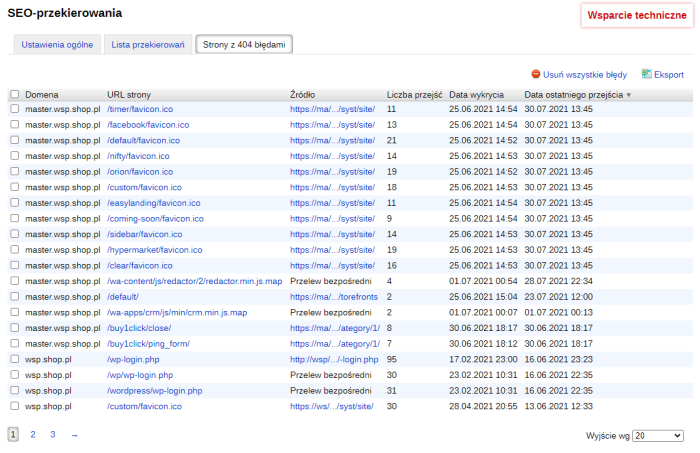
Plugin analyzes the website and displays pages returning a 404 response code. You can see how many pages in the site have invalid URLs, remove them from the list, or add a redirect.
 Import and export redirects to Excel
Manually created redirects within the plugin can be downloaded in .xls and .xlsx formats via "Export" for editing in Excel, and uploaded back from an .xlsx file using the "Import" feature.
 Regular expressions support
Regular expressions are a powerful method for searching and replacing text strings. With regular expressions, the "SEO-redirects" plugin enables solving various problems.
 Detailed data on visits
Plugin can collect data (IP, user-agent, operating system, browser) about users who accessed pages returning a 404 response code. Based on this information, you can determine whether they are bots or real users.
Suitable for both beginners and professionals:
You can enable "recommended settings" for automatic redirects and not think about anything else. At a more advanced level, you can manually define your own rules.
What tasks can be solved using regular expressions:
- Redirecting users when changing the site structure;
- Migrating from http to https protocol and vice versa;
- Redirecting users after migration from another CMS;
- Removing "www" from the website address;
- Removing a segment from the URL, for example "catalog", and setting up redirects to pages without "catalog".
This way, the plugin allows you to configure bulk redirects via the site's admin panel without accessing the .htaccess file (Full list of regular expression features).
How does the plugin work in specific examples?
Task 1. It is necessary to configure the system so that after changing the URL of a category, product, or informational page, redirects to new addresses are created automatically.
Solution:
- Purchase, install and activate the "SEO-redirects" plugin;
- Enable the plugin;
- In the settings, select "Use recommended redirect settings";
- Save changes.
The problem was solved using the plugins "SEO-redirects".
Task 2. When removing pages created by the "SEO-filter" plugin, it is necessary to automatically place a 301 redirect to the category.
Solution:
- Purchase, install and enable the "SEO-redirects" plugin;
- Uncheck the option "Use recommended redirect settings" to access detailed settings;
- In the section "When deleting pages created by the 'SEO-filter' plugin, select "301 redirect" to "Category".
The problem was solved using the plugins "SEO-redirects".
Task 3. Redirects from pages with 404 errors.
Solution:
- Purchase, install and enable the "SEO-redirects" plugin;
- Go to the Plugins "Pages with 404 errors";
- A button for creating a redirect will appear when you hover over the page;
- Click the button and set up the redirect manually;
- Repeat for all relevant pages.
The problem was solved using the plugins "SEO-redirects".
Task 4. Switch from http protocol to https.
Solution:
- Purchase, install and enable the "SEO-redirects" plugin;
- In the "Redirect list" section, add a redirect from http://* to https://$1.
The problem was solved using the plugins "SEO-redirects". After switching to http, the user will be automatically redirected to https. Other regular expression rules are available at this link.
All features of plugins:
Basic
- Automatic creation of redirects;
- Manual creation of redirects;
- Support for regular expressions;
- Tracking pages with 404 errors;
- Import/Export manual redirects in .xls and .xlsx format.
Automatic redirects from old URLs to new ones are created for:
- Changing URL type - "Simple", "Mixed", or "Natural";
- Changing category, product, and product subpage URLs;
- Changing the URL of information pages created by the Shopy-Script app;
- Moving a category into another category;
- Changing the parent category;
- Changing the URL of pages created by the "SEO-filter" plugin (version 2.0 and above);
- Changing the URL of pages created by the "Brands" plugin;
- Deleting categories, products, and subpages.
Debug mode allows the administrator to view information about redirects stored in the archive. The information is displayed after clicking on the link that triggered the redirect.
Creating redirects
The plugin allows creating a redirect from any page to another:
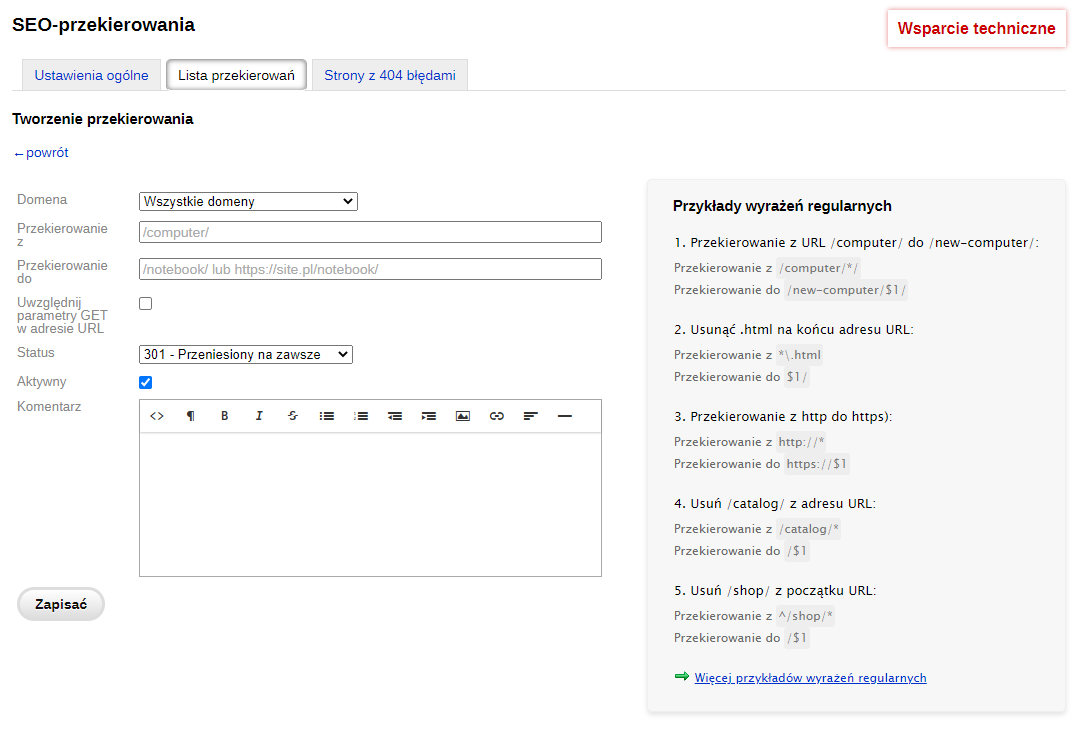
Available customization fields:
- Domain;
- Redirect from;
- Redirect to;
- Include parameters in the URL;
- Status (301 or 302 redirect);
- Active;
- Comment.
The "Include parameters in the URL" setting for manual redirects allows including GET parameters, for example in links like: site.ru/category/?size=12.
Regular expression support.
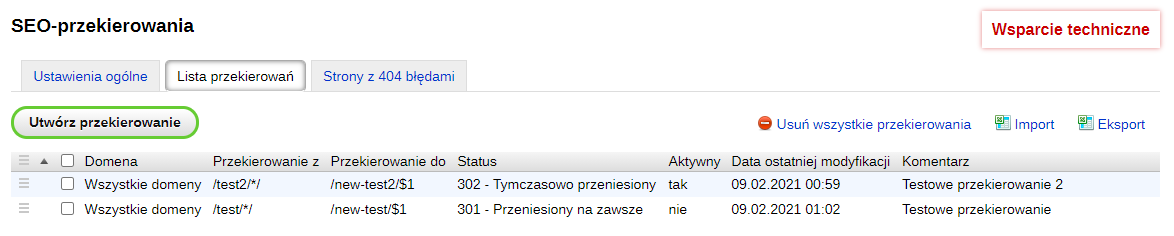
Redirect list
List of all manually created redirects, with options to export and import the table to Excel, delete and edit redirects:
Pages with response code 404
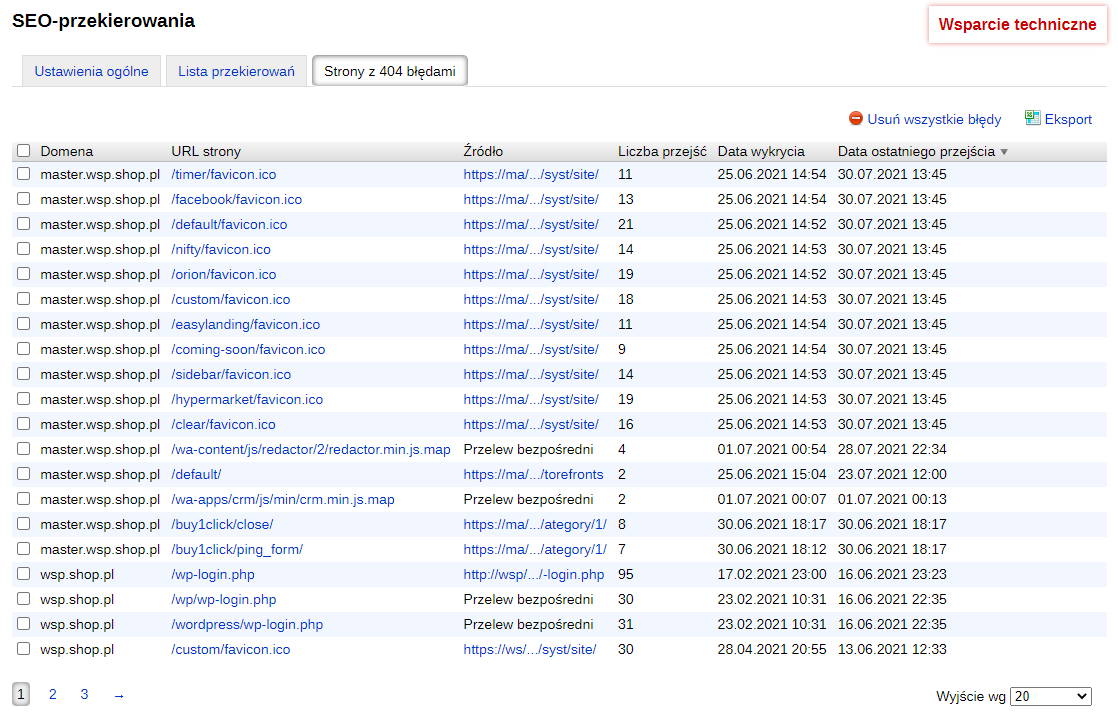
Plugin tracks user visits to pages returning a 404 response code (non-existent page) and collects the following data:
Site;
- Page URL;
- Referral source;
- Total number of user visits to the page;
- Date the page was first detected;
- Date of the last visit to the page.
You can exclude pages from tracking 404 errors.
It's possible to export the table to Excel, as well as quickly create a redirect from a 404 page to any other page.
Note! Plugin is not suitable for websites with a large number of products (~500 thousand).
| Technical specifications | |
Developed for | Shopy-Script |
Localization settings | English, Polish, Russian |
UI backend support | 1.3, 2.0 |
Software type | Plugin |
Free | No |
| Developer and version plugins | |
Designer (programmer) | Bodysite |
License | Web Systems Pro |
Version | 1.15.11.0.wsp |
Update | 09/06/2024 |
With this product also buy