Guide o szablonie graficznym "ASPIRE Landing Page"
Instructions in case of an error.
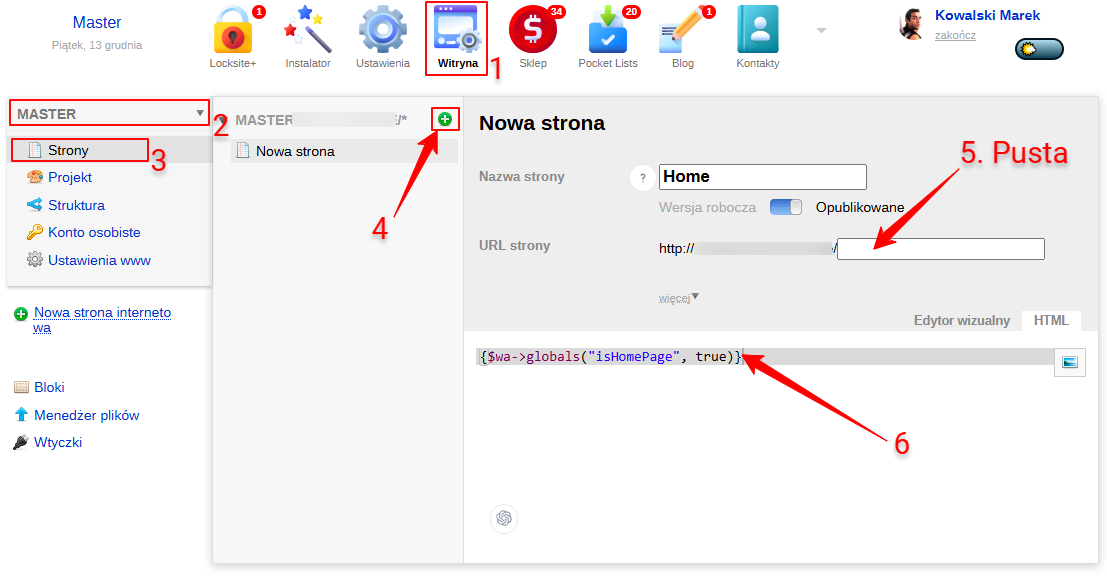
If a "404 Error" suddenly appears on the homepage, it usually means that the Site application does not have a page with an empty address. A page with an empty address is treated as the homepage. Create the homepage:
- In the Web Systems Pro backend, open the Site application.
- In the upper-left corner, select the website domain.
- Open the "Pages" section.
- Create a new page using the plus icon.
- Leave the "Page URL" field empty.
- Add the code {$wa->globals(„isHomePage”, true)} - to avoid getting a 500 error
- Save the page.