Grouping blocks - plugin for the "Site" application



If you actively use blocks for any task, you may notice that the number of blocks grows over time and becomes difficult to navigate in the block list.
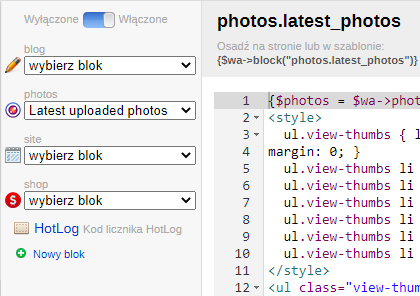
The Plugin "Grouping blocks" solves the problem of grouping blocks by their prefix in the dropdown list.
You can use any word separated from the block name by a dot as a prefix.
For example, we have two blocks named photos.latest_photo and photos.all_photo
Here photos is the prefix for grouping.
Specify this prefix in the plugins settings. If there are multiple prefixes, specify them separated by commas.
If a block has a filled description, it will be displayed as the item name in the dropdown list.
The plugins styles provide for displaying icons of main applications >Web Systems Pro<, but you can add your own icon for each block. To do this, specify the path to the CSS file with your styles in the plugins settings.
| Technical specifications | |
Developed for | Site |
Localization settings | English, Polish, Russian |
UI backend support | 1.3 |
Software type | Plugin |
Free | No |
| Developer and version plugins | |
Designer (programmer) | ElevenGroup |
License | Web Systems Pro |
Version | 1.1.1.wsp |
Update | 04/21/2023 |