Sitemap PRO - flexible site map management





"Application Sitemap PRO" — a professional tool for SEO specialists, with which you can precisely customize the creation of the Sitemap.xml file: priorities and update frequency, the ability to create a separate XML file for images, accounting for Robots.txt file prohibitions, and much more.
Advanced, flexible settings for creating
and updating Sitemap.xml!

XML Sitemap is a list of all pages of an internet resource intended for search engine robots. It helps robots (Google, Bing, and others) find the site's pages and index them. Moreover, the presence of a sitemap increases the trust of search engines in the online store.
Relevance of the application
The XML sitemap helps search robots find new and changed pages faster using direct links. With high complexity, this ensures that all categories, products, information pages, and blog posts get indexed.
Benefits of using "Sitemap PRO":
1. Faster site indexing;
2. Guarantee that the robot finds the right pages;
3. Increased trust of search engines in the internet resource;
4. Configuration of page parameters (priority, frequency).

Thus, the sitemap.xml file actually exists in the Shopy-Script application, but it is generated automatically and has certain drawbacks. You can use it, but only in its original form, since changing any parameters is not allowed. Moreover, it does not include links added by plugins: as a result, the file may be too large to be fully loaded.

Main features:

Generating Sitemap.xml according to specific rules
You can select specific blocks to be included when generating links (for example, categories, pages, publications, tags), set visibility parameters, priority, frequency of changes.
Helpdesk for the "Store", "Site", "Blog" apps
Application allows you to add links to the Sitemap.xml file for the "Store", "Blog", "Site" apps. Links to pages of other apps are displayed according to the general rules.
Excluding pages
You can exclude specific pages from Sitemap.xml files. The app allows you to bulk remove links to hidden products and categories in the "Store" app, as well as manually add links for exclusion.
Including Robots.txt file rules
This feature allows you to exclude from Sitemap.xml links that are blocked for indexing according to the rules of the Robots.txt file. Add only those pages that are relevant to your website!
Image links
A separate sitemap for product images in the "Store" app has been introduced. You can add it to the sitemap.xml file. You can choose the image size.
Generating the file using CRON
The plugins settings include a command generator for CRON, where you can specify the update schedule for Sitemap files.
Adding arbitrary subpages to Sitemap.xml
You can add any product subpages to the Sitemap.xml file. For example, pages with reviews, certificates, additional information.
Multi-site
You can set general settings for the entire site or add rules for individual sites.Explanation of settings:
changefreq tag
This tag allows you to specify the approximate frequency of page updates. It is a recommendation, and robots may decide to visit the site less or more often.
Possible tag values:
— Always;
— Hourly;
— Daily;
— Weekly;
— Monthly;
— Yearly;
— Never.
In the "Sitemap PRO" app, you can select your own change frequency for each block of links.

priority tag
This tag indicates the priority of a page's importance on the website and affects the order of its indexing. The priority value can range from 0 to 100, with a default setting of 50. The higher the priority, the faster the page will be indexed.
However, you do not need to set the value to 100 for all URLs, as it is a relative value and shows which pages on the site are more important. If all pages have the same value, it will only mean that all links are equally important.
In the "Sitemap PRO" app, you can specify a priority for each group of pages.

All app settings
Settings:
— App status (enabled/disabled);
— Settings for domain (general settings and domain/subdomain selection);
— Update sitemap.xml via CRON (yes/no);
— Include Robots.txt (yes/no);
— Exclude from Sitemap.xml.
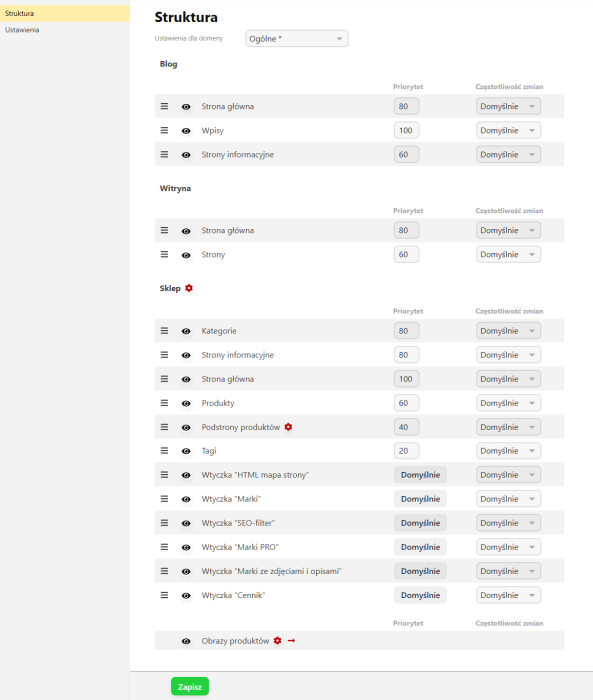
Structure:
— Settings for domain (general settings and domain/subdomain selection);
— Settings for the Shopy-Script app (show hidden categories, show hidden products, include canonical tag from plugins "Canonical link", link block settings);
— Settings for the "Site" app (link block settings);
— Settings for the "Blog" app (link block settings).
Management rules for link blocks of the "Store" app (visibility, priority, change frequency):
— Home page;
— Categories;
— Information pages;
— Products;
— Product subpages;
— Tags;
— Plugin "Brands PRO";
— Plugin "SEO filter";
— Plugin "HTML sitemap";
— Plugin "SEO-regions".
Settings for images
— Enable file visibility;
— Add product images sitemap to sitemap.xml (yes/no, available only via direct link);
— Image size (option selection).
Management rules for application link blocks "Site" (visibility, priority, change frequency):
— Pages;
— Homepage.
Management rules for application link blocks "Blog" (visibility, priority, change frequency):
— Homepage;
— Publications;
— Information pages.
| Technical specifications | |
Localization settings | English, Spanish, Polish, Russian, Ukrainian, German, French, Italian |
Installed in the cloud | No |
UI backend support | 2.0 |
Software type | Application |
Free | No |
| Developer and application version | |
Developer | Bodysite |
License | Web Systems Pro |
Version | 1.12.7.1.wsp |
Update | 09/27/2026 |