Blocks and Variables Organizer - plugin for the "Site" application






Helpdesk only in the new UI 2.0 interface
Plugin "Blocks and Variables Organizer" works only in the new UI 2.0 interface of the Site application and supports both light and dark backend versions. This tool allows you to organize blocks and variables, making it easier to work with them in the admin panel.
Blocks and Variables Organizer is a professional plugin for convenient work with the corresponding section of the "Site" application in UI 2.0 version. It was created for people who have a large number of blocks and/or variables and want to work faster, without chaos and manual searching.
What is the Blocks and Variables Organizer for?
In the standard UI 2.0 interface of the "Site" application, blocks and variables are displayed in a simple list. When their number reaches tens or hundreds, finding the required element becomes a problem. Plugin solves this problem by:
- Four display modes (standard list, categories, search, tags).
- Flexible grouping system with icons.
- Intelligent search.
- Drag-and-drop interface.
Thanks to this, working with content becomes logical, organized, and fast.
Main operating modes of plugins.
List. Classic view of all elements, known to Web Systems Pro users. Suitable for general overview.
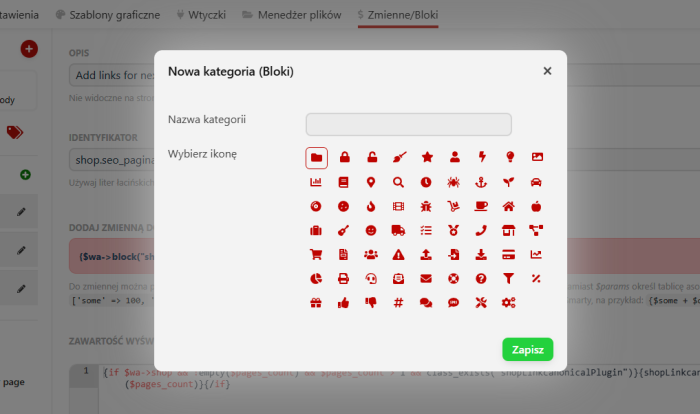
Categories. The most convenient ordering mode. Allows you to create your own categories, assign icons to them, sort, and preview the number of elements in each group. Drag-and-drop of elements significantly speeds up organization.
Search. Works instantly, from the second character entered. Finds elements by name and description, regardless of their category.
Tags. Allow you to combine elements according to meaningful labels. All tags are displayed with the number of elements, filters and quick transitions to related blocks or variables are available.
Key features:
- Categories with a choice of 60+ FontAwesome icons. Categories can be renamed, deleted, and sorted. After deleting a category, elements are not lost but are automatically moved to "Unsorted".
- Drag-and-drop for moving blocks and variables between categories. The system automatically remembers the order of elements.
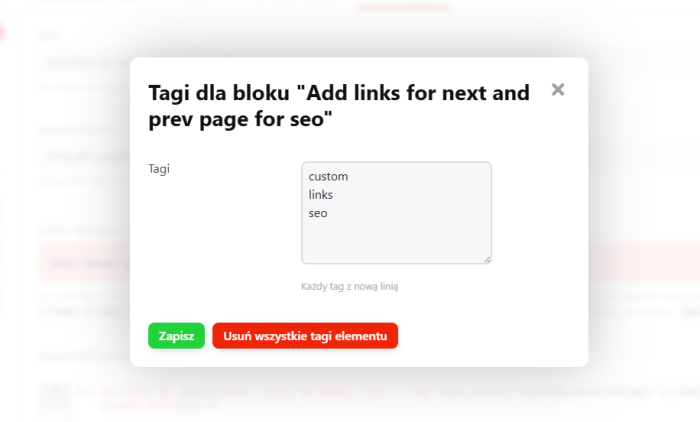
- Tags - unlimited number of labels for any element. You can edit them, delete individually, or clear all at once. Tags allow logical grouping of content.
- State memory. Plugin opens in the same view you were working in last, saving time when switching.
- Automatic synchronization. New blocks and variables appear immediately, without refreshing the page.
- Content area width management. In the "Site" application on the blocks and variables page, the content width varies, causing interface "jumping" when switching. This setting allows you to set a uniform content area width for the entire "Site" application and facilitates work with the interface.
Technical advantages:
- Compatibility. Fully works with UI 2.0, including dark mode.
- Performance. Optimized SQL queries and client-side filtering allow working with hundreds of elements without delays. All operations are done via AJAX.
- Security. Plugin does not have direct access to the file system, works only with the database through the Web Systems Pro API. All operations go through the standard security system.
- Flexibility. You can disable the tag system (separately for blocks and variables) or adjust the width of the working area to the project's needs.
- Localization. Full interface support in Polish, English, and Russian.
Who will benefit from plugin?
This tool is especially useful for people who accumulate many blocks and variables in their projects and often work in this section. If you need to regularly search for necessary elements, switch between dozens or hundreds of records, organize them into logical groups - plugin will significantly speed up your work. It will be useful in large projects, online stores with a wide range, corporate portals, and any websites where it is important to maintain order and quickly find the required blocks and variables.
| Technical specifications | |
Developed for | Site |
Localization settings | English, Polish, Russian |
UI backend support | 2.0 |
Software type | Plugin |
Free | No |
| Developer and version plugins | |
Designer (programmer) | WSPro |
License | Web Systems Pro |
Version | 2.0.2.0.wsp |
Update | 05/30/2026 |