This product is already in cart - plugin for Shopy-Script application
Visually emphasizes the product that is in the cart.

This product is already in cart

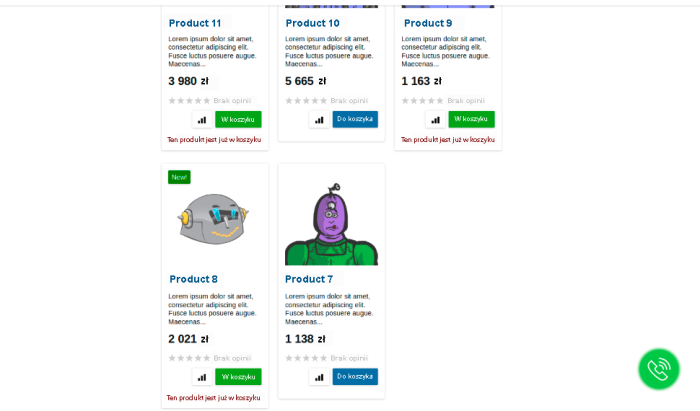


Plugin visually highlights the product already in the customer's cart. v2.0
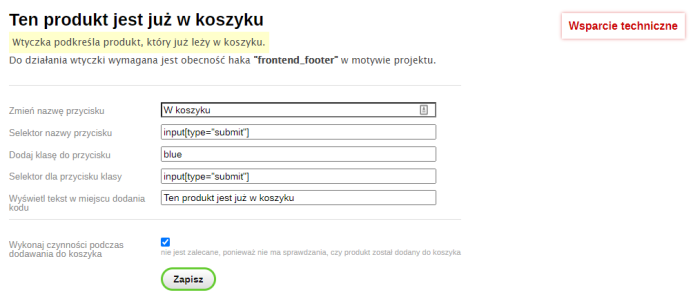
Settings plugins allow you to:
- Display text where the code was added;
- Change the button label;
- Add a CSS class to the button.
To make plugin work, you need to:
- Add the code to the project theme templates (description below);
- Ensure the "frontend_footer" hook exists in the project theme;
- In plugins settings, register the required selectors.
After installing plugins, you must add the code to the project theme templates:
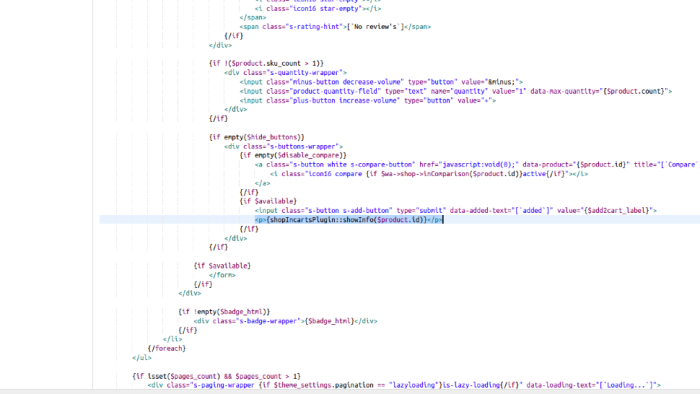
- {if $wa->shop}{if method_exists('shopIncartsPlugin', 'showInfo')}{shopIncartsPlugin::showInfo($p.id)}{/if}{/if} - to the product list output template (e.g. list-thumbs.html), where $p.id is the product ID.
- {if $wa->shop}{if method_exists('shopIncartsPlugin', 'showInfo')}{shopIncartsPlugin::showInfo($product.id)}{/if}{/if} - in the product template or product cart block (e.g. product.cart.html), where $product.id is the product ID.
The code should be added inside the product form, between the <form> and </form> tags.
For example, right after the "Add to cart" button:
<form class="purchase addtocart" method="post" action="/add">
...
<input type="submit" value="Add to cart" />
{shopIncartsPlugin::showInfo($p.id)}
</form>.
Highlight the product already in the customer's cart!
More o wtyczce "This product is already in cart": Updates
| Technical specifications | |
Developed for | Shopy-Script |
Localization settings | English, Polish, Russian |
UI backend support | 1.3 |
Software type | Plugin |
Free | No |
| Developer and version plugins | |
Designer (programmer) | Xverst |
License | Web Systems Pro |
Version | 2.0.2.2.wsp |
Update | 12/26/2022 |
Loading...
Loading...
With this product also buy



-
-

Change customer category according to schedule based on purchase volume.