Combining orders - plugin for Shopy-Script applications
Allows combining multiple orders into one

Combining orders



It often happens that after placing and confirming an order, a customer remembers they forgot to buy something else. They place another order and naturally ask for both orders to be packed in the same box. The Plugin "Combining orders" will help you combine any number of orders into one.
How the plugins works:
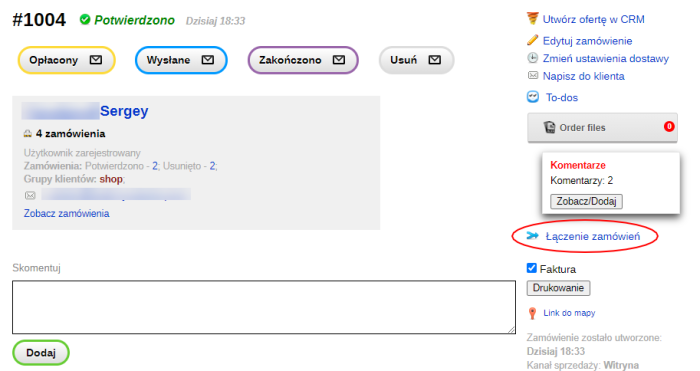
- An order (main) is selected to which other orders will be combined;
- The Combine orders button is pressed (if combining is available for the selected order, otherwise the button is unavailable; the order statuses for which combining is available are defined by the plugins settings);
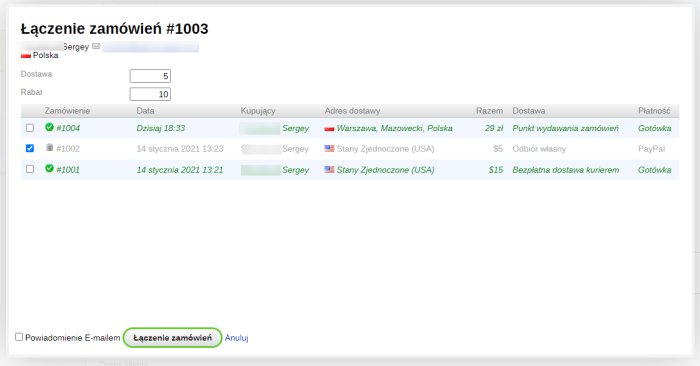
- A pop-up window with a list of orders appears;
- The orders to be combined with the selected order are checked;
- Products from the selected orders are moved to the main order, discounts are also summed up, and the final amount of the main order is recalculated. Shipping costs and other parameters remain unchanged;
- When combining orders, warehouse balances are not updated;
- Orders that have been merged into the main order are deleted with an added comment;
- A comment describing which orders were combined is added to the main order;
- Customers receives (if sending notifications is enabled) a notification about the order combination, the text of which can be edited.
Settings:
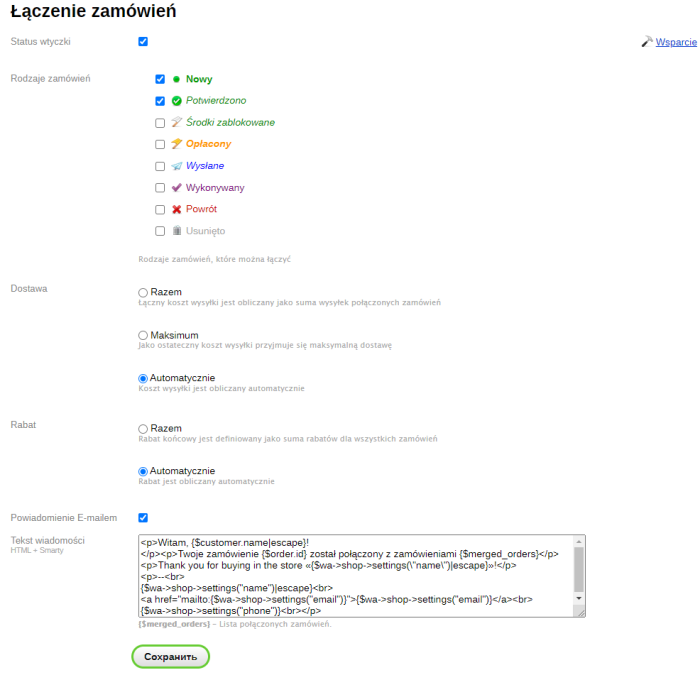
- Setting the plugins status: Enabled / Disabled;
- Configuring the types of orders that can participate in the combination (new, confirmed, paid, etc.);
- Configuring the notification sent to the user by email. Ability to set any news text.
More o wtyczce "Combining orders": Updates
| Technical specifications | |
Developed for | Shopy-Script |
Localization settings | English, Polish, Russian |
UI backend support | 1.3 |
Software type | Plugin |
Free | No |
| Developer and version plugins | |
Designer (programmer) | WA-plugins |
License | Web Systems Pro |
Version | 2.0.3.1.wsp |
Update | 10/27/2021 |
Loading...
Loading...
With this product also buy

-
-

Compression of original photos above a specified size.