Canonical link - plugin for Shopy-Script application




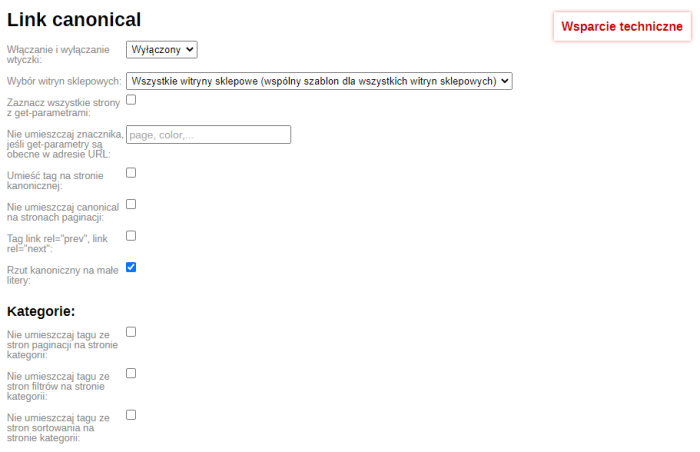


Plugin "Canonical Link" will help you eliminate duplicate content on your website by indicating to search engine bots the preferred version of a page's URL.
Removing duplicates and low-quality pages has never been easier!

If your website has identical or similar content accessible under different URLs, this plugin will indicate the URL to which the search engine bot should return, while ensuring that all attributes (for example, link weight) are transferred to the desired page.
For example, category pages display the same product list with different sorting options:
- https://site.com/category/computers/
- https://site.com/category/computers/?sort=name&order=asc
- https://site.com/category/computers/?sort=total&order=desc
To avoid duplication of such pages in search results, you should place a <link rel="canonical" href="https://youdomain.com/..." /> tag from sorting pages to the category page. This can be done using the plugins "Canonical Link" plugin.
Main features of plugins:
 Automatic tag generation
Automatic generation of values for the <link rel="canonical" href="https://youdomain.com/..."/> tag works according to settings covering most standard situations.
 Manual tag addition on category and product pages
In the category and product edit settings, you can manually specify the canonical page URL, and the tag will appear with a link to it.
 Adding rel="next" and rel="prev" attributes
Tags link rel="prev", link rel="next" Google recommends adding multi-page content to pages so that the bot can connect the content of these pages in logical order.
 Adding a tag to pages with GET parameters
With a single action, you can add the tag to all pages with GET parameters. If there are exceptions, write them manually or select from the plugins settings.
 Disabling the tag on specific pages
Flexible settings are available for disabling tags on certain pages. In particular, you can specify that tags should not be placed from pagination pages to the category page.
 Compatible with the "SEO-filter" plugin
Plugin "Canonical Link" is compatible with the "SEO-filter" plugin. It places the tag on "SEO-filter" pages according to the settings, but you can disable adding the tag for pagination pages.
 Helpdesk multi-site support
You can add your rules for the <link rel="canonical" href="https://youdomain.com/..."/> tag for all store websites as a whole and for each one individually. You can also select a business card, manually adding the tag in product and category settings.
How does plugin work in specific examples?
Task 1. You need to place the tag from all pages with GET parameters to the main category page. The exception is all pagination pages.
Solution:
1. Purchase, install, enable the "Canonical Link" plugin.
2. Check the availability of the <link rel="canonical" href="https://youdomain.com/..."/> tag (see point 3 of the Instruction);
3. Select "All pages with GET parameters";
4. Select "Do not place canonical on pagination pages";
5. Save changes.
The problem was solved using the plugins "Canonical Link" plugin.
Task 2. You need to place the tag from all pages with GET parameters to the main category page. Make an exception for category pagination pages and "SEO-filter" pages.
Solution:
1. Purchase, install, enable the "Canonical Link" plugin.
2. Check the availability of the <link rel="canonical" href="https://youdomain.com/..."/> tag (see point 3 of the Instruction);
3. Select "All pages with GET parameters";
4. Select "Do not place the tag from pagination pages to the category page";
5. Select "Do not place the tag from pagination pages to the SEO-filter page";
6. Save changes.
The problem was solved using the plugins "Canonical Link" plugin.
Task 3. You need to place the tag from all pages with GET parameters, except for pages where the URL contains the parameters: color, weight, brand.
Solution:
1. Purchase, install, enable the "Canonical Link" plugin.
2. Check the availability of the <link rel="canonical" href="https://youdomain.com/..."/> tag (see point 3 of the Instruction);
3. Select "All pages with GET parameters";
4. In the field "Do not place the tag if the following GET parameters are present in the URL", specify "color, weight, brand";
5. Save changes.
The problem was solved using the plugins "Canonical Link" plugin.
All features of plugins:
General
- Enabling and disabling plugins;
- Selecting store websites;
- Place tag from all pages with GET parameters;
- Do not place the tag if specific GET parameters are present in the URL;
- Place the tag on the canonical page;
- Do not place canonical on pagination pages;
- Place link rel="prev", link rel="next" tags.
Categories:
- Do not place the tag from pagination pages to the category page;
- Do not place the tag from filter pages to the category page;
- Do not place the tag from sorting pages to the category page.
SEO-filter:
- Do not place the tag from pagination pages to the "SEO-filter" page.
Products:
- Place the tag on product review pages;
- Place the tag on product review pages (only if there are no reviews);
- Place the tag from all product subpages to the product itself.
Brands:
- Do not place the tag from pagination pages to the brand page;
- Do not place the tag from pagination pages to the brand subcategory page.
| Technical specifications | |
Developed for | Shopy-Script |
Localization settings | English, Polish, Russian |
UI backend support | 1.3, 2.0 |
Software type | Plugin |
Free | No |
| Developer and version plugins | |
Designer (programmer) | Bodysite |
License | Web Systems Pro |
Version | 1.17.1.1.wsp |
Update | 10/26/2024 |