Outlook.com Calendar - plugin for the "Team" app




Integration of >Web Systems Pro< with your personal Outlook.com calendar.
Manage events in your calendar on >Web Systems Pro<, and you'll see all your changes the next time you log in to your Outlook.com account. Similarly, changes made in your Outlook.com calendar will be automatically transferred to your >Web Systems Pro<.
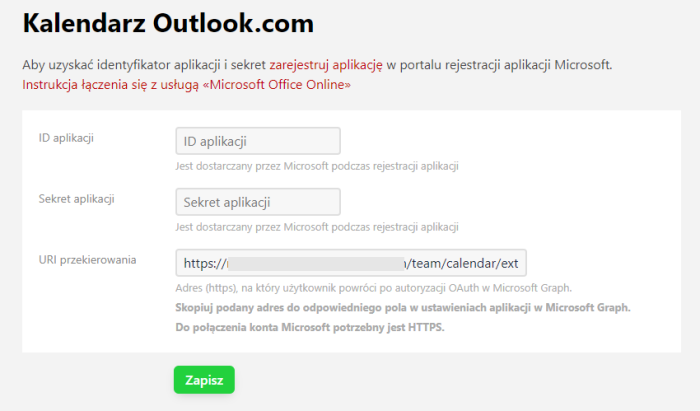
Step-by-step instructions for setting up a connection to the Outlook.com calendar using plugins in the "Team" application: Connecting Outlook.com calendar
Automatic event synchronization.
With this plugin, you can synchronize your Outlook.com calendar with the "Team" application, making it easier to plan and organize meetings and events. All your appointments, meetings, and reminders will be automatically synchronized between both platforms.
Secure and reliable calendar data transfer.
Additionally, our integration ensures secure and reliable data transfer, meaning your information is always up to date and protected. You can safely add, delete, or modify events, knowing that these changes will be reflected both in your >Web Systems Pro< calendar and in Outlook.com.
Time savings through calendar integration.
Thanks to this functionality, you can save time and avoid confusion related to managing multiple calendars. All your events will be available in one place, allowing for better time management and increased work efficiency.
Benefits of connecting Outlook.com and >Web Systems Pro< calendars.
You no longer need to remember to manually transfer information between systems. Automatic synchronization allows you to focus on the most important tasks instead of administrative details. Integration with the Outlook.com calendar makes your planning simpler and more transparent.
| Technical specifications | |
Developed for | Team |
Localization settings | English, Polish, Russian |
UI backend support | 1.3, 2.0 |
Software type | Plugin |
Free | Yes |
| Developer and version plugins | |
Designer (programmer) | WA |
License | LGPL |
Version | 1.1.1.9.0.wsp |
Update | 01/27/2022 |
With this product also buy