Site variables - plugin for Shopy-Script applications
Helps store static data for the website.

Site variables



Important!
After changing variables, clear the site cache. To immediately display the new data.
Application "Settings -> Clearing the cache"
Plugin "Site variables" allows storing variables for your website.
It will be useful for displaying phone numbers and other static data, or for storing keys for various metrics, JS widgets.
Simply create the desired variable and display it on the site using a function in the theme. If the data changes, update its value in the plugin. Then this value will be displayed everywhere the variable is used. You won't need to edit the site theme every time you want to change a phone number or other static data. Now you just change it in the plugin, and all instances will be updated where the function has been placed.
Create a variable:
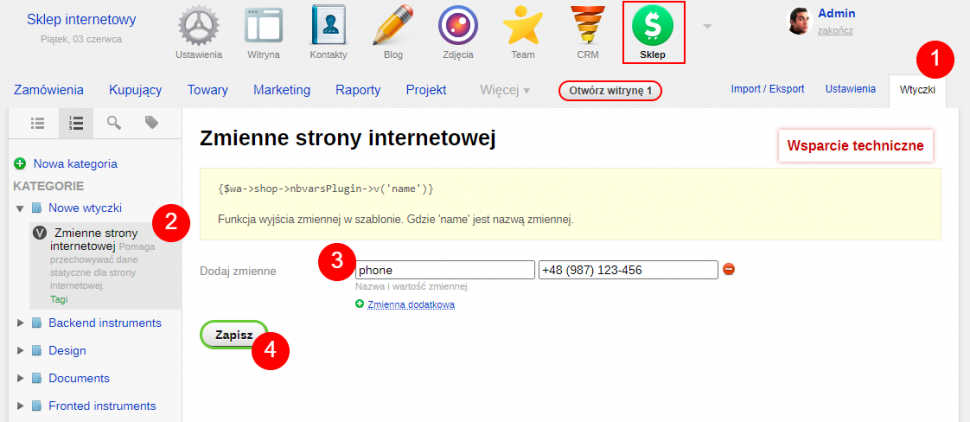
- Go to plugin settings.
- Select the "Site variables" plugin.
- Add the desired variable by specifying its name (key) and the value to be displayed on the page.
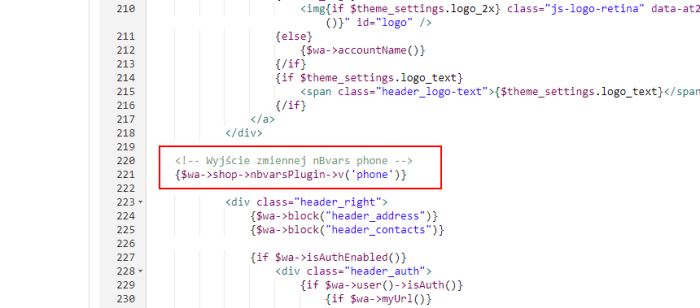
To display a variable on the site, use the function:
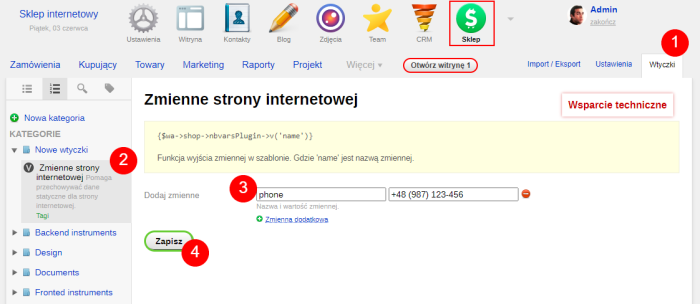
{$wa->shop->nbvarsPlugin->v('name')}
More o wtyczce "Site variables": Updates
| Technical specifications | |
Developed for | Shopy-Script |
Localization settings | English, Polish, Russian |
UI backend support | 1.3 |
Software type | Plugin |
Free | Yes |
| Developer and version plugins | |
Designer (programmer) | nBrains |
License | LGPL |
Version | 1.0.1.1.wsp |
Update | 06/03/2022 |
Loading...
Loading...