

Guide "Unique SEO URLs for Shopy-Script language versions"
Configuration and Usage Guide for the plugins "Unique SEO URLs for Shopy-Script language versions"
Requirements and Installation.
Ensure your system meets the minimum requirements, and also:
- In the Multilang application, site languages and domain rules for your store are configured;
- The free plugin-bridge "Synchronizing SEO URLs for translated categories & products" (shop) is installed and enabled - without it, the frontend will not work;
- The plugin "Product subpages translation" (multilang) is installed to work with product subpages, if you use product subpages.
Install the plugins through Installer using the standard method.
Settings plugins.
The plugins settings page is located in the Multilang application: Multilang → Plugins → Unique SEO URLs in Language Versions Shopy-Script.
Settings plugins are divided into three tabs: "Main", "Generation", and "Links".
Tab "Main".
- plugins Status - the main switch. While disabled, the plugin does not work either in the admin panel or on the frontend.
- Sites - a list of active domains (sites) for which the plugin generates and handles SEO URLs. Domains are managed in the Multilang application settings. SEO URLs are generated and handled at the root path (
/) of each active domain. - CRON Command - the command for processing background generation tasks. Copy the command and add it to CRON on your hosting. Recommended frequency - once per minute. Each execution processes up to 5 generation tasks.
If the free plugin-bridge for shop is not installed or disabled, a corresponding warning with direct links will appear at the top of the settings page. Ensure all warnings have disappeared before starting generation.
Tab "Generation".
In this tab, you configure and launch bulk SEO URL generation:
- Site - the domain for which URLs are generated (or the option "All Sites");
- Generation Language - the locale for which SEO URLs are created (all languages except the default one);
- Generation Scope:
- All Categories - URLs are generated only for categories;
- All Products and Their Subpages - URLs are generated for products and their subpages;
- Products and Subpages of Selected Categories - when this option is selected, a list of categories with checkboxes appears; select the required ones;
- Everything (Categories, Products, Subpages) - full generation.
- Generation Mode:
- Generate Only Missing - URLs are created only for entities that do not yet have an address for the selected language;
- Generate Missing and Changed - additionally, URLs whose name or parent path has changed are updated;
- Regenerate All - all URLs for the selected generation scope will be regenerated.
After selecting the appropriate parameters for bulk URL generation, click the "Start Generation" button. After generation is complete, the page will reload and a new entry with the result will appear in the "Generation History" table below.
Tab "Links".
In this tab, you can browse all created SEO URLs. Select a site and entity type (categories or products); if needed, select a specific category - the plugin will display a table listing entities and their URLs for each locale. Use pagination to easily navigate through a large catalog.
Generating URLs for Categories.
SEO URLs for categories can be generated or edited directly in the category edit window in Shopy-Script.
Step 1. Open the category editor. Go to Shopy-Script → Categories, and open the selected category for editing.
Step 2. Find the "SEO URLs" block. A "SEO URLs" block appears in the category tab below the main URL field. For each active domain and each locale, a separate row with an input field is displayed.
Step 3. Generate or enter the URL.
- Click the refresh button (synchronization icon) next to the field - the plugin will automatically generate the SEO URL from the localized category name via transliteration;
- Or manually enter the URL in the input field;
Step 4. Save the category. Click the "Save" button in the category editor. The Plugin will check the URL uniqueness among other categories and create a 301 redirect from the old address if it has changed.
Important: The default language category retains its original URL - the plugin changes URLs only for non-default locales.
Generating URLs for Products.
Step 1. Open the product card. Go to Shopy-Script → Products → Catalog and open the selected product for editing.
Step 2. Find the "SEO URLs" block. In the product card, below the "Product Page" field (URL of the default locale), a "SEO URLs" block appears with fields for each locale of the active domain. Next to the field is a button to generate from the localized product name.
Step 3. Generate or enter the URL. Click the refresh button or enter the URL manually.
Step 4. Save the product. Click "Save". The Plugin will check the URL uniqueness among other products and create a 301 redirect from the old address if needed.
Generating URLs for Product Subpages.
Product subpages (features, reviews, and others) receive their own SEO URLs for each locale, taking into account the path to the product. To work with subpages, you must install the plugins "Product subpages translation" (multilang).
If the product URL changes, the path to its subpages is recalculated automatically, so subpage final URLs always remain correct.
Correct Display of URLs in sitemap.xml
The Plugin correctly displays all created SEO URLs for each locale in the sitemap.xml sitemap and is fully compatible with the "Sitemap PRO" application.
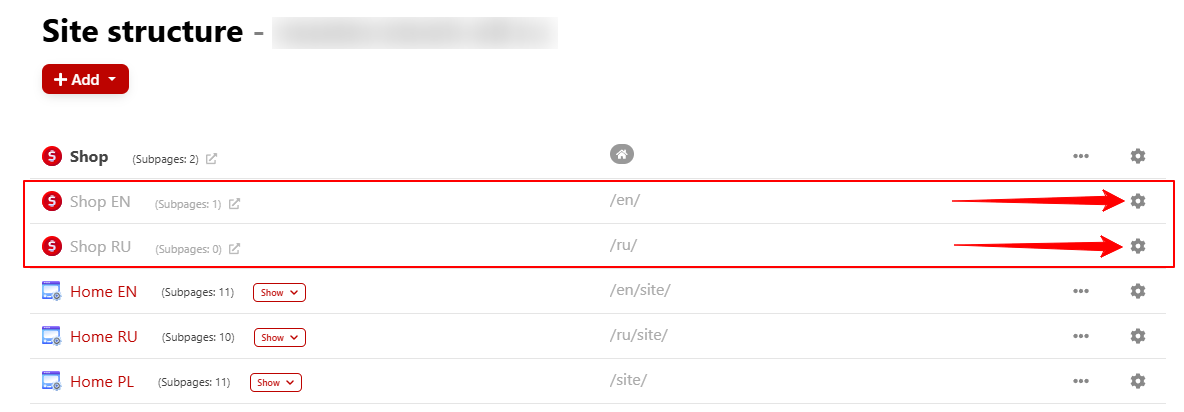
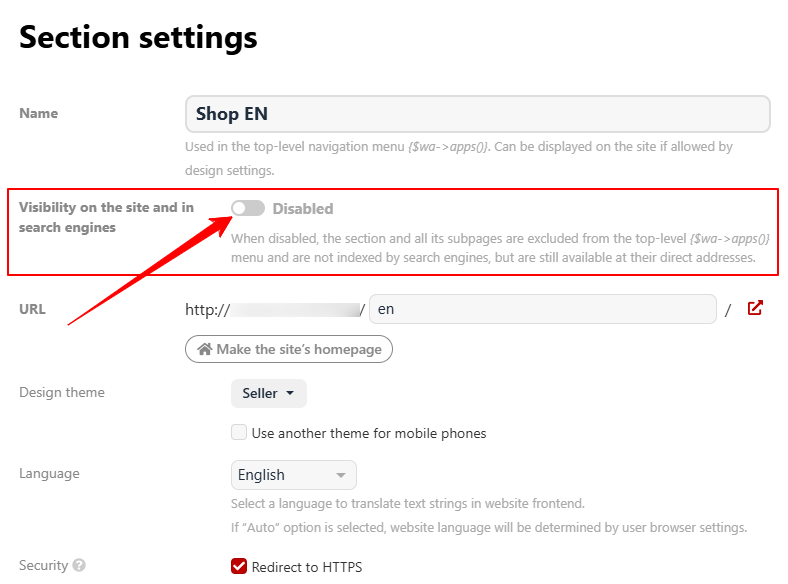
Note! To correctly display non-default locales in sitemap.xml, you must disable the "Publication" (Visibility on the site and in search engines) setting for them in the "Site" application, in the site map for Shopy-Script with non-default locales. For the default locale, this setting remains enabled.
Frontend Website Behavior.
When changing the language on the frontend, visitors are automatically redirected to the SEO URL of the selected language. If the old address has been changed, the plugin performs a 301 redirect to the new URL, so search engines and users will not see a 404 error, and the page authority will be passed to the new address. Redirects are correctly handled for categories, products, and subpages in all languages.
Compatibility with Other plugins.
The Plugin works correctly with standard Shopy-Script themes and the Multilang application. To use subpages, the plugins "Product subpages translation" (multilang) must be installed; for frontend functionality, the free plugins-bridge "SEO URL Synchronization for Translated Categories and Products" (shop) is required.