Unique SEO URLs in language versions of Shopy-Script - plugin for the "Multilang" application





Helpdesk only in the new UI 2.0 interface
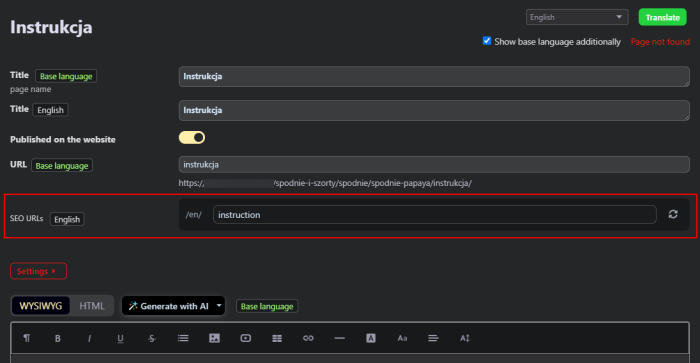
Plugin "Unique SEO URLs in language versions Shopy-Script" works exclusively in the new UI 2.0 interface of the Multilang app and supports both light and dark backend themes.
Attention! For plugins to function properly, the following are required:
- Free plugin bridge "Synchronization of SEO URLs for translated categories and products" (shop) - ensures correct frontend routing and 301 redirects;
- Plugin "Product subpages translation" (multilang) - required for working with product subpages in multilingual mode.
Unique SEO URLs for a multilingual online store.
"Unique SEO URLs in language versions Shopy-Script" is a plugin for the Multilang app that creates separate, SEO-optimized URLs for each language version of your products, categories, and subpages. No more transliterated URLs from the base language across all locales - each language gets its own readable and appropriate URLs.
Plugin completely eliminates duplicate content issues for multilingual stores, as each language version receives a unique URL, not just a different locale prefix. This directly improves search engine indexing and eliminates canonical link problems.
What is this plugin for?
The standard multilingual mechanism in Shopy-Script copies product and category URLs from the base language to all others. As a result:
- URLs in the English version of the store remain in Polish / Chinese / or another base language;
- Search engines see the same URL on different pages (only differing by locale prefix), causing duplicate content issues;
- You cannot set different URLs for the same product in different languages - which is extremely inefficient for SEO;
- Products and categories with unreadable URLs in the visitor's language reduce CTR and user trust.
Plugin "Unique SEO URLs in language versions Shopy-Script" solves all these problems. Each product, category, and subpage receives a separate, SEO-optimized URL for every language. The system automatically tracks uniqueness and correctly handles all routes.
Main features.
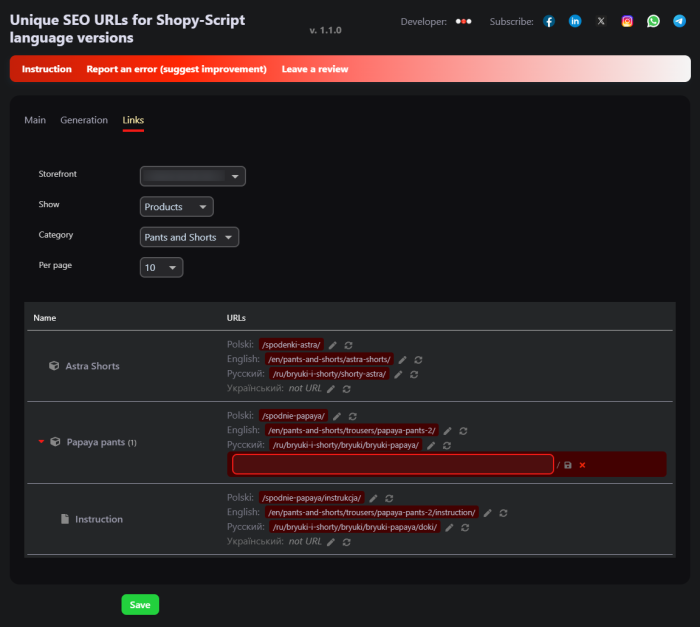
1. Unique URLs for each language version of products.
You can set a separate URL for each product in every language. For example, the product "Leather Jacket" can have the URL /en/leather-jacket/ in English and /de/lederjacke/ in German. URLs are automatically generated from the translated product name, but you can edit them manually directly in the product card.
2. Separate URLs for categories in each language.
Categories also receive unique URLs for each locale. The category "Women's Clothing" can be accessible under /en/women-clothing/ in English and /de/damenbekleidung/ in German. Plugin takes into account category nesting and correctly builds the full path.
3. Support for product subpages.
Product subpages (e.g., "Features", "Reviews") also receive separate URLs for each language. Plugin considers the product path and correctly builds the full URL chain, preserving hierarchy. The free plugin "Product subpages translation" (multilang) is required for subpage functionality.
4. Automatic generation from localized names.
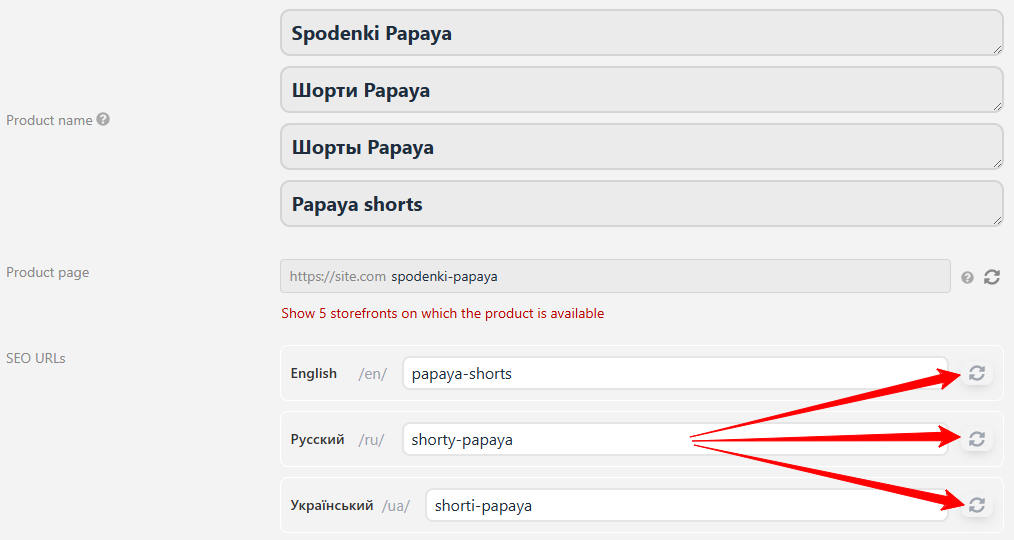
Plugin automatically creates SEO-friendly URLs from the name in the appropriate language. Just click the "Refresh" button in the editor - and the URL will be generated from the translated product, category, or subpage name via transliteration.
5. Intelligent URL uniqueness checking.
When generating or manually entering a URL, the plugin automatically checks whether that address is already taken by another entity of the same type. If the URL is already in use, the system will suggest a unique version with a numeric index (e.g., product-2). When regenerating an existing URL, no duplicate is created - the entity's own URL is always considered available. Comparison is done only within the same entity type: products are checked against products, categories against categories, subpages against subpages.
6. Bulk generation of URLs for all language versions.
Launch bulk SEO URL generation for all products, categories, or subpages of a selected locale. Two modes are available:
- Generate only missing - URLs are created only for entities that do not yet have a URL in the selected language;
- Generate missing and changed - URLs are updated for all entities whose name or parent path has changed;
- Regenerate all - all URLs will be updated.
Bulk generation runs in the background via tasks to avoid blocking store operations. Progress is displayed in real time.
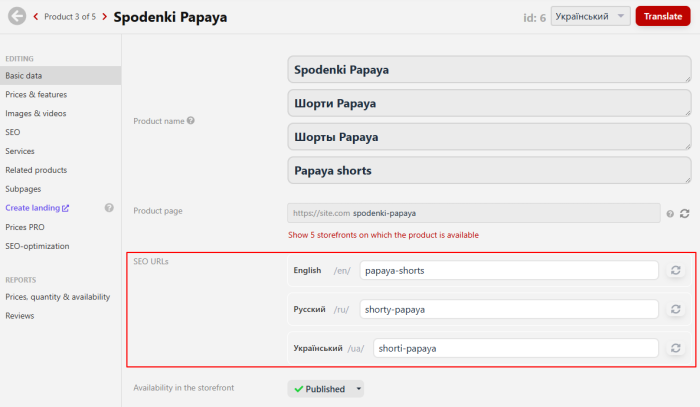
7. URL editor directly in product and category cards.
Plugin adds an "SEO URLs" block to the product and category editors. For each active domain and locale, a separate URL input field is displayed. You can:
- Enter a URL manually for any locale;
- Automatically generate a URL from the localized name;
- View the full final URL with locale prefix and parent paths;
- Remove a URL for a specific locale (by clearing the field) - in this case, the primary locale's URL will be used as fallback.
8. Automatic 301 redirects.
When a URL changes, plugin automatically creates a 301 redirect from the old address to the new one. This ensures search engines and users do not encounter a 404 error, and page authority is passed to the new URL. Redirects are correctly handled for all entity types in all languages.
9. Full integration with Multilang.
Plugin is an extension for the Multilang app. It uses the same routing rules and supports all locales configured in Multilang. When switching language on the frontend, visitors are automatically redirected to the correct SEO URL for the selected language.
10. Correct URL display in sitemap.xml
Plugin correctly displays all created URLs for each locale in the sitemap.xml file. Search engines receive up-to-date addresses for indexing all language versions. Full integration with the "Sitemap PRO" app is also supported, allowing flexible management of priorities and update frequencies for each language version.
11. Background generation via CRON.
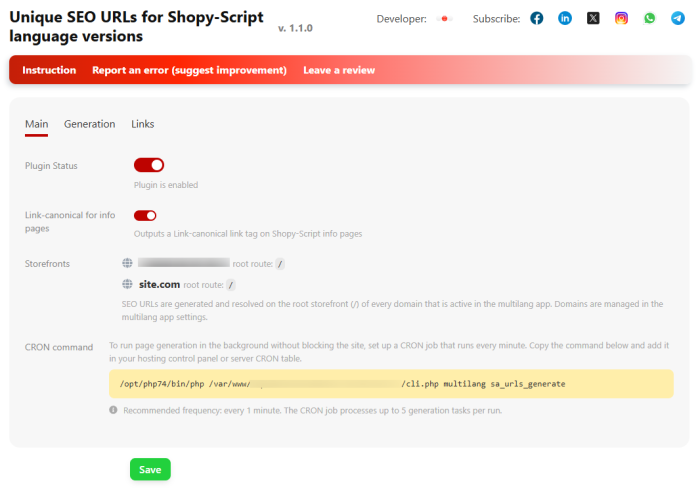
Bulk URL generation is performed asynchronously via CRON tasks. This allows processing large catalogs without blocking the interface or risking script execution time limits. The CRON command is configured once in the plugins settings.
Benefits of plugins.
Improved SEO. Each language version gets a unique URL with keywords in the user's language. Search engines see distinct pages for different languages, not duplicate content with different prefixes.
Higher CTR. Users see understandable URLs in their own language. Leather jacket / leather-jacket / lederjacke - each language has its own readable URL, increasing trust and click-through rates in search results.
Full control. You can manually edit the URL for any locale at any time. Automatic generation is a convenient starting point, but the final decision always remains with you.
Duplicate safety. The system ensures that two products cannot receive the same URL within one language. Intelligent validation works for all entity types and automatically resolves conflicts.
Link equity preservation. 301 redirects from old URLs to new ones preserve the accumulated ranking power of pages. You can change URLs without losing search engine rankings.
Seamless integration. Plugin works as a Multilang extension and does not require modifying theme code. Simply install, configure, and use.
Who is this plugin for?
- For online stores operating in multiple languages that want to improve international SEO and have separate URLs for each locale.
- For owners of multilingual stores using the Multilang app who want product and category URLs to be in the buyer's language, not the original language.
- For SEO specialists promoting multilingual online stores and needing full control over URL structure for each language version.
- For agencies and developers building multilingual projects on Web Systems Pro / Shopy-Script and offering clients professional SEO for international stores.
How does it work?
Step 1. Install the plugin, the free bridge plugin for Shopy-Script, and, if needed, the subpages plugin "Product subpages translation" (multilang).
Step 2. In plugins settings, enable it and ensure active domains (sites) are configured in the Multilang app.
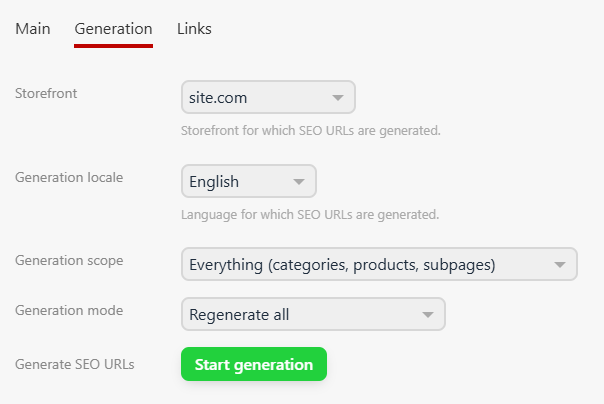
Step 3. Go to the "Generation" tab, select a site, language, and generation scope (categories, products, or everything together).
Step 4. Click "Start generation". Plugin will create SEO URLs for the selected locale based on translated entity names.
Step 5. If needed, edit URLs in product and category cards - a separate field with automatic uniqueness checking is available for each locale.
Step 6. Done! When changing the language on the website, visitors will see URLs in the appropriate language, and search engines will index unique pages for each locale.
You can read a more detailed guide on configuring and using plugins here.
Frequently asked questions
sitemap.xml sitemap Shopy-Script. Full integration with the "Sitemap PRO" app is also supported, allowing flexible management of priorities, update frequencies, and exclusions for each language version.| Technical specifications | |
Developed for | Multilang |
Localization settings | English, Polish, Russian |
UI backend support | 2.0 |
Software type | Plugin |
Free | No |
| Developer and version plugins | |
Designer (programmer) | WSPro |
License | Web Systems Pro |
Version | 1.2.1.wsp |
Update | 10/14/2026 |