Reading time - plugin for the "Blog" application




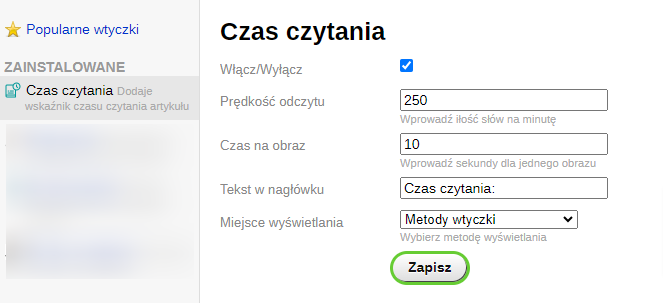


Plugin "Reading time" adds reading time information for articles and allows extending the standard features of the "Blog" application. Plugin enables displaying the article reading time on the article list and on the article viewing page.
Features and settings
Plugin analyzes the article size and calculates the time required to read it. The time calculation is based on the "reading speed" parameter, which can be set on the plugins settings page. Images are also taken into account when calculating the time (the "Time per image" parameter).
After installation, if you already have articles on your blog, a new "readtime" field will appear in the database for these articles, with a default value of "1".
To have the script analyze the article reading time and update the information in the database, you need to open the article editor and click the "Save" button.
Output via plugins methods
The plugin provides automatic output for the default theme and themes based on it. To enable this, in the plugins settings -> "Display location" -> select "plugins methods". If this does not work correctly, use manual output in the theme.
Manual usage in the theme
To display reading time on the blog homepage (where all articles are listed) and on the article view page, place the code (see below) into the templates:
- In the record list output template (stream_posts.html or stream.html), place the code inside the tags
{foreach $posts as $post}...{/foreach} - In the single post output template (post.html), at the location where you want the reading time indicator to appear.
Code for templates:
{if !empty($post.readtime)}
 Reading time: {$post.readtime}
{/if}
| Technical specifications | |
Developed for | Blog |
Localization settings | English, Polish, Russian |
UI backend support | 1.3 |
Software type | Plugin |
Free | No |
| Developer and version plugins | |
Designer (programmer) | Welldi |
License | Web Systems Pro |
Version | 2023.03.03.1.wsp |
Update | 02/15/2024 |