Bulk change of features - plugin for the Shopy-Script app






Available Only in the New UI 2.0 Interface
Plugin "Bulk Feature Change" works exclusively in the new UI 2.0 interface of the "Shop" application and supports both the light and dark versions of the admin panel. With it, you can easily and quickly modify features of multiple products at once, without having to manually edit each one.
Quick feature editing from the product list.
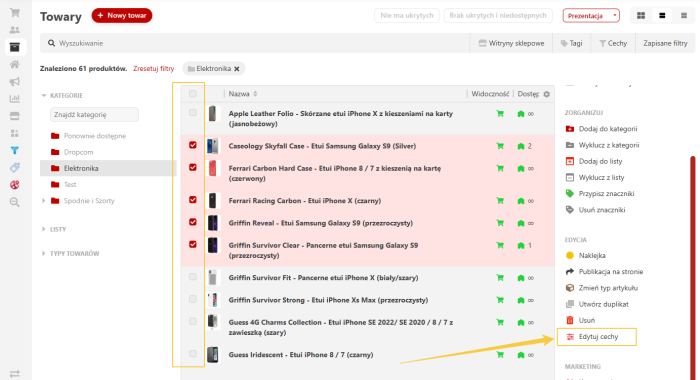
Select the desired products in "Products -> Catalog" of the Shopy-Script application, then choose the required products and click "Edit Features" in the sidebar to assign new values to all selected items in a single step. This is an ideal solution, for example, when you want to bulk-add a brand to an entire product category.
Simplified change process.
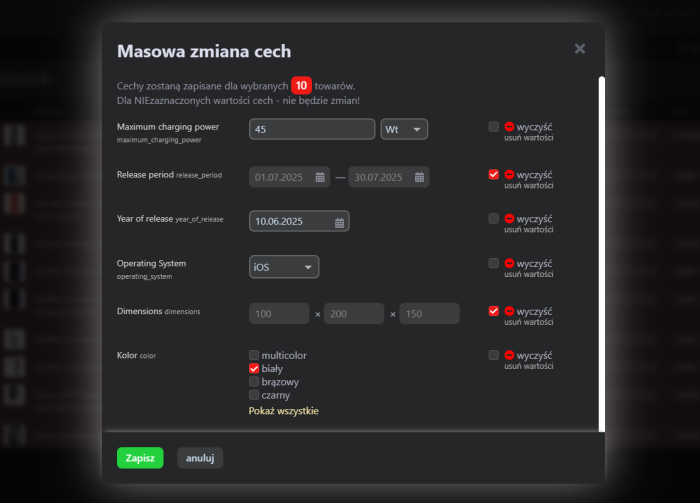
Thanks to this plugin, the process of filling in and editing product features becomes much simpler. After selecting products, a dialog window opens displaying the full list of available features that can be edited.
Note: Plugin supports only those features that can be changed on the "Pricing and Features" tab during standard product editing.
Requirements and limitations.
For plugin to function correctly, products must have a defined product type. Currently, in the dialog window, you can only select from existing values for dropdown and multiple-choice fields - adding new values is only possible in store settings under "Product Types and Features". The remaining elements of the editing window correspond to the "Pricing and Features" tab in the product editing form.
Important note regarding SKUs.
If your store uses SKUs generated based on features, please note that adding new features via this plugin (e.g., a new size) will not automatically create new SKUs. Plugin only modifies existing features available on the "Pricing and Features" → "All Product Features" tab during product editing.
| Technical specifications | |
Developed for | Shopy-Script |
Localization settings | English, Polish, Russian |
UI backend support | 2.0 |
Software type | Plugin |
Free | No |
| Developer and version plugins | |
Designer (programmer) | WSPro |
License | Web Systems Pro |
Version | 1.0.2.0.wsp |
Update | 07/31/2025 |