Subcategories Hub + pinned topics - plugin for the "Hub" app




Supports only the UI 2.0 interface
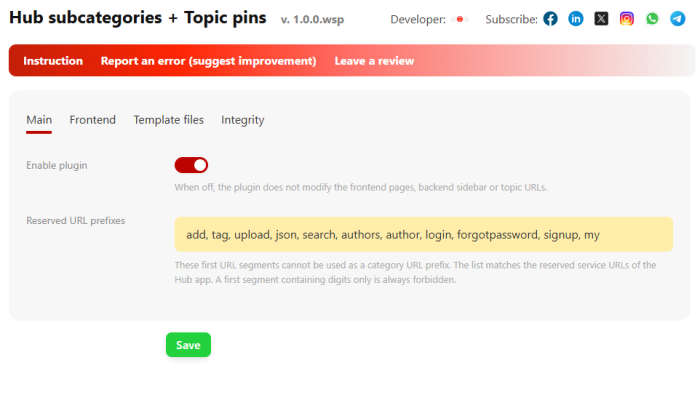
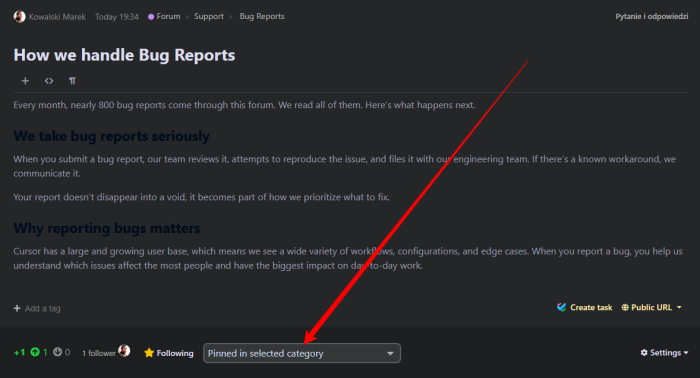
Plugin "Subcategories of Hub + pinned topics" works in the backend interface of the "Hub" application and supports both light and dark versions of UI 2.0.
Now you can create a full-fledged forum based on the Web Systems Pro fork! Plugin "Subcategories of Hub + pinned topics" equips the Hub application with features it badly needed: a real category tree with subcategories up to three nesting levels, pinned topics, intelligent section menu, full breadcrumbs, and advanced SEO optimization - from canonical links to BreadcrumbList markup. Install the plugin, and your community will become convenient for visitors, readable for search engines, and simple to manage.
What is plugin "Subcategories of Hub + pinned topics" for?
Application Hub is perfect for maintaining documentation or a forum, but in the standard version its categories form a flat list without hierarchy. For a growing community, this means serious limitations:
- No structure - all sections lie "in one pile", so visitors of a large community simply get lost;
- No pinned topics - forum rules, important announcements, and useful instructions disappear in the stream of publications;
- Poor navigation - category menu without topic counters, without collapsible branches, and without highlighting the current section;
- Limited SEO - no canonical links, no breadcrumb markup, page addresses are poorly recognized by search engines;
Plugin "Subcategories of Hub + pinned topics" comprehensively solves all these problems: after a single installation, Hub receives the functionality of a fully organized forum without any changes to the framework or application code.
Key features.
1. Category tree up to three levels
Build a structure of any complexity: section - category - subcategory. Page addresses are created according to a logical nesting scheme that is readable by both people and search engine robots. Subcategories inherit the structure from parent categories, and the tree editor in the backend allows you to manage the structure with a few clicks - including bulk moving subcategories when deleting sections.
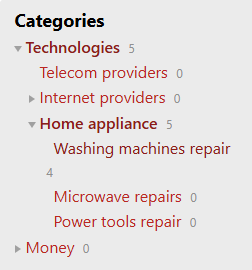
2. Intelligent category menu on the site.
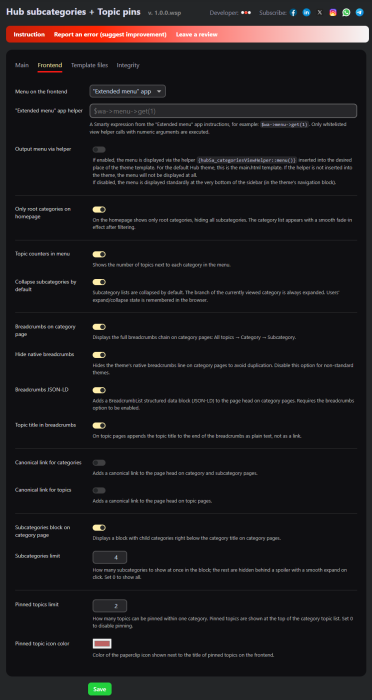
- Collapsing and expanding branches with smooth opening;
- Remembering the menu state in the visitor's browser;
- Automatic expansion of the branch of the currently viewed section;
- Topic counters next to each category;
- Optional display of only main categories on the home page - with smooth appearance of the list;
- Support for the "Extended menu" and "Menu" applications - the menu can be displayed using their helpers anywhere in the theme.
3. Subcategory block on the category page.
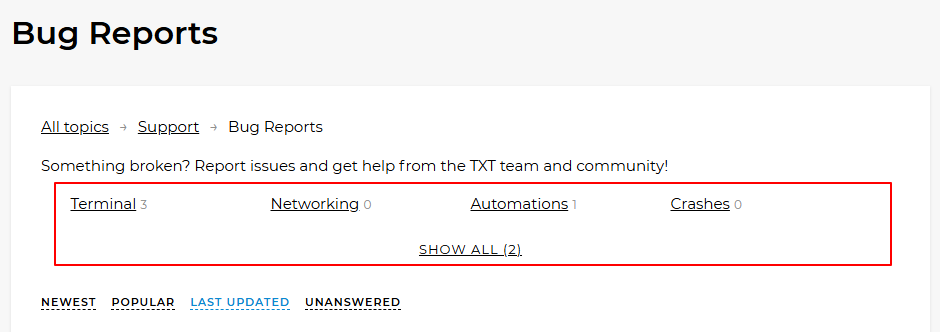
On the page of each section, cards of its subcategories are displayed. You can set a limit for the displayed cards: the rest are hidden under a collapsible block with a "Show all" button and smoothly open after clicking. The block layout is universal - cards display correctly in any graphic theme, from the default to a heavily modified one.
4. Pinned topics.
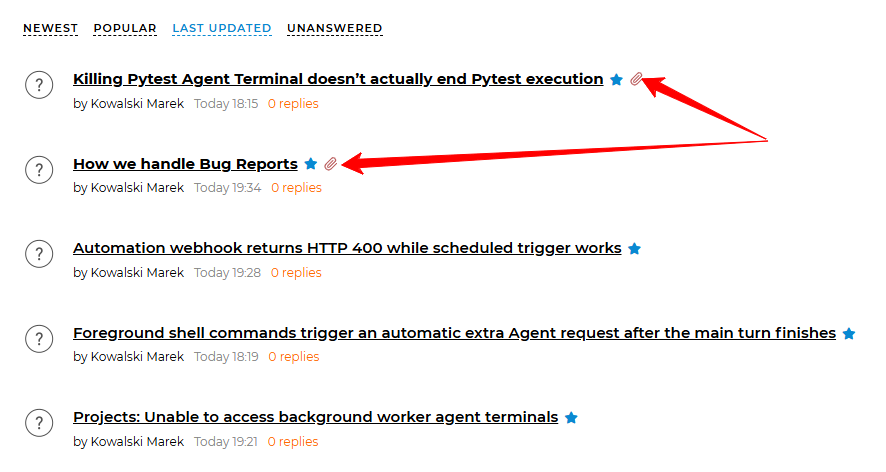
This is one of the most important functions of plugins. Pin important topics - they will always be at the top of the category topic list, regardless of the publication date:
- two pinning modes: only in the selected category or in the selected category and all parent categories simultaneously;
- a limit of pinned topics in a category with protection against exceeding it;
- a paperclip icon with configurable color and a bold title directly on the site;
- convenient management of pins directly in the topic editor in the backend;
5. Full breadcrumbs with markup.
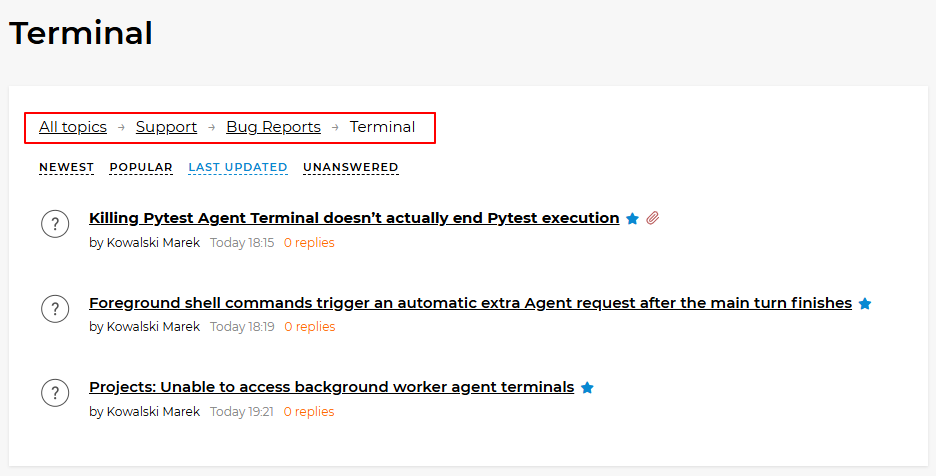
Visitors always see where they are: All topics - Section - Category - Subcategory. The standard theme breadcrumbs can be hidden in the plugins settings to avoid duplication. For search engines, a structured BreadcrumbList block (JSON-LD) is generated - Google and Bing display the path in the search result snippet.
6. Canonical links for categories and topics.
The automatic rel="canonical" tag in the head section of category and topic pages eliminates the duplicate content problem that inevitably arises with friendly URLs and aggregating publications from subcategories. Exactly one page address is indexed.
7. Category descriptions.
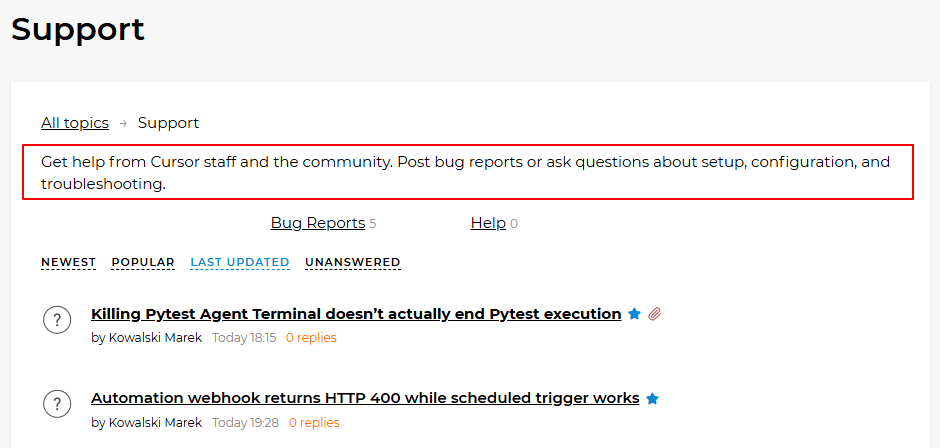
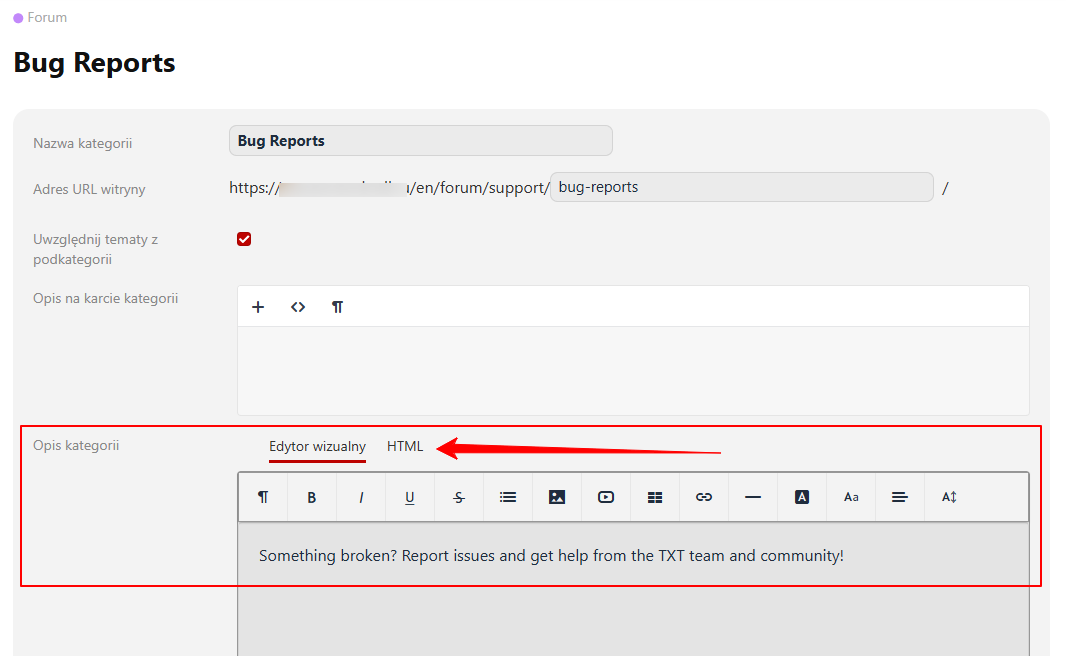
Each section can have its own description - with a WYSIWYG visual editor or in pure HTML mode with Smarty support. The description is displayed in the category itself on the site and helps both visitors and search engines understand the section's subject matter.
8. Topics from subcategories in parent sections.
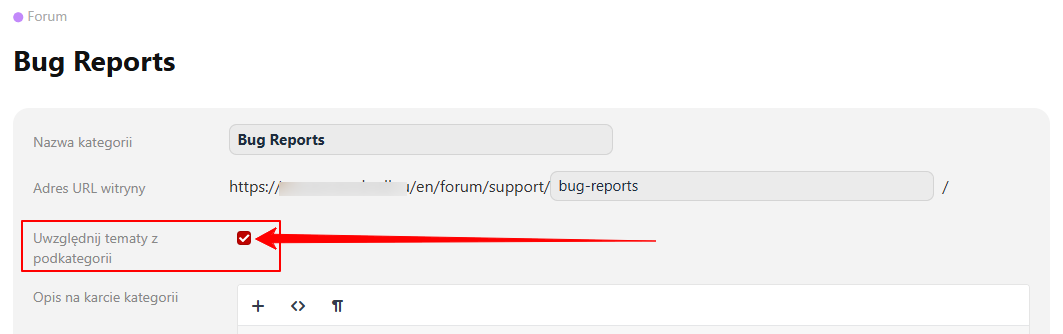
Optionally, you can check a box in the parent category to display topics from all its subcategories, and the topic counters will automatically sum their count across the entire tree. Top-level sections no longer look "empty".
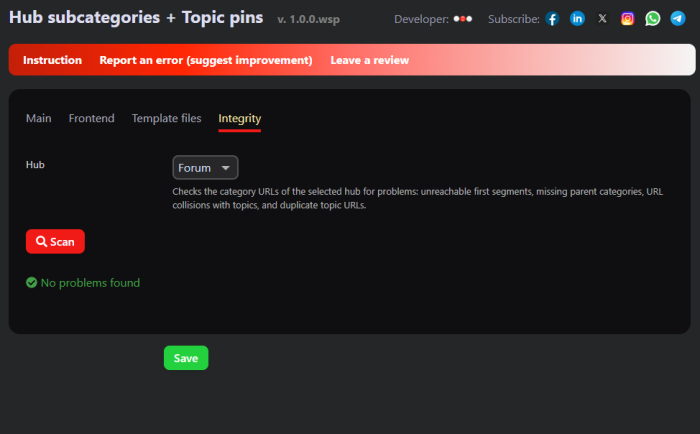
9. Built-in SEO URL scanner.
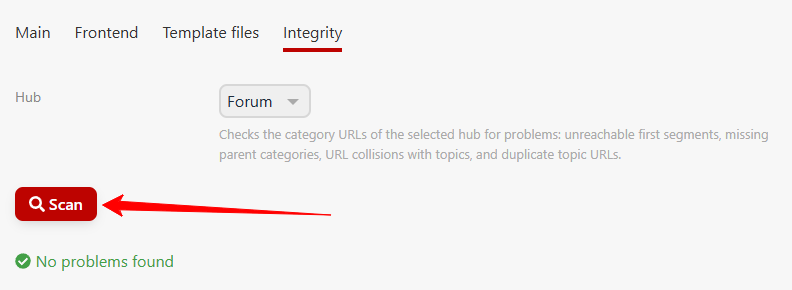
The check module ("Integrity" tab) detects common problems in the category structure:
- Invalid first (root) address segments (numeric or overlapping with system application URLs);
- Subcategories that lack a parent section;
- Conflicts between category addresses and topic addresses;
- Duplicate URLs for different topics.
Detected problems can be fixed with one click: plugin can create the missing parent section and automatically resolve topic address collisions.
10. Convenient backend.
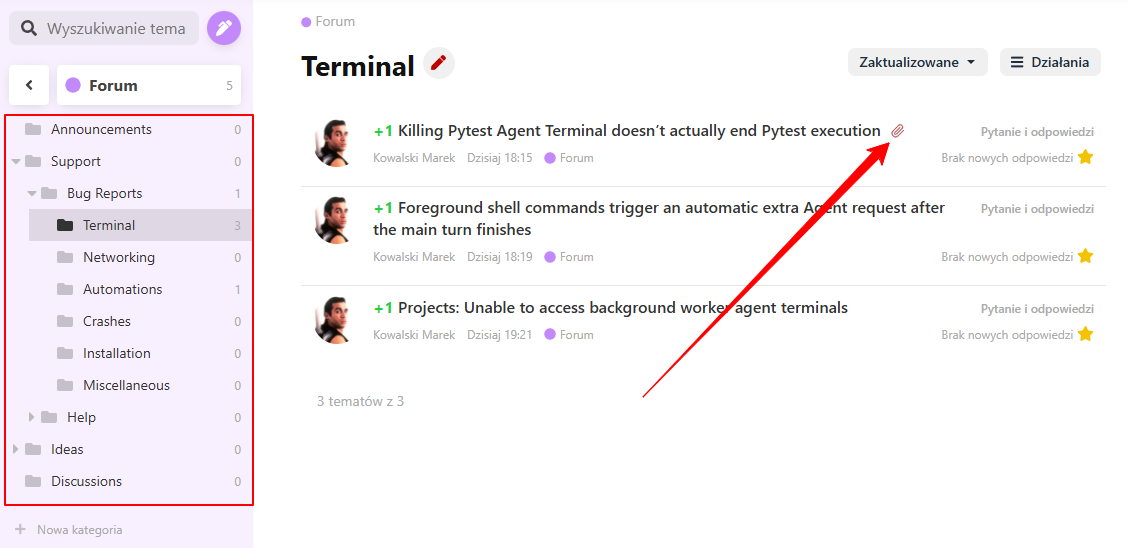
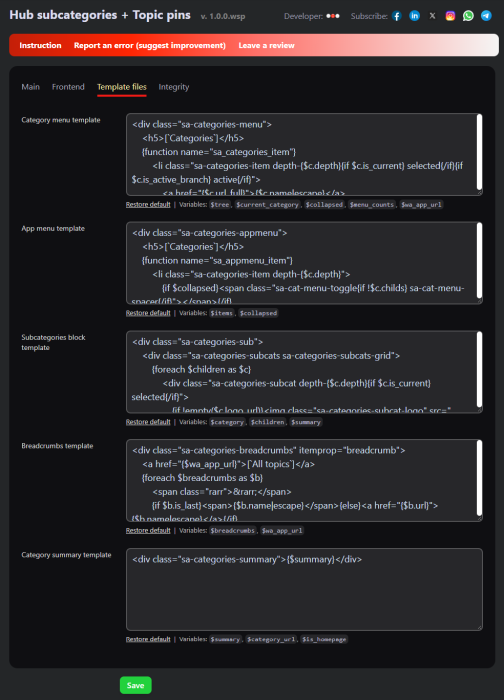
The category tree is displayed in the Hub backend sidebar menu, pinned topics are marked with icons directly on publication lists, and the templates of all displayed blocks can be edited in the standard plugins editor - with the ability to restore default settings.
Advantages of the plugins "Subcategories Hub + pinned topics".
Versatility. plugins blocks can be embedded in any design theme without changing its code: styles are isolated from the theme layout and do not cause conflicts. Universal solutions work both in the default design theme and in custom themes.
SEO right after installation. Nested readable URLs, full breadcrumb navigation with BreadcrumbList markup, canonical links, and address validation - a complete set that search engines appreciate in structured content.
Does not break anything. Plugin integrates safely with standard Hub mechanisms: all changes are safely reverted, and existing pages continue to work. The only action after installation is to insert the menu helper in the chosen place of the theme if the standard menu position does not suit you.
Flexibility. Each displayed block - menu, subcategories, breadcrumbs, and descriptions - is built on a separate editable Smarty template. You have control over every tag on the site.
Tip: immediately after installation, enable breadcrumb navigation with markup and canonical links - this is the fastest way to improve forum indexing without any changes to themes.
Who is this plugin intended for?
Plugin is especially useful for:
- support forums and knowledge bases - a section tree and pinned instructions at the top of each category is a classic application;
- corporate communities - organizing discussions by departments, projects, and products;
- thematic communities and clubs - navigation through branches with topic counters and full breadcrumbs helps retain the reader;
- content projects based on Hub - SEO tools (canonical links, tags, and readable URLs) help improve search engine visibility;
- web studios and developers - a ready-made turnkey solution for clients who need a forum based on Web Systems Pro.
How does it work?
- Step 1. Install the plugin and enable it in the settings.
- Step 2. Create the structure of sections and subcategories directly in the Hub backend.
- Step 3. Insert the menu helper into the theme if the default location does not suit you (in the default theme - into the main.html file).
- Step 4. Customize pinned topics, limits, breadcrumbs, and SEO options for your project.
You can find detailed instructions for configuring and using plugins here.
Frequently Asked Questions
| Technical specifications | |
Developed for | Hub |
Localization settings | English, Polish, Russian |
UI backend support | 2.0 |
Software type | Plugin |
Free | No |
| Developer and version plugins | |
Designer (programmer) | WSPro |
License | Web Systems Pro |
Version | 1.0.2.wsp |
Update | 09/29/2026 |