Google Calendar - plugin for the "Team" app




Integration of >Web Systems Pro< with your personal Google Calendar.
Manage events in your calendar on the >Web Systems Pro< website, and you will see all your changes the next time you log into your Google account. Similarly, changes made in your Google account calendar will be automatically transferred to >Web Systems Pro<.
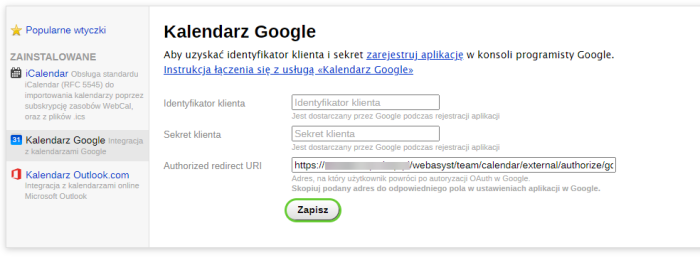
Step-by-step instructions for setting up a connection with Google Calendar using plugins in the "Team" application: Connecting Google Calendar
Easy event synchronization.
With our "Google Calendar" plugin, you can easily synchronize all your events and appointments, allowing for even better organization of your time. Whether you are planning business meetings or private events, our integration ensures you stay up to date.
Simple integration process.
The integration process is simple and fast. Just a few clicks are needed to connect your Google account with the "Team" app on >Web Systems Pro<. Once these steps are completed, all your events will be automatically updated, eliminating the need to manually enter changes.
Flexible synchronization settings.
Our plugin is also highly flexible. You can customize synchronization settings according to your needs, for example by selecting which calendars should be synchronized or setting the update frequency. This gives you full control over how and when your events are synchronized.
Data security.
Your data security is our priority. All information is encrypted and securely stored to ensure complete protection of your privacy. You can be confident that your data is safe and accessible only to you.
If you encounter any issues during the integration process, our technical support team is ready to assist you. We offer detailed documentation and help at every stage to ensure the entire process runs smoothly.
Benefits of Plugins "Google Calendar".
Choose our "Google Calendar" plugin and enjoy full synchronization of your events between the "Team" app and your Google account. Organizing your time has never been this simple and efficient.
| Technical specifications | |
Developed for | Team |
Localization settings | English, Polish, Russian |
UI backend support | 1.3, 2.0 |
Software type | Plugin |
Free | Yes |
| Developer and version plugins | |
Designer (programmer) | WA |
License | LGPL |
Version | 1.0.23.28.0.wsp |
Update | 04/08/2022 |