Multilang pages generator (shop) - plugin for the "Shopy-Script" app




Support for both UI 1.3 and 2.0 interfaces
Plugin “Multilang pages generator” works in both backend interfaces of the Shopy-Script application and supports both light and dark backend themes in UI 2.0.
Plugin is designed to quickly and automatically populate your store website with translated pages based on existing originals. The functionality of plugins supports only standard HTML pages of the Shopy-Script application - both storefront home pages and pages nested in the tree.
Multilang pages generator - AI-powered store page translation.
Multilang pages generator is an advanced plugin for the Shopy-Script application that automatically translates your store pages into multiple languages using artificial intelligence. No more manually copying HTML code, hiring translators, or switching between browser tabs. Simply select the pages and start generation - AI will do all the work for you.
What is this plugin for?
If your online store is expanding into international markets or you want to provide content in multiple languages for audiences from different countries, you need to manage translations of your store pages. Without plugins, this means:
- Manually creating each page for every language in the Shopy-Script admin panel;
- Copying and pasting HTML code with the risk of breaking layout and page appearance;
- Translating all content manually or paying for translation services;
- Wasting hours synchronizing changes across different language versions.
Plugin “Multilang pages generator” solves all these problems. You specify the source language (e.g. Polish), choose target languages (English, German or any others), and the plugin automatically creates fully functional translated page versions, preserving the entire structure, appearance and SEO elements.
Main features
1. AI-powered automatic translation.
Plugin integrates with five leading AI providers: ChatGPT (OpenAI), DeepSeek, Gemini (Google), Qwen (Alibaba), and OpenRouter - a universal gateway providing access to dozens of models from various providers through a single API interface. You can select the model that best suits your needs in terms of price-to-quality ratio.

AI doesn't just translate text - it creates a complete page in another language, preserving:
- Entire HTML structure and CSS styles;
- Images, videos and other multimedia files;
- JavaScript scripts and interactive elements;
- Smarty templates and dynamic store website data.
2. Bulk generation of informational pages.
Select desired pages in the site tree, choose the target language, and click “Generate selected”. Plugin will sequentially create or update the translation of each page, showing real-time progress with protection against timeout limits via CRON. You can translate individual pages or entire content trees simultaneously.

3. SEO-optimized translations.
AI translates not only visible content but also all page SEO elements:
- Page titles (title).
- Meta descriptions (meta description).
- Keywords (meta keywords).
4. Flexible link handling in content (href and src).
You can choose how internal links and image paths should behave on translated pages: “Copy unchanged” - all href and src links remain as they are, or “Leave empty” - all internal href and src values are removed so you can manually set them for the new location.
5. Intelligent page relationship management.
Plugin tracks all relationships between original and translated pages. If you update the original, the plugin will mark the translation as “requires update” and suggest regenerating it. You always see which pages are up to date and which need refreshing.
6. Full AI provider configuration.
For each provider you can:
- Enter your own API key;
- Select a specific model - after entering the API key, all available models are fetched;
- Configure a custom system prompt for a specific translation style;
- Test the AI connection directly from the plugins settings;
- Customize translation settings: maximum number of tokens, delay between pages, and more.
7. Support for all languages and locales.
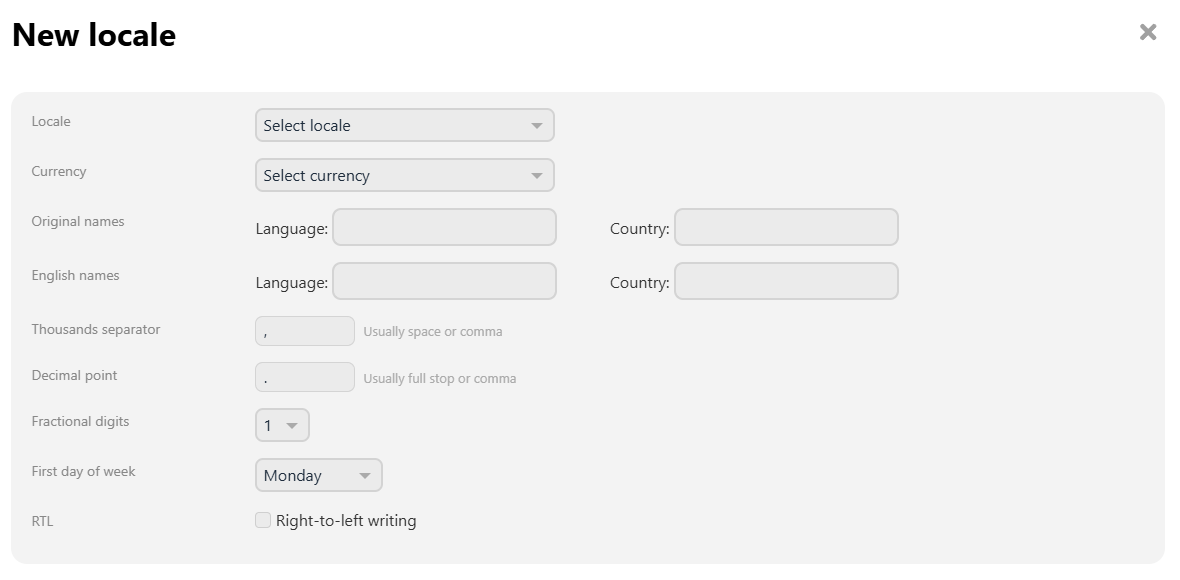
Plugin works with any locale installed in Web Systems Pro. You can create translations for all countries and regions worldwide - plugin includes a built-in interface for adding new locales without modifying the system code. When adding a locale, you can configure the default currency, number format, first day of the week, and text direction (including RTL for Arabic, Hebrew, and other right-to-left languages).
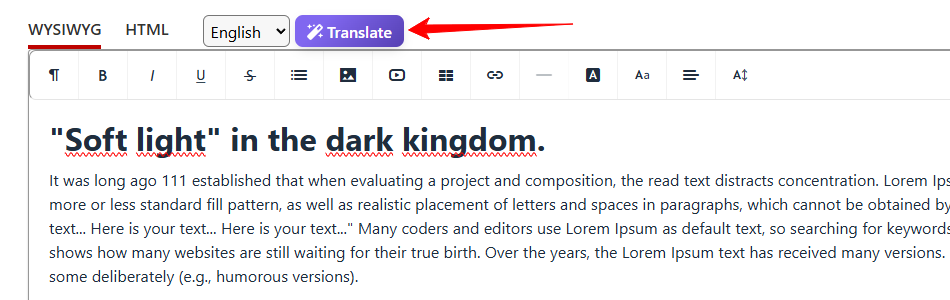
8. Translate directly from the page editor.
You can translate any page without navigating to plugins settings. In the Shopy-Script page editor, simply click the "Translate" button - a modal window will open showing all available languages. Select the desired languages and generate translations with one click. Upon completion, you'll receive direct links to edit each created page.
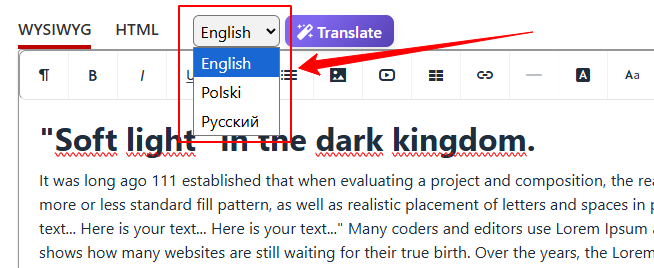
9. Quick switching between linked pages.
A language switcher appears in the page editor, displaying all available translations of the current page. You can instantly switch between the original and any translated version without returning to the page list. This is especially convenient for quickly comparing content or making corrections.
10. Transfer of advanced parameters (advancedparams).
Plugin correctly transfers all additional page parameters when generating translations, provided you have installed the "Managing Additional parameters" plugin for Shopy-Script. Fields of all types (input, textarea, html, select, radio, as well as files and images) are properly copied to the new translated page.
Benefits of plugins.
Time savings. Tasks that previously took days or weeks can now be completed in minutes. Translating one page takes approximately one minute on average (depending on the selected AI model and content volume).
Preserved layout. The AI carefully processes HTML structure, CSS, and scripts. The translated page looks exactly like the original - just in another language.
CRON-based processing. Translation runs in the background via CRON jobs, eliminating timeout errors and browser freezes when translating large numbers of pages. You can start the process and continue working while plugin operates in the background.
Full control. You decide which pages to translate, into which languages, and using which AI provider. By default, newly generated pages receive "Draft" status, allowing you to review each one before publishing.
Clear interface. Plugin supports both modern UI 2.0 and classic UI 1.3. Intuitive settings and a clear page tree let you immediately see which pages already have translations and which do not.
Automatic front-end synchronization. When changing language on the front end, plugin automatically selects the appropriate page version for the chosen locale, regardless of page URLs. This solves the problem of SEO-friendly URLs for each language.
Full integration with the "Multilang" app. If the app Multilang app is installed on your site, plugin takes over language switching logic for Shopy-Script pages. You can synchronize front-end locales with one click - plugin automatically scans all connections and creates proper mappings. Multilang continues to work normally for all other applications.
Support for plugins "Managing Additional parameters" (shop) in Shopy-Script. All custom fields and files are correctly transferred during translation generation.
Who is plugin "Multilang pages generator" (shop) for?
Plugin perfectly complements the "Multilang" app, which translates backend interface and basic front-end messages. Plugin "Multilang pages generator" creates full-page versions with translated content in selected languages and is primarily intended for:
- E-commerce stores looking to quickly launch international website versions in various languages.
- Corporate websites on Shopy-Script operating in multiple countries and requiring multilingual content.
- Interactive designers and developers who create multilingual projects in Web Systems Pro and want to speed up the content-filling process.
- Shop owners planning to expand into foreign markets and wishing to prepare content in advance.
How does it work?
Step 1. Purchase and install the plugin, then go to the settings.
Step 2. Connect an AI provider by entering an API key (ChatGPT, Gemini, DeepSeek, Qwen, or OpenRouter).
Step 3. Select your store's base language and target languages for translation.
Step 4. Open the "Pages" tab, select domain and location, then mark the desired pages.
Step 5. Click "Generate selected" and wait for completion or close the tab - CRON will continue generating in the background.
Step 6. Done! Translated pages will automatically appear in the site structure. Visitors will see content in their language according to the selected locale.
You can find a more detailed configuration guide and instructions for using plugins here.
Multilang pages generator is a modern solution for creating multilingual stores on the Web Systems Pro platform and Shopy-Script. AI-powered translation, bulk page generation via CRON, full control over the process, and perfect preservation of page layout. If your store needs to be available in multiple languages, this plugin will save you hundreds of working hours.
Frequently asked questions
| Technical specifications | |
Developed for | Shopy-Script |
Localization settings | English, Polish, Russian |
UI backend support | 1.3, 2.0 |
Software type | Plugin |
Free | No |
| Developer and version plugins | |
Designer (programmer) | WSPro |
License | Web Systems Pro |
Version | 1.0.0.wsp |
Update | 09/10/2026 |