Guess how many orders I have? - plugin for Shopy-Script applications




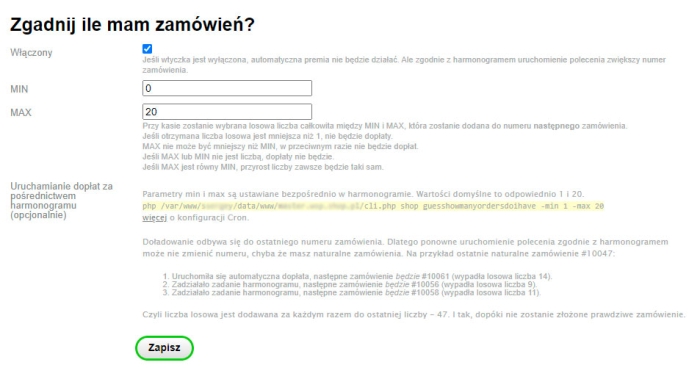


Automatic order number increase
At checkout, a random integer between MIN and MAX (set in the plugins settings) will be selected and added to the next order number.
The following conditions must be met:
- If the random number obtained in this way is less than 1, no surcharge will be applied.
- MAX cannot be lower than MIN, otherwise the surcharge will not be applied.
- If MAX or MIN is not a number, the surcharge will not be applied.
- If MAX equals MIN, the increment will always be the same.
Optionally. Run the surcharge using a schedule.
The min and max parameters are set directly in the schedule. The default values are 1 and 20 respectively.
php path-to-webasyst-installation/cli.php shop guesshowmanyordersdoihave -min 1 -max 20
More information on CRON configuration.
The surcharge is applied to the last order number. Therefore, re-running the command according to the schedule may not change the number unless you have natural orders.
- For example, the last natural order is #10047.
- The automatic surcharge has been applied, the next order will be #10061 (random number 14).
- The scheduled task has run, the next order will be #10056 (random number 9 has been drawn).
- The scheduled task has run, the next order will be #10058 (random number 11 has been drawn).
This means that the random number is added each time to the last number - 47. And so on, until a real order is placed.
| Technical specifications | |
Developed for | Shopy-Script |
Localization settings | English, Polish, Russian |
UI backend support | 1.3, 2.0 |
Software type | Plugin |
Free | No |
| Developer and version plugins | |
Designer (programmer) | Welldi |
License | Web Systems Pro |
Version | 2025.05.01.1.wsp |
Update | 05/14/2025 |