
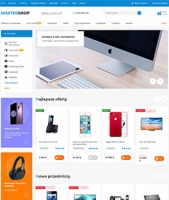
Updates o szablonie graficznym "Mastershop"
History of all updates to the szablonu graficznego "Mastershop"
3.5.0.1.wsp December 22, 2024
- Added localization languages for the frontend:
- German;
- French;
- Spanish;
- Italian.
3.5.0.0.wsp October 25, 2024
- Updates for Pro search, added a new helper plugin.
- Designed the "Question-Answer" page for free use (instructions on using HTML tags).
- Added table styling for free use (instructions on using HTML tags).
- Designed a section list with images and text for free use (instructions on using HTML tags).
- Designed text with images for free use (instructions on using HTML tags).
- Updated instructions for adding a pop-up gallery in any location: new tags for designing a photo list have been added.
- Designed text with an image on the right side for free use (instructions on using HTML tags).
- Designed 2-column text layout for free use (instructions on using HTML tags).
- Corrections and fixes for shortcomings.
3.4.0.1.wsp July 21, 2024
- Changed the social sharing button service to uSocial.pro
- Added the ability to display buttons for Pinterest and Reddit services.
3.4.0.0.wsp June 3, 2024
- In the photo stream (app "Photos"), the pop-up gallery opens when clicking an image (instead of navigating to a separate slider page). To disable, use the option "Open Photos from list (photo stream) in a pop-up window".
- Added the ability to display titles for promotional card lists on the homepage (option "List Title" in section "Homepage/Promocards").
- For plugins "Brands with pictures and descriptions", on the page listing all brands, the ability to display names under the logo has been added.
- In the site header, a custom block ms.header.top.custom has been added to the top navigation bar, instruction.
- In content, the ability to use lazy loading for videos has been added, instruction.
- On the product card, the ability to display a video from the gallery in a separate tab has been added. To do this, add the alias video to the option "Displaying main description..." in the section "Product card/Basic description", instruction. Adaptation of plugins "Features tips".
- The mobile info interface has been removed from the desktop version: info.menu, main menu, and filters.
- The ability to display a promotional list on the product card has been added, instruction.
- Implemented lazy loading for images in the standard theme interface for hidden content in tabs, pop-ups, and spoiler text (use class js-hidden-image-lazy), instruction.
- Corrections and fixes for shortcomings.
3.3.0.1.wsp April 21, 2024
- Updated the "Share" button service
3.3.0.0.wsp February 20, 2024
- On the product card, a floating (fixed) panel with the "Buy" button has been implemented, option "Fixed panel with cart button".
- Tooltips have been added for "compare", "favorite", and "quick view" buttons.
- In the mobile version, a filter button indicator showing applied filters has been implemented.
- For the info message, location can now be selected: "above header" or "bottom, fixed", separately for mobile and desktop versions.
- For product lists on the homepage, the ability to display a link to a separate list page has been added (option "Link to list page").
- Added a new instruction with ready-made markup for a table designed as "stripes".
- Adaptation of plugins "Reviews Catalog".
- Fixes for shortcomings.
3.2.1.0.wsp December 21, 2023
- Minor changes
3.2.0.0.wsp November 1, 2023
- Display of bonus points in product preview and product card (option "Show bonus points in products" in the "Catalog" section).
- In the mobile version, the product preview image has been repositioned (works only on lists without carousel).
- For Pro Search, sorting is now controlled by the theme settings (option "Enable sorting" in the "Search" section).
- In the dropdown Personal Account menu (and in the popup Personal Account menu in the mobile version), a link to viewed products is now displayed.
- Added the option "Maximum number of subcategories visible by default" for the sidebar subcategory menu (in the "Sidebar/Subcategory Menu" section).
- For autocomplete search, automatic search is now triggered by the paste event from the mouse context menu.
- For accordion tabs, automatic default expansion of the first tab has been removed.
- Added output of description tag to microdata in the "Photos" app in "Photo Stream".
- Various fixes and improvements.
3.1.1.0.wsp August 1, 2023
- Fixed display of previews in product gallery preview.
- Fixed rating icons
3.1.0.0.wsp July 7, 2023
- New option in the "Optimization" section: "Plugin exceptions for the 'Load plugin hook frontend_head at the bottom of the page' option".
- On the homepage, in the promotional card list (or promotions in the Marketing section), added the ability to display promotions individually for the mobile version in the "Homepage -> Promocards" section.
- In the "Photos" app, implemented lazy loading of pages.
- In the "Photos" app, implemented lazy loading of images.
- Optimized search form with plugins "Search Pro".
- Improved the design of the order confirmation page in the step-by-step checkout type.
- On the category page, added the ability to display an additional menu in the content area using the "Menu Manager" or "Menu" app.
- In Settingss of the theme, added the option "Disable use of Premium features in templates" in the Catalog/Settings Advanced section.
- Improved design of the comparison page.
- Bug fixes and corrections.
3.0.1.0.wsp April 12, 2023
- Fixing shortcomings
3.0.0.0.wsp April 7, 2023
- Correcting shortcomings.
2.11.1.0.wsp February 21, 2023
- Fixed script error when using plugins "SEO-filter".
2.11.0.0.wsp January 31, 2023
- New option "Load banner on category page" to optimize category page loading speed.
- In the category, added the ability to upload a banner for the mobile version when using plugins "Image for category" (skilbe), configured according to instructions.
- Improved error display when adding a product to cart (replaced standard browser alert with a popup message styled according to the theme).
- Fixed scrolling appearance in breadcrumbs and cards in the mobile version.
- In product preview, instead of the "To cart" button, added the option to display a "More information" button, option "Link name 'More information' instead of displaying the 'To cart' button".
- For the brand list page, added design option using a simple list without logos.
- In the "Photos" app, inferred the alt attribute for images.
- Product card finalized classic tabs in the mobile version: now they can be switched by swiping with a finger, and tabs automatically scroll into view when switched.
- In the product card, for plugins "SEO-filters", added output of filter links with product selections, option "Display links to plugins SEO-filter pages".
- Popup window with video.
- Other improvements and fixes.
2.10.0.0.wsp October 28, 2022
- A new "Stock availability in mobile version" option has been added for tile preview;
- For product lists used in any location on the site, a new configuration option has been added to set the limit, starting position for displaying the list, and a hash to select a specific product. It is now also possible to use Mini previews in such lists;
- New option "Disable logo link on homepage";
- A new block showing all images uploaded by buyers has been added to product card reviews. To disable this block, use the "Show a single block with all images uploaded by buyers" option;
- For promotions in sliders, lists, and sidebars, a new option "Include promotion number as ID in all settings" has been added;
- For blog posts, a new option "Show post author" has been added;
- On the product card, new options have been added for the gallery: "Main image thumbnail size in mobile version" and "Main image block height in mobile version";
- On the homepage reviews, an option to disable the carousel has been added; use the "Display reviews using carousel" option for this;
- In the site header, a popup product list now appears when hovering over the comparison and favorites icons. The option "Popup cart" has been removed and replaced with a general option "Popup product list on hover over cart, comparison, and Favorites" in the "Site Header" section;
- Various fixes, improvements, and bug fixes.
2.9.1.1.wsp September 8, 2022
Before updating, save a clone of the current theme version for each app. A mandatory Reset of all theme changes will be required for each app's project theme. Theme update guide.
- Fixed broken brand logo images;
- On the blog, image preview has been added to search results;
- In category pages, using the plugins "SEO-filter", fixed navigation from a certain type of active sorting to "manual" sorting (i.e., to a page without sorting);
- Fixed the product card gallery when using plugins "Yandex Advisor" in the browser;
- Other minor corrections;
Modified files:
Application "Site":
- horizontal.main.menu.brands-logo.html
- mastershop.css (mastershop.min.css)
- mastershop.js (mastershop.min.js)
- vertical.main.menu.brands-logo.html
Application Shopy-Script:
- brands.list.html
- cart.html
- fixed.cart.html
- /swipebox/js/jquery.swipebox.js
- mastershop.shop.css (mastershop.shop.min.css)
- mastershop.shop.js (mastershop.shop.min.js)
- product.description.html
- product-preview-list.html
- product-preview-tbl.html
- product.cart.html
Application "Blog":
- stream_search.html
- mastershop.blog.min.css.
Application "Photos":
- mastershop.photos.min.css
Application "Helpdesk":
- mastershop.helpdesk.min.css
Application "Hub":
- mastershop.hub.min.css
2.9.0.1.wsp July 7, 2022
Before updating, save a clone of the current theme version for each app. A mandatory Reset of all changes in the project theme of each app will be required. Theme update guide.
- Fixed product preview display when lazy-loading the next page (or using the "Load more" button), after returning to the category (or search) page.
- In the mobile informational menu, the current menu item is now highlighted and revealed.
- Added the "Expand current menu item by default" option for the mobile main menu.
- Minor optimization on the product card.
- On the personal account, the product article number is now displayed in the order list.
- On the personal account, the detailed product page now shows the article, Photos, and product links.
- Updated the design in the step-by-step checkout process at the confirmation step.
- Minor various fixes.
Modified files:
Application "Site":
- add.css.html.
- header.top.menu.mobile.html.
- horizontal.main.menu.subs-deployed.html.
- horizontal.main.menu.subs-dropdown.html.
- horizontal.main.menu.subs-images.html.
- mastershop.min.css (mastershop.css).
- mobile.main.menu.html.
- mobile.filters.html.
- vertical.main.menu.subs-dropdown.html.
Application Shopy-Script:
- checkout.html.
- checkout.confirmation.html.
- list-thumbs.html.
- mastershop.shop.min.css (mastershop.shop.css)
- mastershop.shop.min.js (mastershop.shop.js) - my.order.html
- my.orders.html.
- product.cart.html.
- sidebar.filters.html.
Application "Blog":
- mastershop.blog.min.css.
Application "Photos":
- mastershop.photos.min.css
Application "Helpdesk":
- mastershop.helpdesk.min.css
Application "Hub":
- mastershop.hub.min.css
2.8.0.1.wsp April 18, 2022
Before updating, keep a clone of the current theme of each app. A mandatory Reset of all theme changes will be required for each app's design theme. Theme update instructions.
- New option in the Optimization section: "Load at the bottom of the page".
- The "Personal account menu" option has been finalized in the "Personal account" section; now 3 link creation options are available: "Automatic without using $wa->myNav()", "Automatic creation with $wa->myNav()", from the "Extended menu" app.
- Enhancement of plugins "Search Pro", possibility to use the plugins "Filter location" option with the "Theme location" option.
- Updated design of the order list page and detailed order view.
- Replaced the option "Hide purchase options unavailable for purchase" with "Show unavailable purchase options" with the following options: Do not block, Block, Hide. The "Do not block" option may be needed for some plugins to work, for example, "Notify on arrival".
- New options "Maximum number of favorites" and "Maximum number of viewed" in the Catalog/Custom lists section.
- Integration of the "Menu" app into the top menu, horizontal, vertical, mobile, footer menu, informational menu in the sidebar, and category lists in the main menu.
- Fixed SEO filter linking in the product card for items with SKUs.
- Bug fixes.
Modified files:
Application "Site":
- bar-fixed-bottom.html
- bar-fixed-right.html
- footer.links_block_1.html
- footer.links_block_2.html
- footer.links_block_3.html
- head.js.html
- header.top.menu.html
- header.top.auth.html
- horizontal.main.menu.subs-images.html
- index.html
- last-news.html
- mastershop.css
- mastershop.js
- mobile.main.menu.html
- my.profile.html
- profile-links.html
- popup.auth.html
- sidebar.app_menu.html
- sidebar.profile-pages.html
- vertical-unfolding.main.menu.html
- vertical.main.menu.html
- vertical.main.menu.subs-deployed.html
- vertical.main.menu.subs-dropdown.html
- vertical.main.menu.subs-images.html
Application Shopy-Script:
- categories-subcats.html
- categories-tile.html
- checkout.html
- checkout.confirmation.html
- home.html
- main.html
- mastershop.shop.css
- my.affiliate.html
- my.orders.html
- my.order.html
- my.nav.html
- search.html
- sidebar.filters.html
- product.cart.html
- product.cart.js.html
- product.content.html
- product.features.html
- product.reviews.html
- product-preview-tile.html
- product-preview-list.html
- reviews.html
- reviews.js
Application "Blog":
- breadcrumbs.html
- stream.html
Application "Mailer":
- head.html
- my.subscriptions.html
Application "Helpdesk":
- my.profile.html
- my.requestpage.html
- my.requestlist.html
2.7.0.1.wsp April 13, 2022
Before updating, keep a clone of the current theme of each app. A mandatory Reset of all theme changes will be required for each app's design theme. Theme update instructions.
- New option "Mobile device address bar color".
- New option in the Optimization section: "Preload theme styles and scripts in head".
- New option for "Shop -> Checkout" in cart "Open default comment field in confirmation field".
- Edits in microsizes.
- Possibility to display category list on the homepage using the "Extended menu" app.
- Possibility to edit product sticker names, options "Bestseller sticker name!", "New arrival sticker name!" and "Discount sticker name!".
- New option for subcategory list on category page: "Number of products".
- Displaying number of votes in rating within product preview.
- New option "Maximum number of items in 3rd level of dropdown menu" for horizontal and vertical main menus.
- Possibility to display products from a given category on any lists.
- In the site header, in the personal account menu, added possibility to display links from the "Extended menu" app, option "Personal account section links in header" and "ID from the "Extended menu" app.
- For large screens, added possibility on pages with one sidebar or no sidebars to display large preview tiles in product lists, option "Preview tiles (desktop)" with "Large tiles" (4 products per row on pages without sidebars and 3 products per row on pages with one sidebar).
- Minor corrections.
Modified files:
Application "Site":
- add.css.html
- colors.css.html
- head.html
- header.top.auth.html
- horizontal.main.menu.subs-deployed.html
- mastershop.css
- mastershop.js
- my.profile.html
- popup.auth.html
- theme.xml
- vertical.main.menu.subs-deployed.html
Application Shopy-Script:
- cart.html
- categories-icon.html
- categories-tile.html
- categories-subcats.html
- category.subcategories.html
- head.html
- home.html
- list-thumbs.html
- mastershop.shop.css
- my.affiliate.html
- my.order.html
- my.orders.html
- product-preview-tile.html
- product-preview-list.html
- product-preview-tbl.html
- product.product-lists.html
- product.gallery.html
- product.features.html
- products.list.html
- products.set.html
- promo-tile.html
- order.html
- order.js
- slider.html
- slider.product.html
- sidebar.subcategories.html
- review.html
- theme.xml
Application "Helpdesk":
- head.html
- my.profile.html
- my.requestlist.html
- my.requestpage.html
Application "Blog":
- head.html
Application "Photos":
- head.html
Application "Hub":
- head.html
Application "Mailer":
- my.subscriptions.html
2.6.0.1.wsp January 16, 2022
- On the homepage, for recent posts, the option "Link name" has been added instead of "Read news";
- Fixed the behavior of cards in dynamic content;
- Fixed the pop-up gallery in the album in the "Photos" app;
- A separate page for viewing recently viewed products has been added. If needed, the link to viewed items can be displayed in a fixed bottom-right panel;
- In all menus, when using the "Extended menu" app, the target attribute is now specified;
- Added the option "Link hover color" to the horizontal main menu;
- Added the option "Hide product preview and cart buttons";
- Added the option for category page "Show description only on the first page";
- Fixed content distribution in the header;
- Added the ability to display promotional cards on the product list in a category;
- Other minor improvements.
2.5.1.1.wsp October 25, 2021
- Added Polish language support.
2.5.1 August 23, 2021
1) Fixed auto-scrolling in the slider;
2) Fixed tag display on the product card;
3) Fixed the option "Block height with name, px" in product preview on mobile.
The following files were edited:
- slider.html (Application Shop);
- product.content.html (Application Shop);
- add.css.html (Application Site);
If website theme has already been updated to version 2.5.0 and no changes were made to the above templates, do not reset changes (instead of the reset button, use the "Update available to version 2.5.1" button). Update instructions are available at this link.
2.5.0 August 10, 2021
Before updating, make a clone of the current version theme for each app. A mandatory Reset of all theme changes will be required for each app. Theme update instructions.
1) Added the option "Number of levels" for mobile and expanded main menus;
2) Added the option "Icons in subcategory menu" to the sidebar subcategory menu (sidebar section);
3) Ability to display category list on app pages (instructions);
4) Added another custom block to homepage output, alias custom4 (block with ID ms.homepage.custom4);
5) Ability to add an additional slider on the homepage (instructions);
6) Ability to display a slider on app pages (instructions);
7) Added the option "Display price range" to product preview (Product Preview section);
8) Ability to hide categories in all main menus using advanced options: vertical_menu_hide=1 (for vertical menu), vertical_unfolding_menu_hide=1 (for vertical menu), horizontal_menu_hide=1 (for horizontal menu), mobile_menu_hide=1 (for mobile menu);
9) Minor micro-adjustments;
10) Fixing minor issues.
Modified files:
Application Site:
- breadcrumbs.html
- head.js.html
- horizontal.main.menu.html
- horizontal.main.menu.subs-deployed.html
- horizontal.main.menu.subs-dropdown.html
- horizontal.main.menu.subs-images.html
- fonts.html
- footer.contacts.html
- index.html
- mastershop.css
- mastershop.js
- mobile.main.menu.html
- mobile.filters.html
- page.html
- vertical.main.menu.html
- vertical.main.menu.subs-deployed.html
- vertical.main.menu.subs-dropdown.html
- vertical.main.menu.subs-images.html
- vertical-unfolding.main.menu.html
- theme.xml
Application Shop:
- add.css.html
- cart.html
- catalog.set.html
- category.html
- categories-subcats.html
- category.select-filters.html
- horizontal.filter.html
- home.html
- mastershop.shop.css
- mastershop.shop.js
- main.html
- order.js
- page.html
- product.cart.html
- product.html
- product-preview-list.html
- product-preview-tile.html
- product-preview-tbl.html
- sidebar.filters.html
- slider.html
- slider.product.html
- slider.photo.html
- slider.promo.html
- slider.set.html
- sidebar.subcategories.html
- reviews.html
Application Blog:
- post.html
Application Helpdesk:
- main.html
Application Hub:
- topic.forum.html
- topic.page.html
Application Photos:
- album.html
- main.html
2.4.2 May 21, 2021
On the brand page, in the mobile version, fixed the button in the popup-filter.
Only the search.html file was updated. If website theme has already been updated to version 2.4.0 and the search.html template has not been modified, then you can skip resetting changes (instead of the reset changes button, use the "Update available to version 2.4." button). Update instructions are available at this link.
2.4.1 May 11, 2021
Fixed the filter slider in the mobile version.
Only the jquery.ui.min.js file was updated. If website theme has already been updated to version 2.4.0, there is no need to reset changes. Update instructions are available at this link.
2.4.0 May 4, 2021
Before updating, save a clone of the current theme version for each application. A mandatory Reset of all changes in the design theme of each application will be required. Theme update instructions.
1) Fixed product quantity selection on the page.
2) On product lists, the "Add to cart" button is hidden for products with the "Available for order" checkbox disabled.
3) To complete an order, an option "Select default consent checkbox" has been added to cart.
4) Closing the product popup-gallery by clicking on the background.
5) New option for the sidebar plugin navigation hook: "Number of displayed items in plugin navigation".
6) New option for store tags in the sidebar: "Number of displayed tags".
7) New option for warehouse list on the product card: "Maximum number of open warehouses".
8) For the review subsection title on the product card, added the option "Subsection name 'Reviews'".
9) In the product gallery, added the ability to set thumbnail sizes, with options "Main image thumbnail size" and "Popup gallery image thumbnail size".
10) For microdata, added the option "GTIN feature code", which should be filled with the product feature code containing the barcode.
11) Adaptation of the plugins "Call back".
12) Adaptation of the plugins "Link canonical" according to the developer's instructions.
13) Fixed the "Scroll to top" button in the mobile filter.
14) In the mobile version, added the option to fix the header, option "Fixed header on mobile phone".
15) In the mobile version, added the ability to display a catalog menu button in the header's info menu. Added options "Show catalog menu button below header" and "Show catalog menu button in header info menu". More details in point 4 of the instructions.
16) For the logo, added the option "SVG logo path".
17) In the mobile version, added the ability to place the logo on the top navigation bar, option "Logo location in mobile version".
18) Updated logo settings instructions. !After updating, check the logo display in desktop and mobile versions.
19) Other corrections and bug fixes.
Modified files:
Application Site:
- add.css.html
- colors.css.html
- edit-button.html
- footer.html
- head.html
- header.html
- header.content.html
- header.logo.html (new file)
- header.top.html
- header.top.menu.desktop.html
- header.top.menu.html
- header.top.menu.mobile.html
- header.content.address.html renamed to header.address.html
- header.content.contacts.html renamed to header.contacts.html
- footer.html
- global-var.js.html renamed to head.js.html
- index.html
- mastershop.min.css
- mastershop.css
- mastershop.js
- mobile.filters.html
- page.html
- popup.contacts.phones.html
- theme.xml
Application Shop:
- category.html
- mastershop.shop.min.css
- mastershop.shop.css
- mastershop.shop.js
- order.html
- order.js
- swipebox/css/swipebox.css
- sidebar.plugins.html
- sidebar.shop-tags.html
- product-preview-list.html
- product-preview-tbl.html
- product-preview-tile.html
- product.cart.html
- product.features.html
- product.gallery.html
- product.gallery.previews.bottom.html
- product.gallery.previews.left.html
- product.reviews.html
- reviews.html
- theme.xml
Application Blog:
- comment.html
- footer.html
- mastershop.blog.min.css
- post.album.html
- theme.xml
Application Helpdesk:
- content.html
- footer.html
- mastershop.helpdesk.min.css
- search.html
- pagelist.html
- theme.xml
Application Hub:
- footer.html
- mastershop.hub.css
- mastershop.hub.min.css
- mastershop.hub.js
- topic.custom.html
- topic.feedback.html
- topic.forum.html
- topic.page.html
- topic.question.html
- search.html
- theme.xml
Application Photos:
- footer.html
- mastershop.photo.min.css
- home.html
- photos-plain.html
- theme.xml
2.3.1 February 18, 2021
Technical fix for the quick product preview function related to the insertion of the main.js script from Kaspersky antivirus into web pages.
If website theme has already been updated to the previous version 2.3.0, changes cannot be reset; only the mastershop.js file (mastershop.min.js) was corrected.
If the theme has not yet been updated to version 2.3.0, the update process is standard, requiring a reset of all changes in the design theme of each application. Theme update instructions.
2.3.0 February 8, 2021
Before updating, save a clone of the current theme version of each application. A mandatory Reset of all changes in the design theme of each application will be required. Theme update instructions.
1) Adaptation of plugins "Buy with one click" (iGaponov).
2) Adaptation of plugins "Buy with one click" (EasyIT).
3) Ability to display a short description in tile preview, option "Short description" in the Product preview/Tile view preview section.
4) For pre-order products, the option "Button name for pre-order products" has been added to the Catalog section.
5) In the mobile version, on the product card page, the ability to display the description using classic tabs has been added, option "Product main content design in mobile version" in the Product card section.
6) New customization guide for plugins "Price request".
7) New guide for working with classic tab content, link.
8) New guide for working with accordion tab content, link.
9) Correction of minor issues.
Modified files:
Application Site:
- footer.subscribe.html
- mastershop.css
- mastershop.js
- theme.xml
Application Shop:
- cart.html
- mastershop.shop.css
- order.html
- product-preview-list.html
- product-preview-tbl.html
- product-preview-tile.html
- product.cart.html
- slider.product.html
- theme.xml
2.2.0 December 17, 2020
Before updating, save a clone of the current theme version of each application. A mandatory Reset of all changes in the design theme of each application will be required. Theme update instructions.
1) New option "Load hook plugins frontend_head at the bottom of the page". This option is not compatible with all plugins.
2) For recommended and cross-sell products, the card now includes the option "Show only available products".
3) Added icons for Viber and Telegram. Messenger icons are now displayed in the page header.
4) Added a third phone number and phone headers to contact details. If using the previous option for displaying numbers in the header, disable the option "Additional outgoing numbers in popup".
5) Fixed separators in dynamic specifications.
6) In the mobile version, breadcrumbs are now displayed in a single line with horizontal scrolling.
7) In the mobile version, product list with tile view can now display one item per line; option "Tile preview (mob)".
8) It is now possible to display product lists in blog posts and app pages using tiles, lists, or tables. For posts, the "List view" option is located in the app Blog section, but you can set the view individually for each post, more in the instructions. For lists on app pages - instructions.
9) The main menu now allows disabling the brand list, leaving only the link to the brands page. Option "Show brand list in submenu".
10) Minor HTML structure optimization in the mobile version.
11) Other minor fixes.
Modified files:
Application Site:
- breadcrumbs.html
- colors.css.html
- footer.contacts.html (block - ms.footer.contacts)
- horizontal.main.menu.html
- header.content.html
- header.content.contacts.html (block - ms.header.contacts)
- header.cart.html
- header.fixed-desktop.html
- header.search.html
- index.html
- mastershop.css
- mastershop.js
- mobile.main.menu.html
- page.html
- popup.search.html
- popup.contacts.html
- popup.contacts.phones.html (block - ms.popup.phones)
- popup.contacts.social.html (block - ms.popup.social)
- slider.html
- vertical-unfolding.main.menu.html
- vertical.main.menu.html
- theme.xml
Application Shop:
- cart.html
- cart.add.popup.html
- cart.add.top.html
- category.html
- checkout.html
- compare.html
- fixed.cart.html
- head.html
- home.html
- list-thumbs.html
- mastershop.shop.css
- main.html
- order.html
- page.html
- popup.cart.html
- product-preview-list.html
- product-preview-tbl.html
- product-preview-tile.html
- product.product-lists.html
- products.list.html
- products.set.html
- product.html
- sources-js.html
- search.auto.html
Application Blog:
- breadcrumbs.html
- main.html
- page.html
- post.html
- stream.html
Application Photos:
- main.html
Application Helpdesk:
- main.html
2.1 October 20, 2020
Before updating, save a clone of the current theme version for each application. A mandatory Reset of all changes in the project theme for each application will be required. Theme update instructions.
1) Fixed the ruble sign.
2) Added popup message when a product is added to comparison, Favorites, if fixed panels are disabled.
3) Fixed zoom in product gallery.
4) Added option "Align gallery vertically in center".
5) Other fixes.
Modified files:
Application Site:
- theme.xml
- add.css.html
- fonts.html
- font-exo2.css.html
- font-firasans.css.html
- font-montserrat.css.html
- font-opensans.css.html
- font-play.css.html
- font-ptsans.css.html
- font-roboto.css.html
- font-ubuntu.css.html
- global-var.js.html
- index.html
- mastershop.css
- mastershop.js
Application Shop:
- theme.xml
- mastershop.shop.css
- product.cart.html
- product.gallery.html
2.0 October 2, 2020
Before updating, save a clone of the current theme version for each application. A mandatory Reset of all changes in the project theme for each application will be required. Theme update instructions.
1) Download speed optimization.
2) Correction of shortcomings.
Modified files:
Application Site:
- critical.js.html (removed)
- horizontal.main.menu.html
- header.top.menu.desktop.html
- font-icons.css.html
- font-montserrat.css.html
- font-exo2.css.html
- font-firasans.css.html
- font-opensans.css.html
- font-play.css.html
- font-ptsans.css.html
- font-roboto.css.html
- font-ubuntu.css.html
- fonts.html
- fonts.css.html (removed)
- footer.subscribe.html
- global-var.js.html
- index.html
- main.html
- mastershop.js
- mastershop.css
- sidebar.products.html
- theme.xml
Application Shop:
- brands.list.html
- cart.html
- category.html
- checkout.html
- head.html
- horizontal.filter.html
- home.html
- last-reviews.html
- main.html
- mastershop.shop.css
- mastershop.shop.js
- page.html
- product.html
- product.js
- product.gallery.html
- product.cart.html
- product.reviews.html
- products.list.html
- products.set.html
- product.product-lists.html
- product-preview-list.html
- product-preview-tile.html
- slider.html
- slider.photo.html
- slider.product.html
- slider.promo.html
- theme.xml
Application Blog:
- head.html
- theme.xml
- main.html
Application Photos:
- head.html
- theme.xml
- main.html
Application Hub:
- head.html
- theme.xml
- main.html
Application Helpdesk:
- head.html
- theme.xml
- main.html
1.11 September 7, 2020
Technical fixes in theme version naming
Modified files:
Application Site:
- theme.xml
Application Shop:
- theme.xml
1.10.1 September 3, 2020
Before updating, save a clone of the current theme version for each app. A mandatory Reset of all changes in the project theme for each app will be required. Theme update instructions.
1) Adapted plugins Minimum order for checkout pages in Cart
2) New preview options for list-type items: "Maximum image height (desktop)" and "Maximum image height (mobile)"
3) New font loading options: "Display text without waiting for icon font to load", "Load icon font stylesheet at the bottom of the page", "Display text without waiting for text font to load"
4) Fixed tile gallery in product preview
5) Other minor fixes
Modified files:
Application Site:
- add.css.html
- header.fixed-desktop.html
- fonts.html
- index.html
- mastershop.css
- mastershop.js
- theme.xml
Application Shop:
- list-thumbs.html
- mastershop.shop.css
- order.html
- theme.xml
1.10 August 21, 2020
Before updating, save a clone of the current theme version for each app. A mandatory Reset of all changes in the project theme for each app will be required. Theme update instructions.
1) Added a fixed header with navigation elements, option "Fixed header".
2) Stickies for categories (instructions).
3) Added a new option to display a product added message in a fixed top panel, in the option "Effect when adding to cart on desktop".
4) Adapted plugins Minimum order.
5) On the cart page, warnings about available goods are displayed.
6) On the product card, a link with the number of reviews has been added next to the rating.
7) Up to 3 custom blocks can now be displayed in the right block via the Site -> Blocks app, see instructions (point 5).
8) Added WhatsApp to social media icons.
9) Fixed image flickering when scrolling through the product gallery-popup.
10) In desktop version, phone numbers became clickable.
11) Fixed quick product preview with redirect.
12) For the product card, a new mobile version option "Right block content in mobile version" has been added, allowing block sorting or disabling. More information about this feature can be found in instructions point 2.
13) On the personal account, changed the appearance of the order page for desktop and mobile versions. Also for mobile, changed the order confirmation page.
14) In mobile version, fixed product carousel images not displayed when rotating the device.
15) In cart, payment method icons are disabled, option "Payment method icons".
16) In the content management section, a new instruction "Interface elements" has been added.
17) Added font-display: swap; property for Montserrat font.
18) Fixed language and currency switching when the address bar contains a hash #.
19) For pagination that works without page reload, the page option has been added. Also, for the pagination option "Page by page + Load more button", page switching has been switched to AJAX, i.e. without page reload.
20) In mobile version, fixed radio buttons for shipping / payment methods.
21) Other minor fixes.
Modified files:
Application Site:
- add.css.html
- bar-fixed-bottom.html
- bar-fixed-right.html
- cart.add.top.html
- contacts-page.html
- fonts.css.html
- footer.contacts.html
- footer.social.html
- header.cart.html
- header.content.html
- header.fixed-desktop.html
- header.content.contacts.html
- header.top.auth.html
- horizontal.main.menu.html
- horizontal.main.menu.subs-deployed.html
- horizontal.main.menu.subs-dropdown.html
- horizontal.main.menu.subs-images.html
- index.html
- login.html
- mastershop.css
- mastershop.js
- mobile.main.menu.html
- popup.auth.html
- popup.contacts.phones.html
- popup.contacts.social.html
- settings.html
- vertical.main.menu.html
- vertical.main.menu.subs-deployed.html
- vertical.main.menu.subs-dropdown.html
- vertical.main.menu.subs-images.html
- vertical-unfolding.main.menu.html
- theme.xml
Application Shop:
- cart.html
- categories-icon.html
- categories-subcats.html
- categories-tile.html
- category.subcategories.html
- checkout.confirmation.html
- checkout.payment.html
- checkout.shipping.html
- compare.html
- home.html
- list-thumbs.html
- mastershop.shop.js
- mastershop.shop.css
- my.order.html
- my.orders.html
- reviews.html
- product-preview-list.html
- product.cart.html
- product.features.html
- product.js
- product.short-description.html
- products.list.html
- product.cart.actions.html
- product.html
- theme.xml
1.9 June 17, 2020
Before updating, save a clone of the current theme version for each app. A mandatory Reset of all theme changes will be required for each app's project theme. Theme update instructions.
Support for Shopy-Script app version 8.11: option sku in the address bar and feature-to-article linking.
Modified files:
Application Site:
- mastershop.js (mastershop.min.js)
- theme.xml
Application Shop:
- product.cart.html
- product.features.html
- product.js
- product.short-description.html
- theme.xml
1.8 June 5, 2020
Before updating, save a clone of the current theme version for each app. A mandatory Reset of all theme changes will be required for each app's project theme. Theme update instructions.
1) It is now possible to disable preview display in the product popup gallery, via the option "Show preview in popup gallery on desktop".
2) On the plugins "Search Pro" page, fixed lazy loading of images in the product list, as well as loading of text fonts and icons.
3) Adjusted layout on the checkout page in the "Cart + 1-step order" plugin.
4) Added product card option - "Show stock quantity".
5) For mobile versions, a new option "Add to cart effect" has been added.
6) New option "Link text to all products" for horizontal main menu, vertical dropdown menu and category list on homepage. If left empty, the link will not be displayed.
7) Accordion-style dropdown lists can now be displayed within content, see instructions.
8) In the Photos app album, added ability to design thumbnail image lists with popup gallery, via the option "Album page design".
9) Added discount display in the popup cart and fixed cart panel.
10) It is now possible to display product lists on carousel pages, see instructions.
11) Adjusted plugins Image to menu.
12) Fixed slider dragging.
13) Fixed sorting links on pagination pages.
14) Added new pagination option in Pagination Type - Automatic after first click on "Load more" button.
15) Other minor fixes and corrections.
Modified files:
Application Site:
- colors.css.html
- footer.about.html
- footer.contacts.html
- footer.social.html
- header.content.address.html
- header.content.contacts.html
- horizontal.main.menu.subs-dropdown.html
- horizontal.main.menu.subs-images.html
- horizontal.main.menu.subs-deployed.html
- horizontal.main.menu.html
- index.html
- mobile.main.menu.html
- main.html
- mastershop.js
- mastershop.css
- order.html
- popup.contacts.address.html
- popup.contacts.phones.html
- popup.contacts.social.html
- settings.html
- sidebar.promo.html
- vertical.main.menu.html
- vertical.main.menu.subs-deployed.html
- vertical.main.menu.subs-dropdown.html
- vertical.main.menu.subs-images.html
- vertical-unfolding.main.menu.html
- welcome.description.html
- theme.xml
Application Shop:
- cart.js
- category.html
- category.sorting.html
- categories-subcats.html
- fixed.cart.html
- home.html
- list-thumbs.html
- main.html
- mastershop.shop.css
- mastershop.shop.js
- page.html
- product.html
- product.js
- product-preview-list.html
- product-preview-tbl.html
- product-preview-tile.html
- product.cart.html
- products.set.html
- product.cart.actions.html
- product.content.html
- product.description.html
- product.gallery.html
- product.gallery.previews.bottom.html
- product.gallery.previews.left.html
- product.product-lists.html
- popup.cart.html
- slider.html
- slider.product.html
- slider.photo.html
- slider.promo.html
- theme.xml
Application Blog:
- theme.xml
Application Photos:
- mastershop.photos.css
- photos-plain.html
- theme.xml
Application Helpdesk:
- theme.xml
Application Hub:
- theme.xml
1.7.0.1 April 29, 2020
Before updating, save a clone of the current theme version of each app. A mandatory Reset of all theme changes in each app's project theme will be required. Theme update instructions.
Bug fixes, including those related to the latest update.
Modified files:
Application Site:
- theme.xml
- header.top.html
- mastershop.js
Application Shop:
- mastershop.shop.css
- search.html
- product.product
-lists.html
- products.list.html
- theme.xml
1.7 April 20, 2020
Before updating, save a clone of the current theme version of each app. A mandatory Reset of all theme changes in each app's project theme will be required. Theme update instructions.
1) Ability to display a text slogan under the logo, with font size and color settings. You can now use not only a font icon but also a regular image as the Logo icon. The logo instruction has been updated.
2) Content on the main page can now be sorted in any order, more in the instruction.
3) On the main page, there is now an option to display custom blocks with arbitrary content in the content area via the Site -> Blocks app, more in the instruction.
4) On the main page, an option has been added to place the slider above the main content and sidebars, the option "Place slider above content with sidebars". For more information about possible sidebar locations, read the instructions.
5) In the slider, the ability to jointly display promotions, products, and promotional cards has been added, more details in the updated instruction.
6) Separate options for customizing the slider in mobile version have been added. Specifically, you can display different promotional cards and a photo album, options "Photo album ID in slider (mobile)", "Promocards in slider (mobile)", and "Slide order in mixed slider (mobile)".
7) Fixed product duplication in the cyclic carousel with product list.
8) In the Photos app, removed broken 404 links in slider navigation buttons.
9) Fixed low image quality in the sidebar promotional cards on website subpages.
10) Restored animation for some download icons.
11) For the SEO-filter, fixed blocking of unavailable options during page loading.
12) New option "Maximum number of products in lists on the main page" for offers on the main page.
13) New options to rename tabs on the product card, options Tab Name "Review", Tab Name "Specifications", and Tab Name "Reviews".
14) Added third-level menu items in the top menu, with the ability to customize the number of menu levels, option "Number of levels" in the top menu.
15) New album option in the photo gallery "Open popup gallery when clicking image in album".
16) Fixed image uploading to infoblocks.
17) For subcategories on the main page, the option home can now be used to hide subcategories you don't want to display, read more in the instruction.
18) New option for product cart buttons: "If product is in cart, show checkmark on button".
19) Added display of the discount amount sticker (between old and new price) on the product card and preview, option "Savings sticker".
20) In the cart, discount amount stickers (between old and new product price) have also been added, as well as calculation and display of the total order discount in final totals. Option "Savings information in final totals".
21) Other user interface fixes in the project theme.
Modified files:
Application Site:
- theme.xml
- add.css.html
- colors.css.html
- critical.js.html
- global-var.js.html
- header.content.html
- header.top.auth.html
- header.top.menu.desktop.html
- header.top.menu.mobile.html
- index.html
- mastershop.css
- mastershop.js
- settings.html
- sidebar.photos.html
- sidebar.promo.html
- welcome.photos.html
Application Shop:
- theme.xml
- brands.list.html
- categories-subcats.html
- cart.js
- cart.html
- home.html
- list-thumbs.html
- mastershop.shop.js
- mastershop.shop.css
- product.html
- product.content.html
- product-preview-list.html
- product-preview-tbl.html
- product-preview-tile.html
- product.cart.html
- product.gallery.html
- product.js
- product.comments.fb.html
- product.comments.vk.html
- product.content.html
- product.reviews.html
- products.list.html
- products.set.html
- slider.product.html
- slider.photo.html
- slider.promo.html
- slider.html
Application Photos:
- theme.xml
- mastershop.photos.js
- photos-plain.html
1.6.1 January 21, 2020
Before updating, make a clone of the current version theme for each app. Theme update instruction.
1) In the Helpdesk app, fixed buttons in the My Requests section of the personal account.
2) Fixing mixed pagination scripts.
3) Fixed link to comparison page in the title of recommended products in the product card.
4) A new h1 option has been added for category page and product card, replacing the name in the h1 header (instructions: for categories and for products).
5) It is now possible to display menus in the sidebar from the Extended menu app, instructions.
6) For product lists in the sidebar, a general option "Number of visible products in carousel" has been added.
7) Ability to replace standard labels "Out of stock", "In stock", "On order" and "This product is temporarily unavailable for order".
8) Moved order amount display to a fixed cart on the right side.
9) Other corrections and fixes.
Modified files:
Application Site:
- mastershop.css
- mastershop.js
- mobile.filters.html
- sidebar.left.html
- sidebar.right.html
- theme.xml
Application Shop:
- category.select-filters.html
- category.html
- horizontal.filter.html
- fixed.cart.html
- mastershop.shop.css
- mastershop.shop.js
- product.html
- product.cart.actions.html
- product-preview-tile.html
- product-preview-list.html
- product-preview-tbl.html
- product.cart.html
- products.list.html
- products.set.html
- sidebar.products.html
- sidebar.filters.html
- sidebar.left.html
- sidebar.right.html
- theme.xml
Application Blog:
- sidebar.left.html
- sidebar.right.html
- theme.xml
Application Photos:
- sidebar.left.html
- sidebar.right.html
- theme.xml
Application Hub:
- sidebar.left.html
- sidebar.right.html
- theme.xml
Application Helpdesk:
- my.requestpage.html
- sidebar.left.html
- sidebar.right.html
- theme.xml
1.6 December 24, 2019
Before updating, make a clone of the current theme version for each app. Theme update instructions.
1) Added ability to set default sorting for search page, option "Default sorting" in section Search.
2) Added option in short description to select specific product features for display; option "Feature aliases in product short description" – enter feature codes separated by commas in the value field.
3) New options for slider and first item in "List" view to disable short description output: option "Short description" in product preview section and option "Short description in slider" in Home page section.
4) Ability to display infoblocks in the sidebar, output alias "services", options located in Infoblocks section in sidebar. For more information about displaying blocks in the sidebar, read instructions.
5) New option to display selected color name on product card, option "Name of selected color option".
6) In category dropdown menu, added option to set default expanded sections, option "Visible categories" – enter category IDs separated by commas in the value field.
7) Updated dynamic refresh of product list block in cart sidebar.
8) Added new effect option when adding product to cart: display of a fixed panel on the right side, option "Effect after adding to cart".
9) Added ability to individually override certain category settings via advanced options, list of options in instructions.
10) Switched to AJAX sorting (product list updates without page reload when changing sort order).
11) New pagination option in catalog: Pagination + button to load next page, option "Pagination" in Catalog section.
12) Minor file optimizations.
13) Other minor changes.
Modified files:
Application Site:
- add.css.html
- critical.js.html
- header.search.html
- header.top.menu.desktop.html
- horizontal.main.menu.html
- index.html
- mastershop.css
- mastershop.js
- mobile.filters.html
- popup.search.html
- settings.html
- sidebar.services.html
- sidebar.cart.html
- vertical-unfolding.main.menu.html
- theme.xml
Application Shop:
- cart.html
- cart.js
- category.description.html
- category.sorting.html
- category.html
- checkout.contactinfo.html
- checkout.payment.html
- checkout.shipping.html
- horizontal.filter.html
- fixed.cart.html
- list-thumbs.html
- mastershop.shop.css
- mastershop.shop.js
- popup.cart.html
- product.cart.html
- product.cart.actions.html
- product.content.html
- product.description.html
- product.features.html
- product-preview-list.html
- product-preview-tile.html
- product-preview-tbl.html
- product.short-description.html
- product.js
- products.set.html
- slider.products.html
- sidebar.filters.html
- theme.xml
Application Blog:
- sidebar.left.html
- sidebar.right.html
- theme.xml
Application Photos:
- sidebar.left.html
- sidebar.right.html
- theme.xml
Application Hub:
- sidebar.left.html
- sidebar.right.html
- theme.xml
Application Helpdesk:
- sidebar.left.html
- sidebar.right.html
- theme.xml
1.5 November 7, 2019
Before updating, keep a clone of the current version theme for each application. Theme update instructions.
1) Ability to disable the promotional slider matrix with name, use the option "Display matrix with slide name and description".
2) New options "Replace standard recommended header" and "Replace standard cross-sell header".
3) Ability to display popup gallery in application page content, instructions.
4) Ability to display popup window with text in application page content when clicking any button (link), instructions.
5) Updated instructions on using the "Read more" button in text, you must update HTML tags if this button is used in content.
6) New instructions section for goals.
7) Ability to display an additional product list on tab, instructions.
8) Ability to display product lists in desired order on tab, instructions.
9) Ability to open content in popup window when clicking an info block, option "Open page in popup window".
10) Ability to disable carousel on product lists on homepage and product page, use options "Carousel on desktop" and "Carousel on mobile" in Homepage and Product Page sections.
11) Fixed circular carousel in product gallery preview.
12) Ability to customize sidebar separately for categories without products.
13) New options for purchase options on product page: "Option selection view - as select", "Hide purchase options unavailable for purchase", "Number of open purchase options".
14) Layout customization for plugins checkout in 1 step.
15) Integration with Smart filter plugin.
16) Added new instructions section horizontal scrolling for wide tables for content editing.
17) Other minor fixes.
Modified files:
Application Site:
- colors.css.html
- fonts.html
- index.html
- mobile.filters.html
- mastershop.js
- mastershop.css
- mastershop.critical.js
- page.html
- settings.html
- services.html
- theme.xml
- vertical.main.menu.html
Application Shop:
- category.html
- category.description.html
- horizontal.filter.html
- home.html
- list-thumbs.html
- mastershop.shop.css
- mastershop.shop.js
- page.html
- product.cart.html
- product.reviews.html
- products.list.html
- products.set.html
- product.product-lists.html
- product-preview-tile.html
- product.html
- product.js
- product.services.html
- review.html
- sidebar.left.html
- sidebar.right.html
- sidebar.filters.html
- slider.photos.html
- slider.promos.html
- theme.xml
1.4.1.1 September 30, 2019
Before updating, keep a clone of the current version theme for each application. Theme update instructions.
Critical update: Fixed lazy pagination in catalog. For those using this pagination option, update is mandatory.
Modified files:
Application Site:
- theme.xml
Application Shop:
- list-thumbs.html
- mastershop.shop.css
- mastershop.shop.js
- theme.xml
1.4.1 September 27, 2019
Before updating, keep a clone of the current version theme for each application. Theme update instructions.
1) Fixed layout and display of info block image-icons on product page and site footer.
2) Fixed display of promotional images in slider.
3) New options for short description on product page: "Limit short description length" and "Strip HTML tags from short description".
4) Improved layout in order inquiry form.
5) Ability to display dropdown list on application pages, instructions.
6) Other fixes and bug corrections.
Modified files:
Application Site:
- footer.links_block_1.html
- footer.links_block_2.html
- footer.links_block_3.html
- horizontal.main.menu.html
- horizontal.main.menu.subs-deployed.html
- horizontal.main.menu.subs-dropdown.html
- horizontal.main.menu.subs-images.html
- mastershop.css
- mastershop.js
- services.html
- vertical-unfolding.main.menu.html
- vertical.main.menu.html
- vertical.main.menu.subs-deployed.html
- vertical.main.menu.subs-dropdown.html
- vertical.main.menu.subs-images.html
- theme.xml
Application Shop:
- cart.js
- categories-icon.html
- categories-subcats.html
- categories-tile.html
- category.banner.html
- mastershop.shop.css
- my.order.html
- product.services.html
- products.set.html
- product-preview-tile.html
- product.short-description.html
- slider.promos.html
- theme.xml
1.4.0 September 13, 2019
Before updating, save a clone of the current theme for each app. Theme update instructions.
1) Improved functionality for saving filters in subcategory list links. Now you can save filtering for specific features only by specifying their aliases separated by commas in the "Saved filters aliases" option.
2) Ability to customize the effect after adding a product to the cart: animation of the product "flowing" into the cart or opening a popup window suggesting to proceed to checkout. Option "Effect after adding to cart".
3) New option "Article header text" to replace the word "Article" with a custom text.
4) New option for the product card gallery image preview carousel: "Loop the preview carousel".
5) New blog post option: "Script for sharing buttons in post".
6) Ability to link a product list to a blog post (news) and display it on the news page. To do this, register in the post settings under "Advanced options" on a new line: products_list=list_id, more in the instructions.
7) New option in the product review form: "Disable the "Site" field".
8) Uploading images in reviews.
9) Cross-selling products on the checkout page in the cart.
10) Ability to choose tile, list or table view for viewed, cross-selling and recommended products lists (on the product card), options "Cross-selling products view", "Recommended products view" and "Viewed products view".
11) Ability to display infoblocks on product cards, options located in the "Infoblocks on product cards" section.
12) New product list carousel scrolling option: "Loop carousel".
13) Increased number of product lists displayed in the main and sidebar bars to 6.
14) Added another promotional cards list on the homepage, option "Promocards on list no. 2".
15) Display icons for the first level of mobile menu categories, option "Display icons for level 1" in the mobile main menu section.
16) For product lists in the sidebar, added option to move carousel navigation buttons to the bottom of the block to make space for a long blog header, option "Carousel buttons location".
17) Instruction added to the content section: "Table in mobile version".
18) Added instruction to display label in the slider above the product name, point 6 of the instruction.
19) Added instructions on how to display category banner in horizontal (instruction point 6) and vertical menu (instruction point 7).
20) Ability to link a product list to a category and display it in the sidebar, more in instructions.
21) For videos in the product card gallery, added option "Video order in gallery" with choices: Last or First.
22) Ability to display city selection button in the top navigation bar (next to the personal account button), options "City selection button in desktop version" and "City selection button in mobile version". If you use this location option, you must configure the plugin as described in instruction point 4.
23) Fixed "sliding slider", + added option for lazy image loading: "Lazy image loading".
24) Ability to set tab sorting on the product card, as well as separate settings for mobile and desktop versions, more in instructions.
25) Added new tab view type: "Accordion", can be set separately for mobile version, options "Design of main product content in desktop version" and "Design of main product content in mobile version".
26) For "Tile" preview type, you can now set image thumbnail size, block height and internal padding for the image block, options "Internal padding of image block", "Height of image block", "Image size" in the product preview section.
27) For "List" preview type, you can set image thumbnail size and width, options "Width of image block" and "Image size" in the product preview section.
28) Modified image loading for category images on Retina displays. Option available only when using plugins images for categories (from skilbe). To activate, use options "Category images retina in content" and "Category images retina in menu".
29) On the right block of the product card, added ability to move the price and cart block to the top via the option "Right block content", more in instructions.
30) Other fixes.
Modified files:
Application Site:
- theme.xml
- add.css.html
- bar-fixed-bottom.html
- bar-fixed-right.html
- colors.css.html
- cart.add.popup.html
- header.top.html
- header.cart.html
- header.content.address.html
- horizontal.main.menu.brands-logo.html
- horizontal.main.menu.html
- horizontal.main.menu.subs-deployed.html
- horizontal.main.menu.subs-dropdown.html
- horizontal.main.menu.subs-images.html
- index.html
- mobile.filters.html
- mobile.main.menu.html
- mastershop.css
- mastershop.js
- sidebar.cart.html
- sidebar.products.html
- vertical-unfolding.main.menu.html
- vertical.main.menu.brands-logo.html
- vertical.main.menu.html
- vertical.main.menu.subs-deployed.html
- vertical.main.menu.subs-dropdown.html
- vertical.main.menu.subs-images.html
Application Shop:
- theme.xml
- category.banner.html
- categories-icon.html
- categories-subcats.html
- categories-tile.html
- category.subcategories.html
- category.description.html
- checkout.shipping.html
- horizontal.filter.html
- home.html
- mastershop.shop.js
- mastershop.shop.css
- main.html
- order.html
- reviews.html
- reviews.js
- search.html
- slider.products.html
- slider.photos.html
- slider.promos.html
- sidebar.filters.html
- sidebar.category-banner.html
- sidebar.left.html
- sidebar.right.html
- product.html
- product.js
- product-preview-list.html
- product-preview-tbl.html
- product-preview-tile.html
- products.list.html
- product.product-lists.html
- product.cart.html
- product.cart.actions.html
- product.content.html
- products.set.html
- product.services.html
- product.short-description.html
- product.gallery.html
- product.gallery.previews.bottom.html
- product.gallery.previews.left.html
Application Blog:
- theme.xml
- comment.html
- main.html
- mastershop.blog.css
- stream_posts.html
- stream_search.html
- post.html
- sidebar.left.html
- sidebar.right.html
Application Photos:
- theme.xml
- sidebar.left.html
- sidebar.right.html
Application Hub:
- theme.xml
- sidebar.left.html
- sidebar.right.html
Application Helpdesk:
- theme.xml
- sidebar.left.html
- sidebar.right.html
1.3.0 July 3, 2019
Before updating, keep a clone of the current theme version for each application. Theme update instructions.
1) Built-in tile gallery in product preview of "list" and "tile" types.
2) Lazy loading of images for product lists, categories, etc.
3) Ability to select the main font from a list: Open Sans, Roboto, Exo 2, Ubuntu, Arial, Fira Sans, Montserrat, Helvetica, PT Sans, Play. The "Main font" option is available in the Appearance section of the theme settings.
4) The product card for main content adds an anchor tab option. When a tab is clicked, smooth scrolling to the content occurs. The "Creating main product content" option is in the Product card section.
5) On the cart page, an option to design the total amount block full-width has been added. The "Design total amount block" option is in the "Cart and order" section.
6) Implementation of 404 page.
7) Design of the contact page, instructions for setup.
8) Ability to display the "Buy with one click" button in tile-type previews. The "Show 'Buy with 1 click' button" option is in the product preview section.
9) Video viewing on the product card has been moved to a popup window. Now in the mobile version, there is no browser "glitch" related to swiping on the YouTube video block.
10) Other minor fixes.
Modified files:
Application Site:
- theme.xml
- mastershop.js
- mastershop.css
- error.html
- horizontal.main.menu.html
- horizontal.main.menu.subs-deployed.html
- horizontal.main.menu.subs-dropdown.html
- horizontal.main.menu.subs-images.html
- horizontal.main.menu.brands-logo.html
- fonts.html
- colors.css.html
- contacts-page.html
- index.html
- last-news.html
- sidebar.promo.html
- sidebar.photos.html
- sidebar.products.html
- settings.html
- page.html
- product-preview-mini.html
- vertical.main.menu.html
- vertical-unfolding.main.menu.html
- vertical.main.menu.subs-deployed.html
- vertical.main.menu.subs-dropdown.html
- vertical.main.menu.subs-images.html
- vertical.main.menu.brands-logo.html
- welcome.photos.html
Application Shop:
- theme.xml
- mastershop.shop.css
- mastershop.shop.js
- brands.list.html
- cart.html
- categories-icon.html
- categories-subcats.html
- categories-tile.html
- last-reviews.html
- list-thumbs.html
- page.html
- promocards.html
- product.html
- product-preview-list.html
- product-preview-tile.html
- product-preview-tbl.html
- products.list.html
- products.set.html
- product.gallery.html
- product.gallery.previews.bottom.html
- product.gallery.previews.left.html
- product.js
- slider.photos.html
- slider.products.html
- slider.promos.html
1.2.0 May 23, 2019
Before updating, keep a clone of the current theme version for each application. Theme update instructions.
1) Display a video icon in product lists, with quick preview in a modal window upon click. Controlled by the "Show video popup button" option in the Product Preview section.
2) Ability to save active filters when navigating to subcategory content, via the "Save filtering and sorting in subcategories" option in the Category Page section.
3) "Info message" widget, through which you can notify about cookie collection, technical issues, and other important information. Supports an identifier mechanism that allows creating new news to display to all users. Configuration guide.
4) Action widget (or any informational message) in a popup window, options are located in the "Action widget in popup" section. Configuration guide.
5) Ability to set a custom image instead of the default one (for products and categories without images), option "Site stub for products and categories" in the Catalog section.
6) Display of VK comments widget in product card tabs (can be used for "Discussions", "Have a question?", "Reviews" etc. interfaces), options are in the Product Card section.
7) Display of Facebook comments widget in product card tabs (can be used for "Discussions", "Have a question?", "Reviews" etc. interfaces), options are in the Product Card section. Configuration guide.
8) Integration of plugins "Stickies".
9) Separate settings for mobile output of product features and block height setting for product name in "Tile" type product preview.
10) New options: "Slide slider in Desktop version" and "Slide product carousels in Desktop version".
11) Other minor fixes.
Modified files:
Application Site:
- add.css.html
- bar-fixed-bottom.html
- bar-fixed-right.html
- colors.css.html
- horizontal.main.menu.subs-images.html
- horizontal.main.menu.subs-dropdown.html
- header.cart.html
- head.html
- index.html
- info.message.html
- mastershop.js
- mastershop.css
- sidebar.cart.html
- product-preview-mini.html
- popup.advert.html
- vertical.main.menu.subs-images.html
- theme.xml
Application Shop:
- cart.html
- checkout.confirmation.html
- categories-icon.html
- categories-tile.html
- category.subcategories.html
- compare.html
- list-thumbs.html
- list-thumbs-mini.html
- mastershop.shop.js
- mastershop.shop.css
- order.js
- search.html
- search.auto.html
- slider.products.html
- slider.photos.html
- slider.promos.html
- product.html
- product.gallery.html
- product.comments.fb.html
- product.comments.vk.html
- products.set.html
- products.list.html
- product-preview-list.html
- product-preview-tbl.html
- product-preview-tile.html
- theme.xml
1.1.0 April 17, 2019
Before updating, make a clone of the current theme version for each application. Theme update guide.
1) Implemented a dropdown list of subcategories in the breadcrumb trail. To disable, use the option "Expanded subcategories in breadcrumb trail".
2) Completely redesigned the homepage slider (without changing the visual appearance), faster and smoother performance, improved functionality on touch screen devices. Also fixed non-working links and buttons in the slider.
3) New option "Text for unavailable product with selected features".
4) Added swipe gestures to scroll the main image in the product card gallery. In the mobile version, created a more convenient popup gallery with image zoom capability.
5) New gallery options: "Display description of current product image", "Enable zoom for large image", "Height of the block with the main image", "Number of visible thumbnails in product gallery" (for left-side display option).
6) A second option for displaying gallery thumbnails has been added: below the large image, as a carousel, via the "Image thumbnails" option.
7) Tags export from plugins tag editor.
8) Adaptation of plugins Search Pro (Bodysite).
9) Adaptation of plugins "Buy in 1 click" (Bodysite), configuration instructions.
10) Adaptation of plugins "Brands Pro" (Bodysite), configuration instructions.
11) Added the ability to individually customize the sidebar on search and brand pages.
12) Adaptation of plugins "Seo-filter" (Bodysite); to display helpers, enable the option "Used plugins SEO-filter".
13) Adaptation of plugins "SEO-regions" (Bodysite), configuration instructions.
14) Customization of plugins "Automatic city detection and selection" (Echo).
15) Adaptation of plugins "Single-page checkout" (wa-plugins.ru).
16) Customization of plugins "Cart in one step" (Steemy).
17) For the subscription form, added an option to display captcha instead of using the built-in robot protection, configuration instructions.
18) New product preview option from tile view: "Show feature values on product lists (tile view)". To align card heights, use the new options "Height of the name block in preview (tile view)" and "Height of the combined block with name and features in preview (tile view)".
19) New option "List of additional managers to display quick edit links".
20) Minor corrections and fixes.
List of modified files.
Application Site:
- bar-fixed-bottom.html
- bar-fixed-right.html
- colors.css.html
- footer.subscribe.html
- footer.about.html
- footer.contacts.html
- header.cart.html
- header.content.address.html
- header.content.contacts.html
- header.search.html
- horizontal.main.menu.brands-column.html
- horizontal.main.menu.brands-list.html
- horizontal.main.menu.brands-logo.html
- horizontal.main.menu.html
- index.html
- popup.contacts.address.html
- popup.contacts.phones.html
- popup.contacts.html
- popup.search.html
- mobile.filters.html
- mobile.main.menu.html
- mastershop.js
- mastershop.css
- ie.css
- settings.html
- services.html
- sidebar.shop-tags.html
- vertical.main.menu.brands-column.html
- vertical.main.menu.brands-list.html
- vertical.main.menu.brands-logo.html
- vertical.main.menu.html
- vertical-unfolding.main.menu.html
- welcome.description.html
- theme.xml
Application Shop:
- brands.list.html
- breadcrumbs.html
- cart.html
- category.html
- category.description.html
- category.sorting.html
- horizontal.filter.html
- head.html
- home.html
- list-thumbs.html
- main.html
- mastershop.shop.css
- mastershop.shop.js
- review.html
- page.html
- photoswipe.html
- product.html
- products.list.html
- product-preview-list.html
- product-preview-tbl.html
- product-preview-tile.html
- product.gallery.html
- product.gallery.previews.bottom.html
- product.gallery.previews.left.html
- product.features.html
- product.cart.html
- product.reviews.html
- product.js
- slider.photos.html
- slider.products.html
- slider.promos.html
- search.html
- sidebar.filters.html
- theme.xml
March 27, 2019
- Initial release.