Bulk feature editing - plugin for Shopy-Script applications



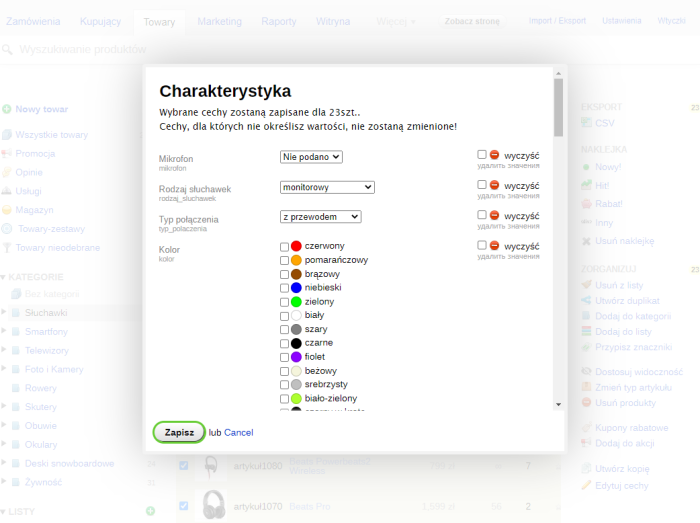
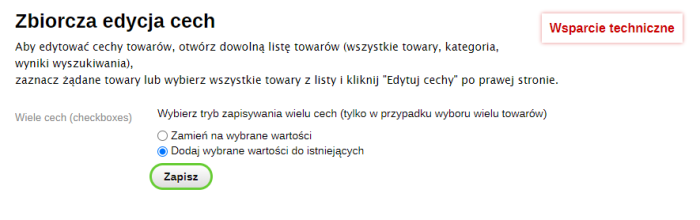


Plugin "Bulk feature editing" allows you to edit product features in bulk directly from the product list.
Simply select the desired products, and then in the dialog box specify which features should be set for the selected products.
You can easily, for example, assign a brand to all products in a specific category.
You can also search for products and set features for all found products.
For example, if you have a phone store, you can type Samsung in the search and assign the Samsung brand to all those products.
This greatly simplifies the process of filling in product features.
Just select the desired products or all products from any product list and click the "Edit features" link on the right - a dialog box will open showing all features available for the selected products.
Note!
Plugin allows you to edit only those features that can be changed on the "Characteristics" tab when editing a product.
For plugin to work correctly, products must have a specific product type.
Currently, you cannot specify new values for dropdowns and multiple values in the dialog box; only values that have already been set are available for selection. New values can be specified in the store settings in the "Product types and features" section.
Otherwise, the contents of the feature editing dialog box are the same as the "Characteristics" tab when editing a product.
If you have SKUs based on features, then after adding new features using plugins (for example, New Size), new SKUs will not be created! Plugin only changes what is on the "Characteristics" tab when editing a product.
| Technical specifications | |
Developed for | Shopy-Script |
Localization settings | English, Polish, Russian |
UI backend support | 1.3 |
Software type | Plugin |
Free | No |
| Developer and version plugins | |
Designer (programmer) | WA-apps |
License | Web Systems Pro |
Version | 1.6.1.wsp |
Update | 10/31/2021 |