Product subpages translation - plugin for the "Multilang" application




UI 2.0 interface only support
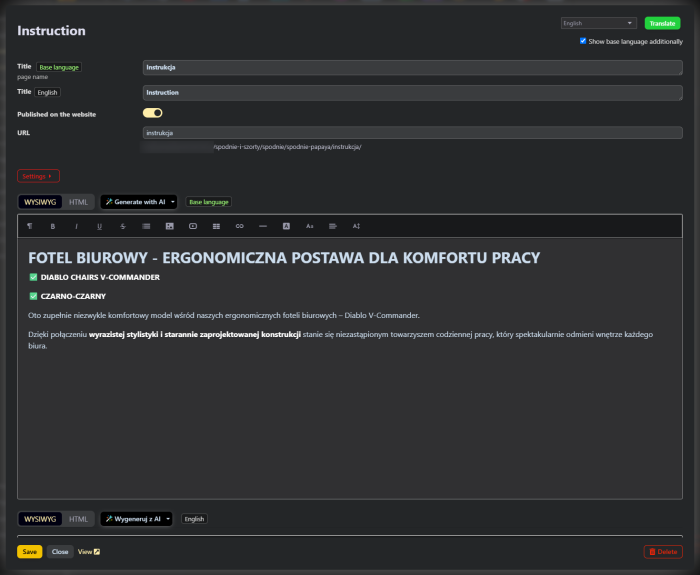
The Plugin "Product subpages translation" works within the backend interface of the "Multilang" application and supports both light and dark versions of the UI 2.0 backend.
Settings plugins and "Auto-translate" also work in Multilang's UI 1.3, but the old interface is not supported when editing product subpages in Shopy-Script.
Multilingual Product Subpages for Shopy-Script
Plugin adds a long-missing feature to your Shopy-Script-based online store: full translation of product subpages. Each product subpage, such as "Delivery", "Warranty", "Package contents", or "Instructions", can be available in all languages of your store. Customers will automatically see it in their language, and you won't waste time manually copying and switching between language versions.
Plugin naturally complements the "Multilang" application and fills a gap in its functionality: while app translates products and categories, product subpages remained unsupported for multilingual use. Now this issue has been resolved.
What is plugin for?
A store with multiple sales languages always faces content challenges. Translating products and categories isn't difficult, but products often have additional pages-shipping terms, warranty information, size charts, or package content descriptions. Without translations, these pages are shown to international customers in the store's base language, causing some visitors to leave the store simply because they can't find the necessary information.
Plugin solves several problems:
- translates product subpages into all store languages;
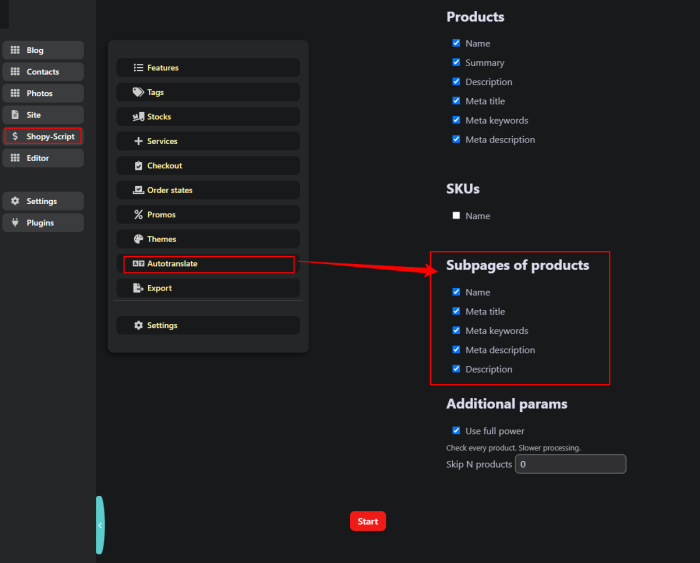
- saves administrator time: automatic subpage translation via the "Shopy-Script -> Auto-translate" section using the "Multilang" app itself;
- enables quick one-click translation directly from the product card;
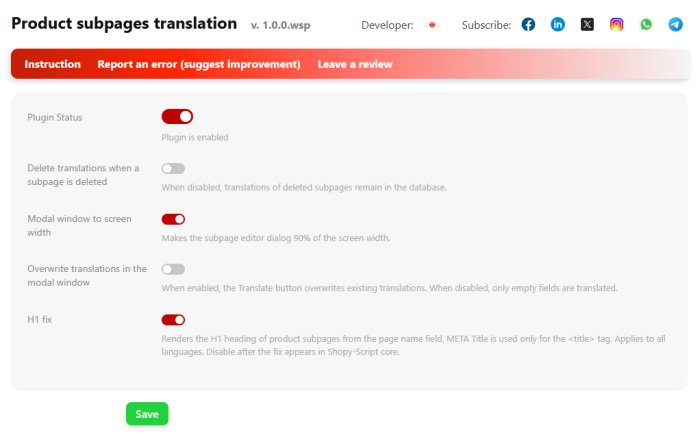
Bonus feature: when enabled, the H1 header of the subpage is generated based on the page name, while META Title is used as intended-for the browser title tag and search results. This option can be turned on with a single switch in settings.
Main features of the plugins "Product subpages translation".
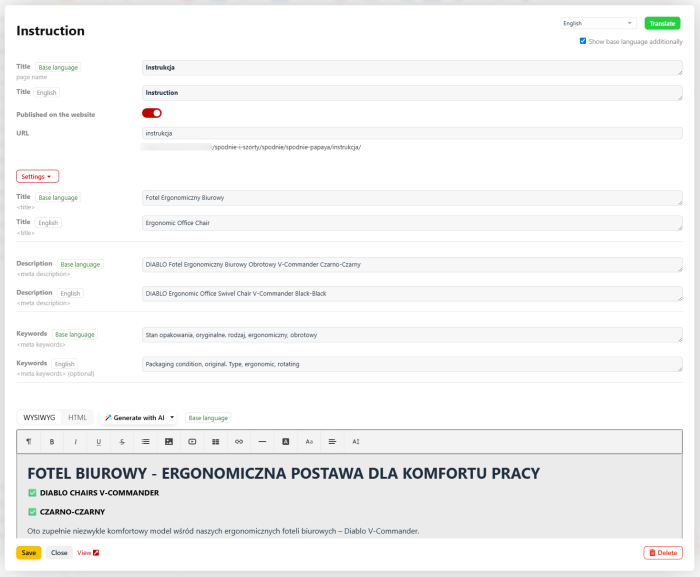
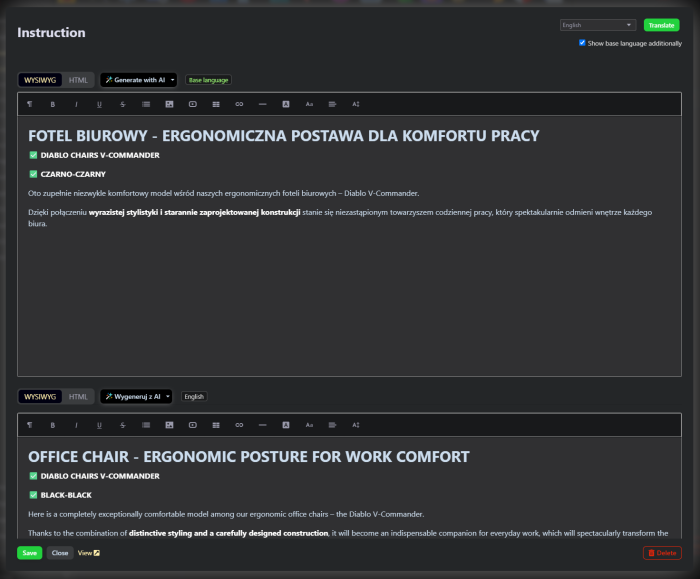
- Modal translation editor. Open the "Subpages" tab on the product card, select a language, and fill in the fields: page name, META Title, META Description, META Keywords, and description. Everything happens in one window, without navigating between sections.
- Automatic subpage translation. A new "Product Subpages" section appears in the auto-translation area of the "Multilang" app. Select the language and fields, click the button, and all subpages will be translated automatically.
- Bilingual editing mode. If needed, display the base language alongside the translation. This makes comparing the original with the translation easier, without having to memorize the entire text.
- Enhanced interface for working with product subpages. In plugins settings, enable the "Full-screen modal window" option to get more workspace for content editing.
- Clean deletion. When a subpage is deleted, its translations are removed along with it, keeping the database clean (this behavior can be configured).
Who is plugin for?
Primarily for owners of multilingual Shopy-Script stores already using app "Multilang". If you sell in two or more markets and your products have additional pages, plugin ensures those pages are equally understandable for all customers. It will also benefit SEO specialists and content managers: accurate translation of meta tags and subpage headings directly improves store visibility in search engine results across every language.
How does it work?
After installation, plugin appears in the "Multilang" application settings. On the product card, under the "Subpages" tab, the familiar modal editing window opens-but now available for each store language. Fill in the fields manually in the base language, then translate them using the auto-translation button (translation uses additional plugins for the "Multilang" app), save changes, and customers will see the subpage in their language. No extra configuration is required on the storefront: page names, content, and meta tags are inserted automatically.
A detailed step-by-step setup and usage guide is available in a separate article.
Benefits.
- Completes "Multilang" functionality. One unified ecosystem tool for all store translations instead of scattered solutions.
- Saves time. Automatic translation and AI-powered generation eliminate repetitive copying of texts between languages.
- Better SEO. Each language version of a page has its own heading and meta tags, which is important for search engines.
- System error fix. Plugin correctly displays product page H1s, even if the issue hasn't yet been fixed in Shop-Script itself.
- Clear interface. The product page editor in the modal window has become even more convenient and logically organized in the multilingual version (works only in UI 2.0).
- Safe rollback of changes. Any option, including the H1 fix, can be disabled with a switch without needing to modify the code.
Plugin "Product subpages translation" makes a multilingual store truly consistent: every page, from the catalog to the last product page, speaks to the customer in their language.
| Technical specifications | |
Developed for | Multilang |
Localization settings | English, Polish, Russian |
UI backend support | 2.0 |
Software type | Plugin |
Free | No |
| Developer and version plugins | |
Designer (programmer) | WSPro |
License | Web Systems Pro |
Version | 1.0.3.wsp |
Update | 10/14/2026 |
With this product also buy